> For the complete documentation index, see [llms.txt](https://docs.pancakeswap.finance/llms.txt). Markdown versions of documentation pages are available by appending `.md` to page URLs; this page is available as [Markdown](https://docs.pancakeswap.finance/vietnamese/giao-thuc/voting/voting-guide.md).
# Cách bỏ phiếu

Tham gia bỏ phiếu quản trị rất dễ dàng và hoàn toàn **MIỄN PHÍ**. Bạn thậm chí không cần phải trả phí gas! Tìm hiểu thêm về cách bỏ phiếu, theo dõi đề xuất tiếp theo và bỏ phiếu của bạn.
### Cách bỏ phiếu
#### Điều hướng đến đề xuất bỏ phiếu
Mỗi khi chúng tôi công bố một đề xuất mới, chúng tôi luôn đính kèm liên kết đến trang bỏ phiếu. Vì vậy, hãy theo dõi [các kênh mạng xã hội của chúng tôi](/vietnamese/chao-mung-den-voi-pancakeswap/contact-us/social-accounts.md) để cập nhật tin tức và thông tin mới nhất.
Ngoài ra, bạn có thể truy cập [cổng bỏ phiếu gốc của PancakeSwap](https://voting.pancakeswap.finance/?_gl=1*pc8o0h*_ga*MTUzNDEzNDQxMy4xNjAwNzkzNDM4*_ga_334KNG3DMQ*MTYwNDMwMTk4Ni42MC4xLjE2MDQzMDM3MDIuMA..#/)[ ](https://pancakeswap.finance/voting)để duyệt qua danh sách các đề xuất. Nếu bạn không thấy đề xuất, nó có thể nằm trong tab "sắp tới".
#### Đọc và chọn lựa chọn để bỏ phiếu

Trên trang đề xuất, bạn sẽ thấy:
* Nội dung của đề xuất
* Các lựa chọn để bỏ phiếu
* Chi tiết của đề xuất như block snapshot và khoảng thời gian bỏ phiếu
* Kết quả bỏ phiếu mới nhất
* Danh sách các phiếu bầu
Đọc kỹ đề xuất và nhấp vào lựa chọn bạn muốn bỏ phiếu.

#### Xác nhận và bỏ phiếu của bạn

Xác nhận tất cả các chi tiết và nhấp "Confirm Vote", sau đó xác nhận trong ví của bạn để ký thông điệp.
Xong, bạn đã bỏ phiếu thành công.
### Cách kiểm tra chi tiết
{% tabs %}
{% tab title="Kiểm tra quyền bỏ phiếu" %}
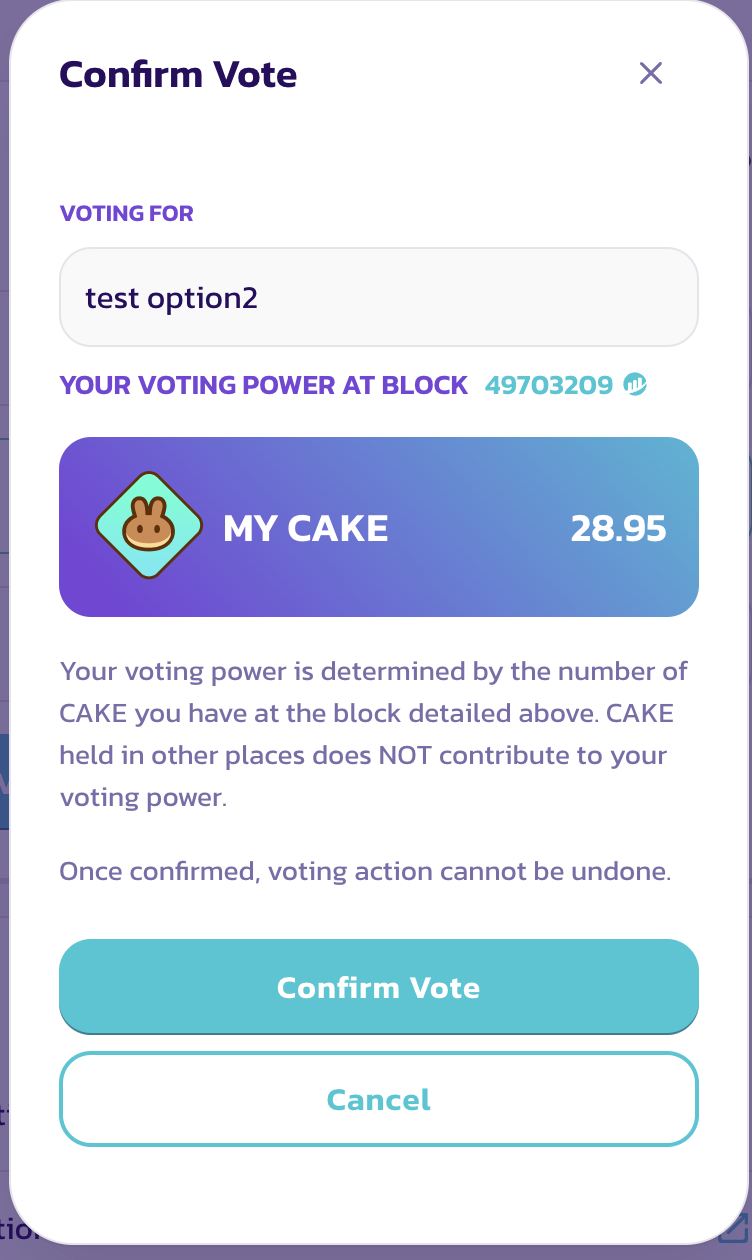
Trước khi bỏ phiếu, bạn sẽ thấy cửa sổ "Confirm Vote".
Trong cửa sổ này, bạn có thể xem các mục sau:
* Lựa chọn bạn đã chọn
* Quyền bỏ phiếu của bạn
Quyền bỏ phiếu của bạn bằng với số dư CAKE của bạn tại block snapshot.
{% endtab %}
{% tab title="Kiểm tra block snapshot" %}
#### Kiểm tra block snapshot

Quyền bỏ phiếu được tính dựa trên snapshot được chụp tại block snapshot. Do đó, việc mua hoặc nạp thêm CAKE sau khi đề xuất được đăng sẽ không làm tăng quyền bỏ phiếu cho đề xuất cụ thể đó.
Nếu bạn muốn biết thời gian chính xác của block snapshot, chỉ cần nhấp vào số block và tìm timestamp trên trang BscScan.

{% endtab %}
{% endtabs %}
---
# Agent Instructions
This documentation is published with GitBook. GitBook is the documentation platform designed so that both humans and AI agents can read, navigate, and reason over technical content effectively. Learn more at gitbook.com.
## Querying This Documentation
If you need additional information that is not directly available in this page, you can query the documentation dynamically by asking a question.
Perform an HTTP GET request on the current page URL with the `ask` query parameter, and the optional `goal` query parameter:
```
GET https://docs.pancakeswap.finance/vietnamese/giao-thuc/voting/voting-guide.md?ask=&goal=
```
`ask` is the immediate question: it should be specific, self-contained, and written in natural language.
`goal` is optional and describes the broader end goal you are ultimately trying to accomplish on behalf of the user. GitBook uses it to tailor the answer towards what is most useful for that goal.
The response will contain a direct answer to the question and relevant excerpts and sources from the documentation.
Use this mechanism when the answer is not explicitly present in the current page, you need clarification or additional context, or you want to retrieve related documentation sections.