> For the complete documentation index, see [llms.txt](https://docs.pancakeswap.finance/llms.txt). Markdown versions of documentation pages are available by appending `.md` to page URLs; this page is available as [Markdown](https://docs.pancakeswap.finance/vietnamese/giao-dich/perpetual-trading/perpetual-trading-v2/how-can-i-use-it.md).
# Tôi có thể sử dụng nó như thế nào?
Cách sử dụng V2 Perpetuals Trading

Sử dụng tính năng này thực sự rất dễ dàng (điều khó là giao dịch tốt). Chúng ta chỉ cần thực hiện theo một loạt các bước để hoàn thành trải nghiệm. Để biết thêm thông tin, vui lòng truy cập [Bảng Thuật Ngữ V2](/vietnamese/giao-dich/perpetual-trading/perpetual-trading-v2/perpetuals-glossary.md).
### Đến trang Giao Dịch Hợp Đồng Vĩnh Viễn
Bạn có thể truy cập từ [trang web](https://pancakeswap.finance), trong mục Trade → Perpetual, hoặc qua [liên kết này](https://perp.pancakeswap.finance/en/futures/BTCUSDT)
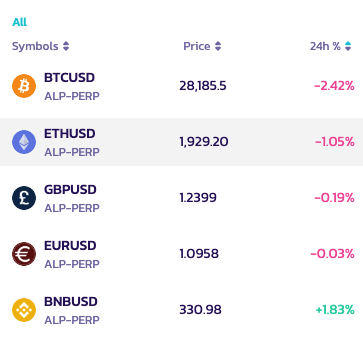
### Chọn cặp để giao dịch
Bạn có thể chọn cặp có thể giao dịch bằng cách nhấp vào mũi tên bên cạnh cặp, ở đầu trang.
Nhiều cặp giao dịch hơn sẽ sớm có mặt!
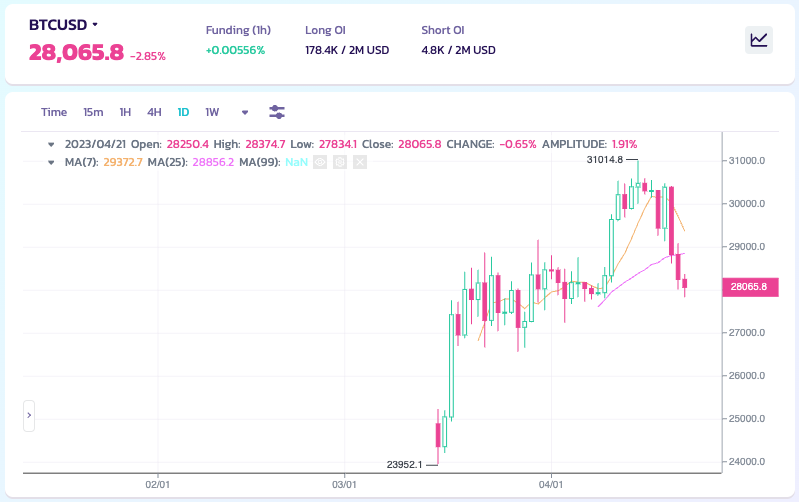
### Phân tích biểu đồ và quyết định chiến lược giao dịch của bạn
Đến giờ giao dịch rồi!! Hãy nghiêm túc. Bạn có thể phân tích biểu đồ theo cách riêng của mình, với tất cả các công cụ có sẵn
**Bạn đã biết cách làm hoặc muốn cải thiện kỹ năng phân tích của mình?**
Đây là hướng dẫn để bắt đầu trong thế giới phân tích biểu đồ:
* [Cách Sử Dụng TradingView trên Trang Web Binance](https://www.binance.com/en/support/faq/8419126024404348a1c6e4039fbed3fe)
* [Biểu đồ nến](https://academy.binance.com/en/articles/a-beginners-guide-to-candlestick-charts)
* [Đường Xu Hướng Được Giải Thích](https://academy.binance.com/en/articles/trend-lines-explained)
### Đặt lệnh của bạn
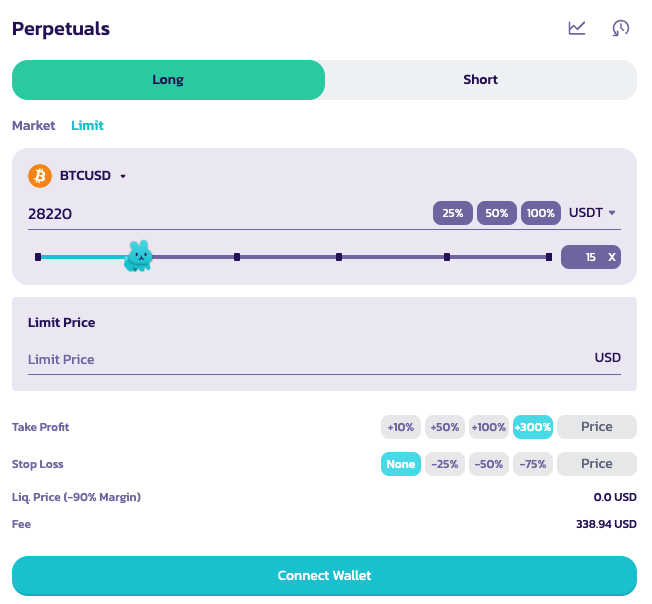
Sau đó, ở phần trên bên phải, bạn có bảng để đặt lệnh.
Bạn phải đặt một số thông số, chẳng hạn như:
*Không theo thứ tự cụ thể*
1. Long hoặc Short
Chọn vị thế giao dịch bạn muốn áp dụng
2\. Mức đòn bẩy x
Di chuyển con thỏ để chọn vị thế đòn bẩy phù hợp. Bạn cũng có thể nhập thủ công vị thế vào ô bên trái.
Tuyên bố từ chối trách nhiệm: Hãy nhớ rằng mức đòn bẩy cao mang lại rủi ro rất cao, hãy sử dụng cẩn thận.
3\. Loại Lệnh
4\. Đặt kích thước lệnh và đặt giá cho lệnh của bạn (Đối với lệnh giới hạn)
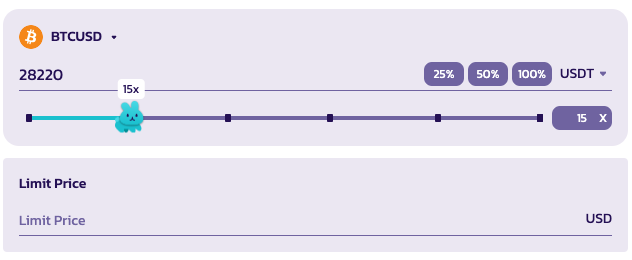
Bạn cũng có thể chọn đồng tiền tham chiếu để xem vị thế của mình.
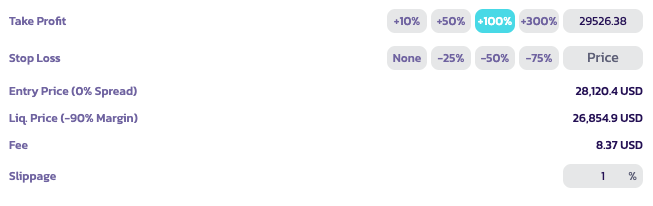
5. Chốt Lời/Cắt Lỗ & Trượt Giá
Người dùng có thể đặt giá chốt lời hoặc cắt lỗ khi mở vị thế.
* Chốt Lời: Vị thế của người dùng sẽ bị thanh lý khi họ đạt được tỷ lệ lãi PnL đã đặt.
* Cắt Lỗ: Vị thế của người dùng sẽ bị thanh lý khi họ đạt được tỷ lệ lỗ PnL đã đặt.
* Trượt Giá: Dùng để tự động hủy lệnh thị trường nếu giá biến động quá nhanh theo hướng giao dịch trước khi lệnh được mở. Ví dụ, nếu bạn muốn mở vị thế long theo thị trường ở giá hiện tại nhưng trước khi lệnh được mở, giá tăng lên 1%, lệnh sẽ tự động hủy.
Lưu ý: Bạn có thể di chuột qua mỗi tùy chọn để biết thêm thông tin. Vui lòng tham khảo [Bảng Thuật Ngữ Perpetuals V2](/vietnamese/giao-dich/perpetual-trading/perpetual-trading-v2/perpetuals-glossary.md) để có hướng dẫn chi tiết.
### Gửi lệnh của bạn
Khi tất cả các thông số đã được đặt, bạn có thể gửi lệnh bằng cách nhấp vào Open Position

### Kiểm tra vị thế của bạn
Sau khi lệnh được gửi, nó sẽ xuất hiện trong "Open Orders" cho đến khi được khớp.

### Đang hoạt động!
Khi được khớp, vị thế của bạn sẽ hoạt động. Bạn có thể thấy nó trong bảng vị thế. Bạn cũng có thể xem, chỉnh sửa hoặc đóng nó.
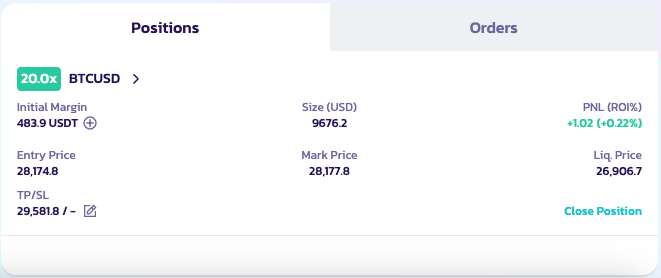
Chúc bạn giao dịch thành công!
---
# Agent Instructions
This documentation is published with GitBook. GitBook is the documentation platform designed so that both humans and AI agents can read, navigate, and reason over technical content effectively. Learn more at gitbook.com.
## Querying This Documentation
If you need additional information that is not directly available in this page, you can query the documentation by asking a question.
Perform an HTTP GET request on the following URL with the `ask` and `goal` query parameters:
```
GET https://docs.pancakeswap.finance/vietnamese/giao-dich/perpetual-trading/perpetual-trading-v2/how-can-i-use-it.md?ask=&goal=
```
`ask` is the immediate question: it should be specific, self-contained, and written in natural language.
`goal` is what the user is ultimately trying to achieve, the reason they need the answer. Sharing it helps GitBook give you a better, more relevant answer. A goal is most helpful when it describes the outcome the user wants rather than restating the question. For example, with `ask=how do I create an API token`, a goal like `automate deployments from our CI pipeline` lets GitBook tailor the answer to that use case.
The response will contain a direct answer to the question and relevant excerpts and sources from the documentation.
Use this mechanism when the answer is not explicitly present in the current page, you need clarification or additional context, or you want to retrieve related documentation sections.