> For the complete documentation index, see [llms.txt](https://docs.pancakeswap.finance/llms.txt). Markdown versions of documentation pages are available by appending `.md` to page URLs; this page is available as [Markdown](https://docs.pancakeswap.finance/vietnamese/giao-dich/perpetual-trading/perpetual-trading-v2/dumb-mode/dumb-mode-guide.md).
# Hướng dẫn chế độ Dumb
### Cách Đặt Lệnh trong Dumb Mode
Để đặt lệnh trong Dumb Mode trên PancakeSwap, hãy làm theo các bước sau:
1. Chọn Thị Trường: Đến [**PancakeSwap Perpetuals**](https://perp.pancakeswap.finance/en/futures/v2/BTCUSD?theme=light\&chain=bsc) trên BSC. Chọn từ các thị trường có sẵn như BTCUSD, ETHUSD, v.v.
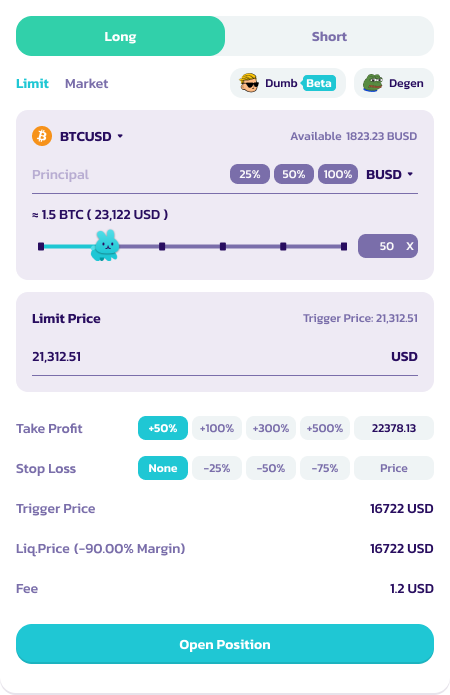
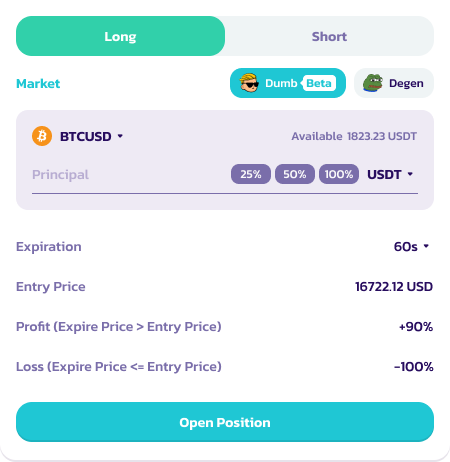
2. Nhấp vào **Biểu tượng Dumb (Beta).** Giao diện vị thế sẽ thay đổi sang chế độ Dumb.
2. Chọn Vị Thế: Chọn long hoặc short tài sản cơ sở\*
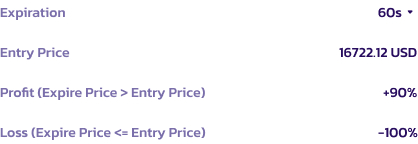
1. Đối với vị thế long: Nếu giá hết hạn lớn hơn giá vào lệnh, người dùng sẽ thắng giao dịch và có lợi nhuận.
2. Đối với vị thế short: Nếu giá hết hạn thấp hơn giá vào lệnh, người dùng sẽ thắng giao dịch và có lợi nhuận.
3. Nếu không, người dùng sẽ mất toàn bộ tài sản thế chấp.
4. Tham khảo phần ghi chú để biết thêm chi tiết về vị thế
3. Đặt Ký Quỹ và Số Lượng: Chọn tài sản ký quỹ của bạn (USDC, USDT, CAKE, v.v.) và chỉ định số lượng làm tài sản thế chấp.
4. Chọn Thời Hạn: Quyết định thời hạn giao dịch của bạn — 60 giây, 5 phút, hoặc 10 phút.
5. Đặt Lệnh: Xem xét ROI, xác nhận chi tiết và đặt giao dịch bằng cách nhấp **Open Position**\*
5. Theo Dõi Giao Dịch: Sau khi giao dịch được đặt, theo dõi tiến trình của nó cho đến khi hoàn tất thông qua tab "Position". **Người dùng không thể đóng giao dịch trước khi hết hạn**
7. Quyết toán: Sau khi giao dịch kết thúc, nếu thành công, ROI của bạn sẽ được ghi có sau khi trừ phí 6%. Nếu giao dịch không thành công, tổn thất sẽ là 100%.
### Lưu Ý Thêm về Vị Thế
* Lưu ý rằng bộ đếm thời gian hết hạn không bắt đầu khi bạn nhấp vào nút 'OpenPosition'; thay vào đó, đếm ngược 60 giây / thời hạn đã chọn bắt đầu từ khoảnh khắc giao dịch được xác nhận trên blockchain
* Giá bạn thấy hiển thị chỉ là giá tham khảo. Giá vào lệnh cuối cùng sẽ được xác định bởi mức giá chính xác tại thời điểm giao dịch được xác nhận trên blockchain. Giá này sẽ được cập nhật trên tab "position"
### Mẹo Sử Dụng Dumb Mode
* Hiểu Rõ Rủi Ro: Hãy nhận thức được rủi ro cao liên quan, đặc biệt với ROI -100% khi thua lỗ.
* Quản Lý Tài Sản Thế Chấp Của Bạn: Chỉ đầu tư những gì bạn có thể chấp nhận mất.
* Cập Nhật Thông Tin: Theo dõi xu hướng thị trường đối với các tài sản bạn đang giao dịch.
---
# Agent Instructions
This documentation is published with GitBook. GitBook is the documentation platform designed so that both humans and AI agents can read, navigate, and reason over technical content effectively. Learn more at gitbook.com.
## Querying This Documentation
If you need additional information that is not directly available in this page, you can query the documentation dynamically by asking a question.
Perform an HTTP GET request on the current page URL with the `ask` query parameter, and the optional `goal` query parameter:
```
GET https://docs.pancakeswap.finance/vietnamese/giao-dich/perpetual-trading/perpetual-trading-v2/dumb-mode/dumb-mode-guide.md?ask=&goal=
```
`ask` is the immediate question: it should be specific, self-contained, and written in natural language.
`goal` is optional and describes the broader end goal you are ultimately trying to accomplish on behalf of the user. GitBook uses it to tailor the answer towards what is most useful for that goal.
The response will contain a direct answer to the question and relevant excerpts and sources from the documentation.
Use this mechanism when the answer is not explicitly present in the current page, you need clarification or additional context, or you want to retrieve related documentation sections.