> For the complete documentation index, see [llms.txt](https://docs.pancakeswap.finance/llms.txt). Markdown versions of documentation pages are available by appending `.md` to page URLs; this page is available as [Markdown](https://docs.pancakeswap.finance/vietnamese/giao-dich/pancakeswap-x/how-to-use-pancakeswap-x.md).
# Cách sử dụng PancakeSwap X
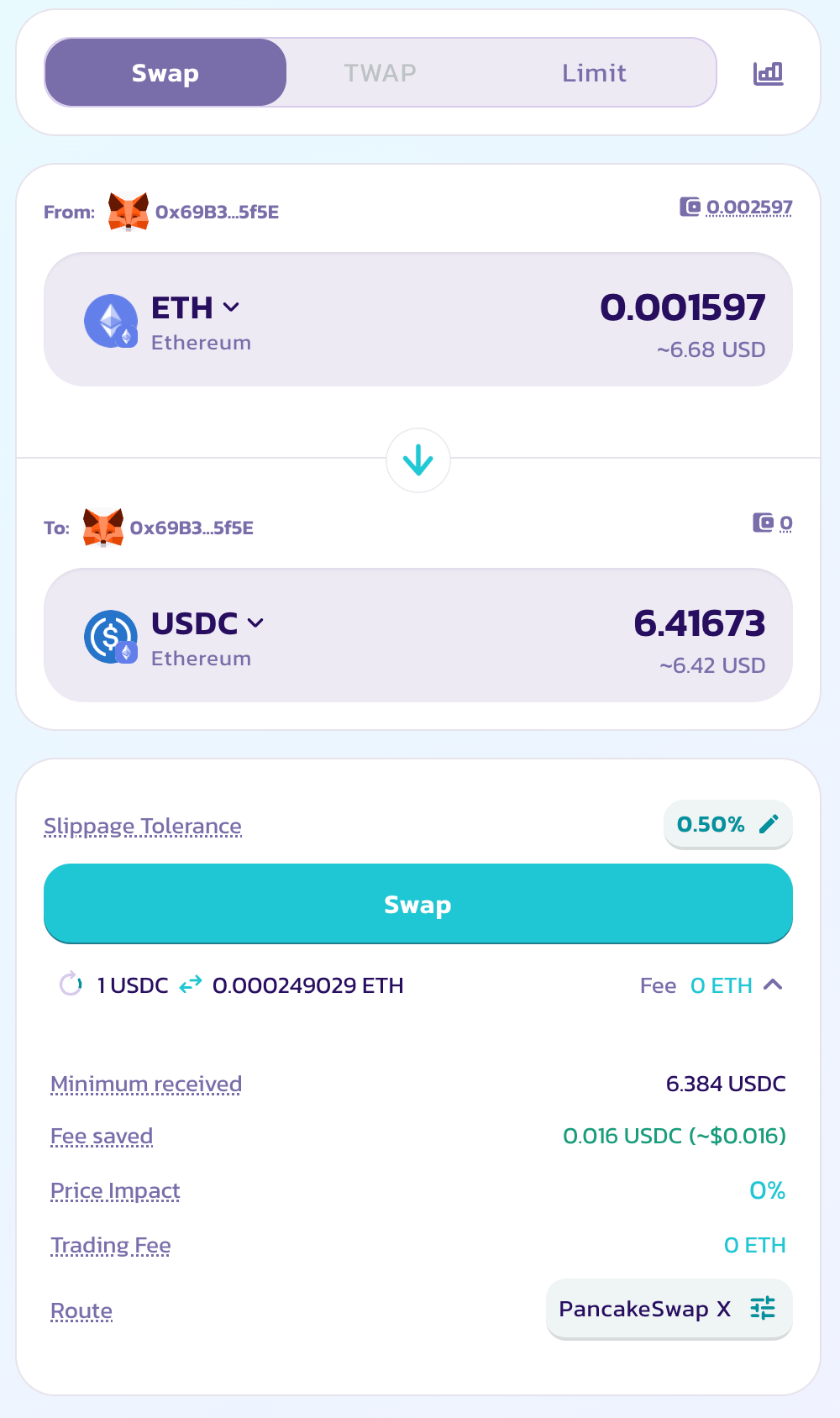
PancakeSwap X được tích hợp trực tiếp vào giao diện "Hoán Đổi" quen thuộc và được bật cho tất cả người dùng theo mặc định. Để sử dụng PancakeSwap X, chỉ cần truy cập trang [Hoán Đổi](https://pancakeswap.finance/swap) và bắt đầu giao dịch.
### Bật PancakeSwap X
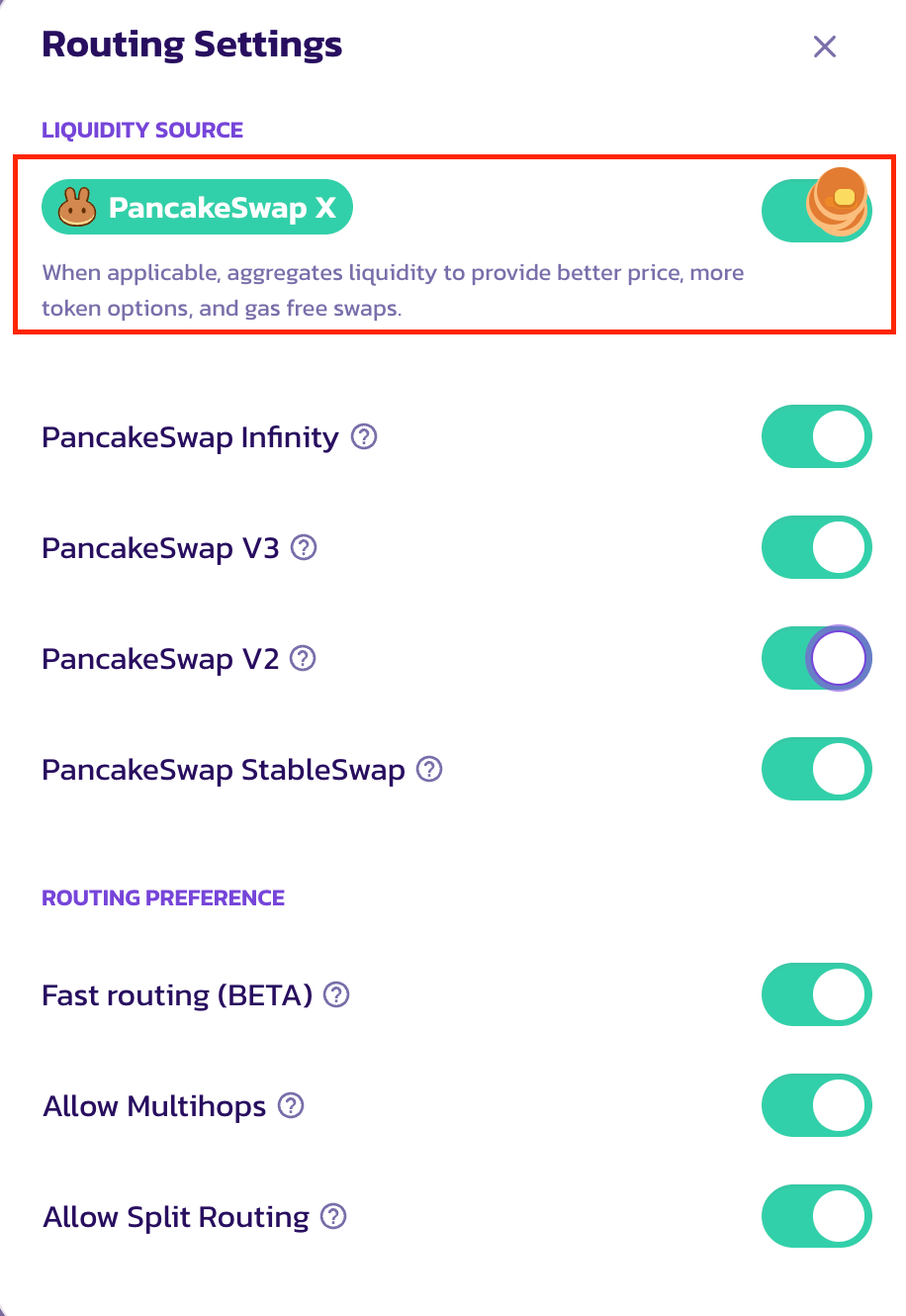
Trong trường hợp X chưa được bật. Nhấp vào biểu tượng cài đặt trong "Lộ Trình" để mở modal cài đặt, sau đó nhấp "Tùy Chỉnh Định Tuyến" để mở tùy chọn định tuyến.
Trong modal "Tùy Chỉnh Định Tuyến", sẽ có một công tắc mới để bật/tắt PancakeSwap X cho các lộ trình giao dịch. Chỉ cần nhấp hoặc chạm để bật.
Sau khi bật, bạn có thể quay lại trang Hoán Đổi chính. Nếu Hoán Đổi hiện tại có sẵn cho PancakeSwap X, một chỉ báo sẽ xuất hiện trong phần "Lộ Trình". Với tác động giá và phí đều bằng 0.
Lưu ý rằng PancakeSwap X không khả dụng cho tất cả các hoán đổi. Tính khả dụng của nó phụ thuộc vào token đầu vào, token đầu ra, cũng như quy mô giao dịch và mạng lưới. Nếu hoán đổi không thể được xử lý bởi PancakeSwap X, nó sẽ được định tuyến qua các pool thanh khoản AMM.
Khi giao dịch đang đi qua PancakeSwap X, nó sẽ được làm nổi bật trong phần "Lộ Trình".
### Gửi Lệnh
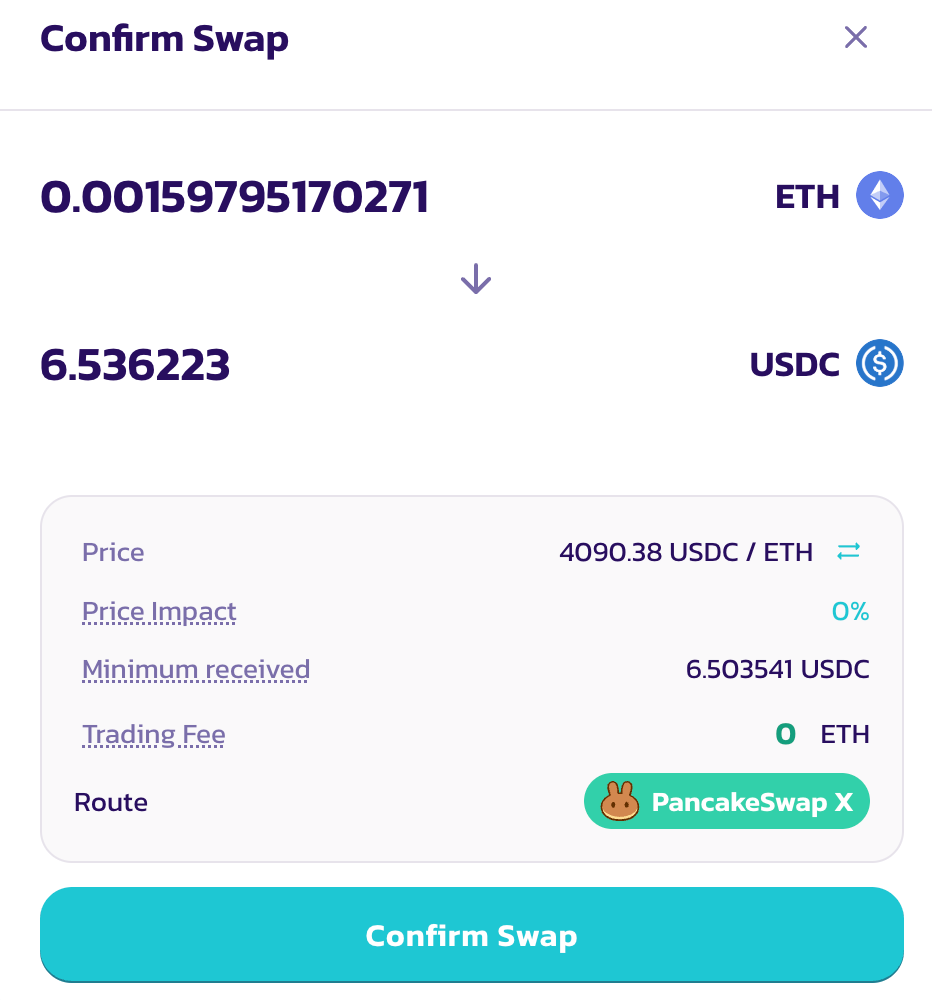
Để gửi lệnh, nhấp "Hoán Đổi", sau đó xác minh tất cả các tham số trong modal "Xác Nhận Hoán Đổi". Nếu mọi thứ đều ổn, nhấp "Xác Nhận Hoán Đổi" để tiếp tục.
Nếu bạn chưa phê duyệt token đầu vào, ví của bạn sẽ nhắc bạn phê duyệt. Lưu ý rằng mặc dù hoán đổi qua PancakeSwap X không yêu cầu gas token, việc phê duyệt chi tiêu token vẫn cần gas.
Sau khi phê duyệt token, một popup ví khác sẽ xuất hiện để yêu cầu ký lệnh. Chỉ cần nhấp "Xác Nhận" để tiếp tục. Không có chi phí gas hay giao dịch trên chuỗi nào liên quan.
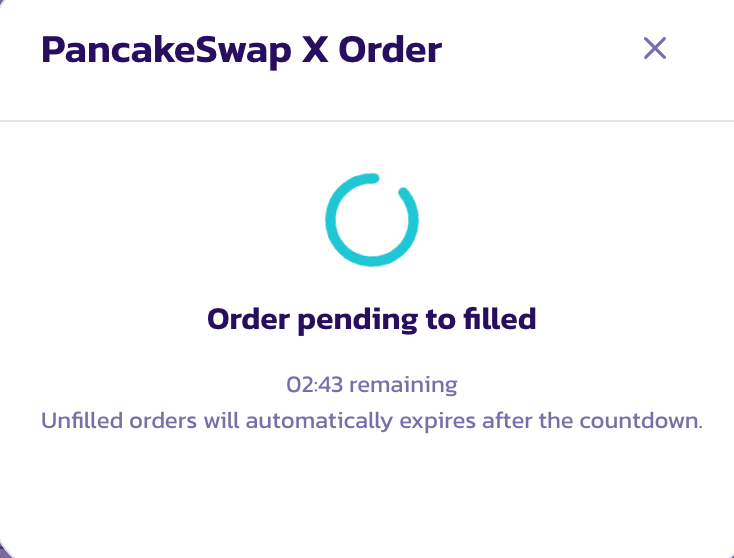
Sau khi lệnh được gửi, một modal với thanh tiến trình sẽ xuất hiện. Bạn có thể đóng modal, trong khi lệnh của bạn sẽ tiếp tục được lấp đầy trong nền.
Lưu ý rằng không giống như hoán đổi pool thanh khoản AMM DEX thông thường, sau khi lệnh PancakeSwap X được gửi, sẽ mất một thời gian để các nhà cung cấp thanh khoản phản hồi và lấp đầy lệnh của bạn. Có thể mất đến 2 phút cho đến khi lệnh được lấp đầy thành công.
### Theo Dõi Trạng Thái Lệnh
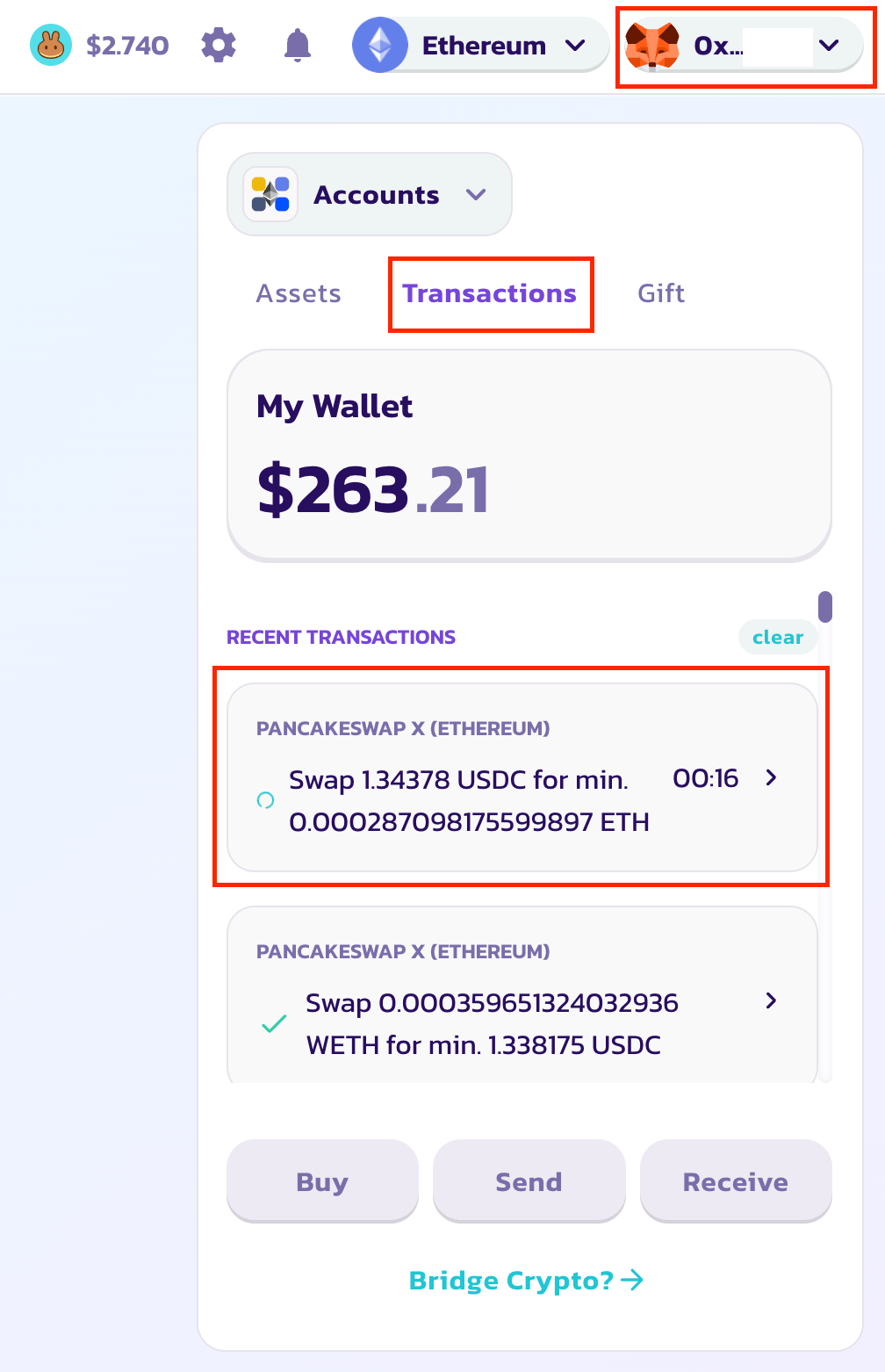
Để theo dõi trạng thái lệnh, mở modal ví từ menu thả xuống ví ở trên cùng bên phải. Nhấp nút "Giao Dịch" để hiển thị danh sách lệnh. Để xem thêm chi tiết của một lệnh cụ thể, chỉ cần nhấp và mở modal chi tiết.
Sau khi lệnh được lấp đầy thành công, bạn sẽ thấy dấu tích xanh trên lệnh, trong khi token đã mua được gửi tự động vào ví của bạn.
---
# Agent Instructions
This documentation is published with GitBook. GitBook is the documentation platform designed so that both humans and AI agents can read, navigate, and reason over technical content effectively. Learn more at gitbook.com.
## Querying This Documentation
If you need additional information that is not directly available in this page, you can query the documentation dynamically by asking a question.
Perform an HTTP GET request on the current page URL with the `ask` query parameter, and the optional `goal` query parameter:
```
GET https://docs.pancakeswap.finance/vietnamese/giao-dich/pancakeswap-x/how-to-use-pancakeswap-x.md?ask=&goal=
```
`ask` is the immediate question: it should be specific, self-contained, and written in natural language.
`goal` is optional and describes the broader end goal you are ultimately trying to accomplish on behalf of the user. GitBook uses it to tailor the answer towards what is most useful for that goal.
The response will contain a direct answer to the question and relevant excerpts and sources from the documentation.
Use this mechanism when the answer is not explicitly present in the current page, you need clarification or additional context, or you want to retrieve related documentation sections.