> For the complete documentation index, see [llms.txt](https://docs.pancakeswap.finance/llms.txt). Markdown versions of documentation pages are available by appending `.md` to page URLs; this page is available as [Markdown](https://docs.pancakeswap.finance/vietnamese/chao-mung-den-voi-pancakeswap/vecake-sunset/bcake/migration-guide.md).
# Hướng dẫn di chuyển
Để bắt đầu boost thanh khoản V2, StableSwap hoặc Position Manager của bạn thông qua bCAKE, bạn cần thực hiện việc chuyển đổi bằng cách unstake LP từ hợp đồng cũ và restake vào hợp đồng mới.
### Điều hướng đến trình hướng dẫn chuyển đổi
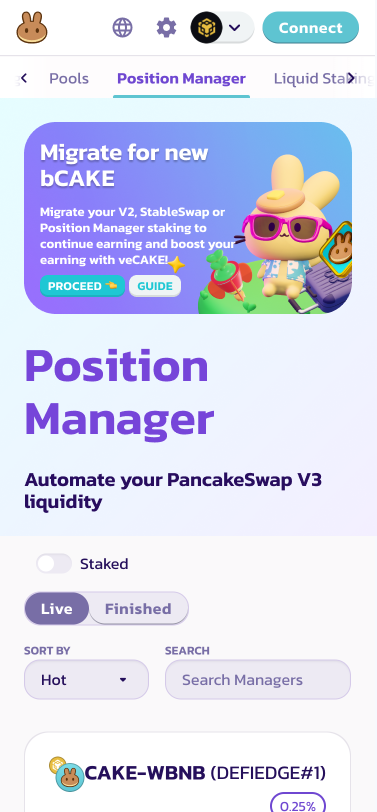
Tìm banner ở đầu trang Farm hoặc Position Manager, nhấp "Proceed" để bắt đầu quá trình chuyển đổi.
[Đến Farm](https://pancakeswap.finance/farms)
[Đến Position Manager](https://pancakeswap.finance/position-managers)
### Unstake token LP của bạn từ các hợp đồng cũ
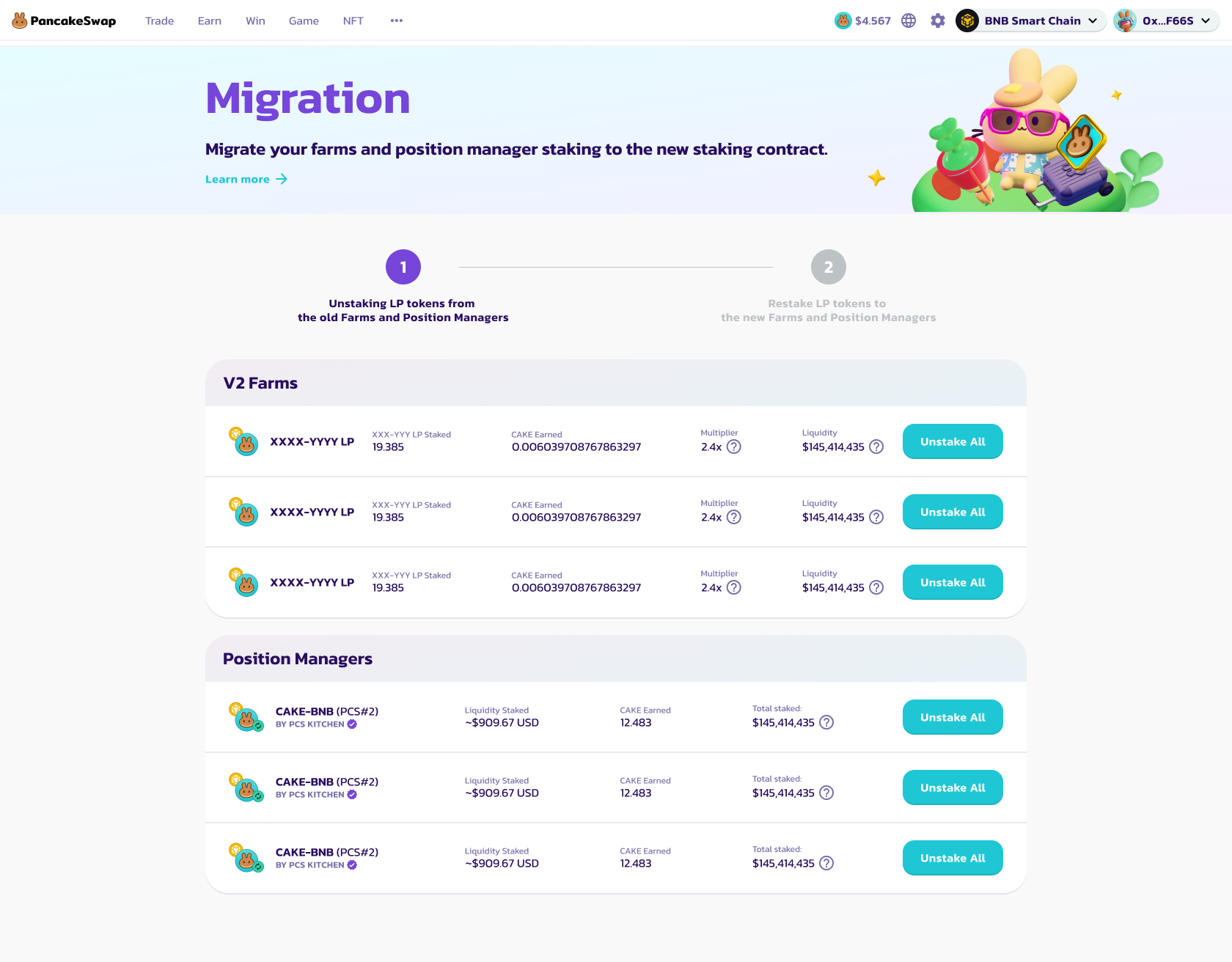
Trong bước đầu tiên, bạn sẽ thấy danh sách đầy đủ các farm V2, StableSwap và position manager cần chuyển đổi để hưởng lợi từ bCAKE boosting.
Nhấp các nút "Unstake All" ở bên phải, và xác nhận giao dịch trong ứng dụng ví của bạn, để unstake TẤT CẢ token LP từ các hợp đồng cũ.
Bạn sẽ cần unstake từng cái một.
Sau khi unstake tất cả LP, nhấp "Go to Stake" để chuyển sang bước tiếp theo.
### Restake token LP của bạn vào các hợp đồng mới
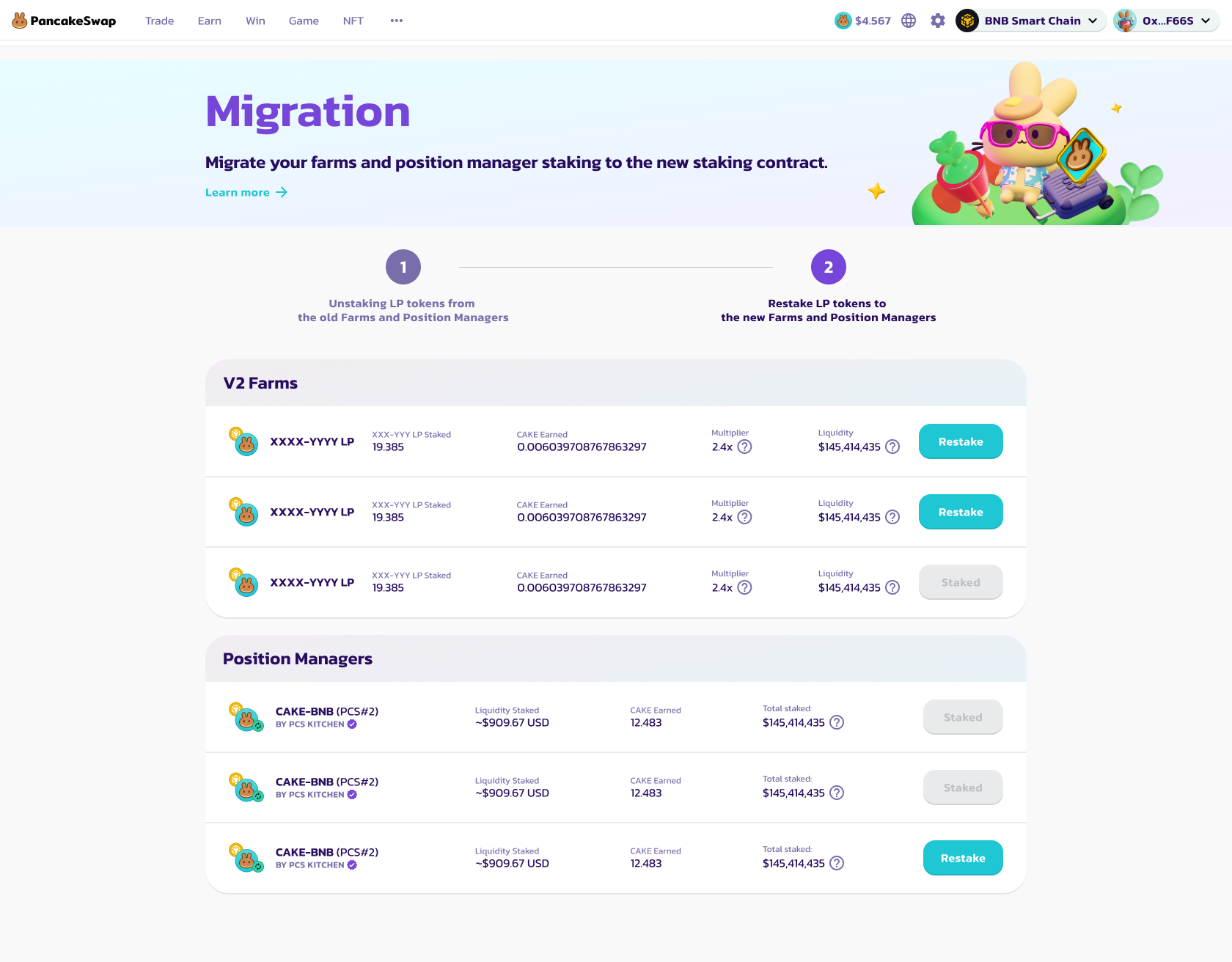
Trong bước thứ hai, bạn sẽ thấy danh sách đầy đủ các farm V2, StableSwap và position manager có thể restake.
Đầu tiên, nhấp các nút "Enable" để kích hoạt nạp tiền.
Sau đó, nhấp các nút "Restake" để restake token LP vào hợp đồng mới.
* Đối với farm V2 và StableSwap, bạn cần xác định số lượng token LP muốn restake trong modal bật lên mới.
Chúng tôi khuyến nghị restake tất cả token LP của bạn để đảm bảo bạn đang kiếm được yield tối đa.
* Đối với Position Manager, chỉ cần xác nhận giao dịch trong ví của bạn, tất cả LP Position Manager của bạn sẽ được restake vào các hợp đồng mới.
Vì LP Position Manager không thể được xử lý riêng lẻ, chúng tôi khuyến nghị mạnh mẽ nên restake TẤT CẢ LP position manager vào các hợp đồng mới.
Sau khi restake, các nút sẽ chuyển thành "Staked"
Bạn sẽ cần restake từng cái một.
Sau khi restake tất cả LP, nhấp "Finish" để quay lại trang Farm.
---
# Agent Instructions
This documentation is published with GitBook. GitBook is the documentation platform designed so that both humans and AI agents can read, navigate, and reason over technical content effectively. Learn more at gitbook.com.
## Querying This Documentation
If you need additional information that is not directly available in this page, you can query the documentation dynamically by asking a question.
Perform an HTTP GET request on the current page URL with the `ask` query parameter, and the optional `goal` query parameter:
```
GET https://docs.pancakeswap.finance/vietnamese/chao-mung-den-voi-pancakeswap/vecake-sunset/bcake/migration-guide.md?ask=&goal=
```
`ask` is the immediate question: it should be specific, self-contained, and written in natural language.
`goal` is optional and describes the broader end goal you are ultimately trying to accomplish on behalf of the user. GitBook uses it to tailor the answer towards what is most useful for that goal.
The response will contain a direct answer to the question and relevant excerpts and sources from the documentation.
Use this mechanism when the answer is not explicitly present in the current page, you need clarification or additional context, or you want to retrieve related documentation sections.