> For the complete documentation index, see [llms.txt](https://docs.pancakeswap.finance/llms.txt). Markdown versions of documentation pages are available by appending `.md` to page URLs; this page is available as [Markdown](https://docs.pancakeswap.finance/turkish/ticaret/perpetual-trading/perpetual-trading-v2/dumb-mode/dumb-mode-guide.md).
# Dumb Mod Kılavuzu
### Dumb Mode'da Nasıl Emir Verilir
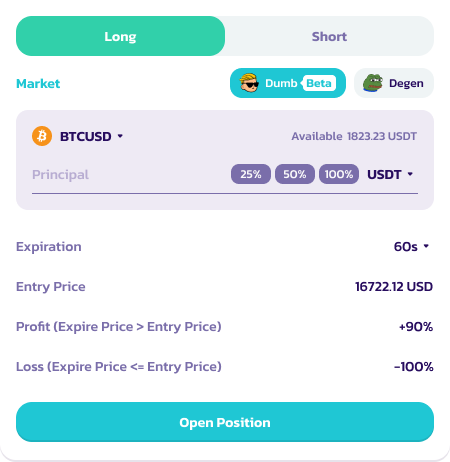
PancakeSwap'ta Dumb Mode'da emir vermek için şu adımları izle:
1. Bir Piyasa Seç: BSC'de [**PancakeSwap Perpetuals**](https://perp.pancakeswap.finance/en/futures/v2/BTCUSD?theme=light\&chain=bsc) sayfasına git. BTCUSD, ETHUSD gibi mevcut piyasalardan birini seç.
2. **Dumb (Beta) Simgesine** tıkla. Pozisyon arayüzü Dumb moduna geçecektir.
2. Pozisyon Seç: Dayanak varlık için long veya short seçeneğini belirle\*
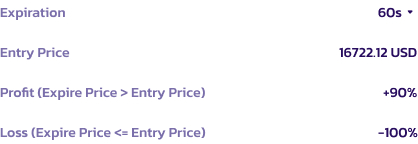
1. Long pozisyonlar için: Sona erme fiyatı giriş fiyatından yüksekse kullanıcı işlemi kazanır ve kâr elde eder.
2. Short pozisyonlar için: Sona erme fiyatı giriş fiyatından düşükse kullanıcılar işlemi kazanır ve kâr elde eder.
3. Aksi takdirde kullanıcı tüm teminatını kaybeder.
4. Pozisyon hakkında daha fazla ayrıntı için notlara bakın.
3. Marj ve Miktar Ayarla: Marj varlığını (USDC, USDT, CAKE vb.) seç ve teminat miktarını belirt.
4. Süre Seç: İşleminin sona erme süresine karar ver — 60s, 5d veya 10d.
5. Emir Ver: ROI'yi gözden geçir, ayrıntıları onayla ve **Pozisyon Aç**'a tıklayarak işlemini gerçekleştir\*
5. İşlemi İzle: İşlem gerçekleştirildikten sonra, tamamlanana kadar "Pozisyon" sekmesi aracılığıyla ilerlemeyi izle. **Kullanıcılar işlemleri sona ermeden kapatamaz.**
7. Uzlaşma: İşlem tamamlandığında, başarılıysa ROI'n %6 ücret düşülerek sana yatırılır. İşlem başarısız olursa kayıp %100 olur.
### Pozisyon Hakkında Ek Not
* Sona erme sayacının 'Pozisyon Aç' butonuna tıkladığında başlamadığını; bunun yerine 60 saniyelik / seçilen süre geri sayımının işlemin blok zincirinde onaylandığı andan itibaren başladığını lütfen unutma.
* Görüntülenen fiyat yalnızca referans olarak hizmet eder. Nihai giriş fiyatı, işlemin blok zincirinde onaylandığı tam andaki fiyat noktasına göre belirlenir. Bu, "pozisyon" sekmesinde güncellenecektir.
### Dumb Mode Kullanım İpuçları
* Riskleri Anla: Özellikle kayıplarda -%100 ROI olmak üzere yüksek risklerin farkında ol.
* Teminatını Yönet: Yalnızca kaybetmeyi göze alabileceğin miktarı yatır.
* Güncel Kal: İşlem yaptığın varlıklar için piyasa trendlerini takip et.
---
# Agent Instructions
This documentation is published with GitBook. GitBook is the documentation platform designed so that both humans and AI agents can read, navigate, and reason over technical content effectively. Learn more at gitbook.com.
## Querying This Documentation
If you need additional information that is not directly available in this page, you can query the documentation by asking a question.
Perform an HTTP GET request on the following URL with the `ask` and `goal` query parameters:
```
GET https://docs.pancakeswap.finance/turkish/ticaret/perpetual-trading/perpetual-trading-v2/dumb-mode/dumb-mode-guide.md?ask=&goal=
```
`ask` is the immediate question: it should be specific, self-contained, and written in natural language.
`goal` is what the user is ultimately trying to achieve, the reason they need the answer. Sharing it helps GitBook give you a better, more relevant answer. A goal is most helpful when it describes the outcome the user wants rather than restating the question. For example, with `ask=how do I create an API token`, a goal like `automate deployments from our CI pipeline` lets GitBook tailor the answer to that use case.
The response will contain a direct answer to the question and relevant excerpts and sources from the documentation.
Use this mechanism when the answer is not explicitly present in the current page, you need clarification or additional context, or you want to retrieve related documentation sections.