> For the complete documentation index, see [llms.txt](https://docs.pancakeswap.finance/llms.txt). Markdown versions of documentation pages are available by appending `.md` to page URLs; this page is available as [Markdown](https://docs.pancakeswap.finance/turkish/protokol/voting/voting-guide.md).
# Nasıl Oy Kullanılır

Yönetişim oylamasına katılmak kolaydır ve tamamen **ÜCRETSİZDİR**. Gas ücreti bile ödemene gerek yok! Nasıl oy kullanacağını öğren, bir sonraki teklifi yakala ve oyunu kullan.
### Nasıl oy kullanılır?
#### Oylama teklifine git
Yeni bir teklif yayınladığımızda oylama sayfasına her zaman bağlantı ekliyoruz. Bu nedenle haberler ve güncellemeler için [sosyal kanallarımızı](/turkish/pancakeswapa-hos-geldiniz/contact-us/social-accounts.md) takip ettiğinden emin ol.
Alternatif olarak tekliflere listeli hâlde göz atmak için [PancakeSwap'ın yerel oylama portalını](https://voting.pancakeswap.finance/?_gl=1*pc8o0h*_ga*MTUzNDEzNDQxMy4xNjAwNzkzNDM4*_ga_334KNG3DMQ*MTYwNDMwMTk4Ni42MC4xLjE2MDQzMDM3MDIuMA..#/) ziyaret edebilirsin. Teklifi göremiyorsan "yakında" sekmesinde olabilir.
#### Oku ve oy seçeneğini belirle

Teklif sayfasında şunları bulacaksın:
* Teklifin içeriği
* Oy seçenekleri
* Snapshot bloğu ve oylama penceresi gibi teklif ayrıntıları
* En son oylama sonucu
* Oyların listesi
Teklifi dikkatlice oku ve oy kullanmak istediğin seçeneğe tıkla.

#### Onayla ve oyunu kullan

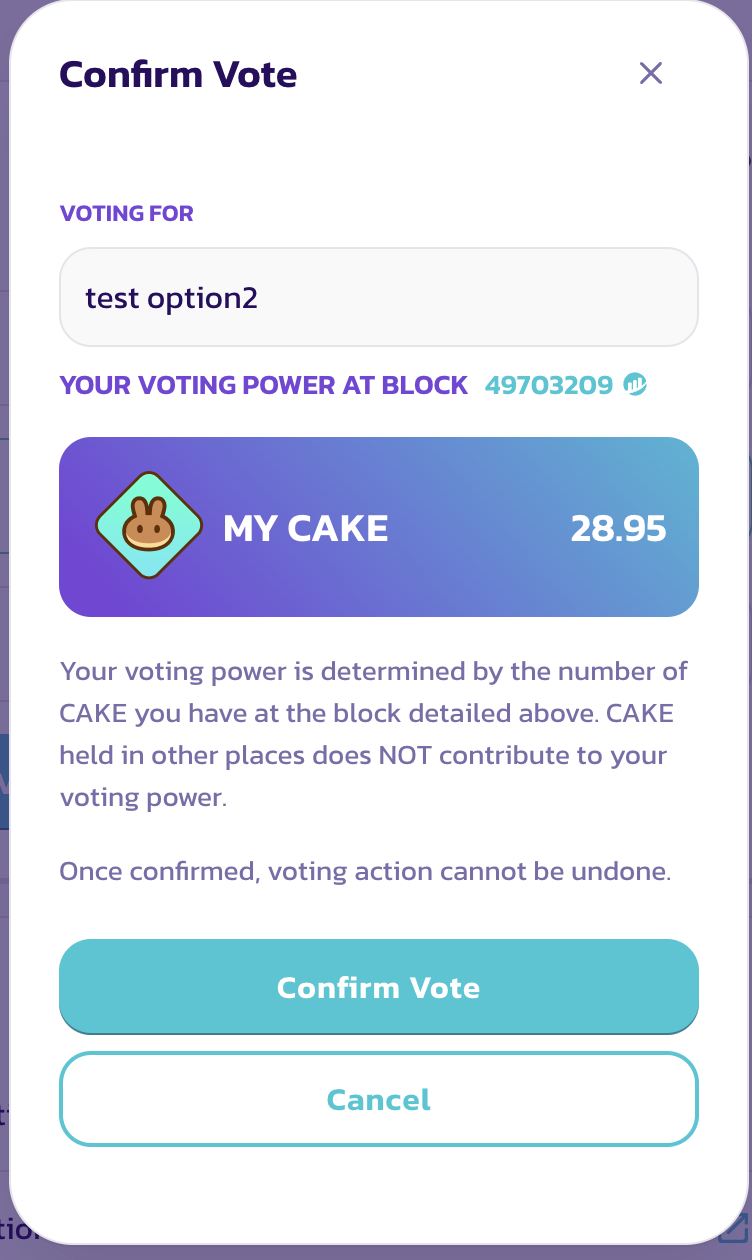
Tüm ayrıntıları onayla ve "Oyu Onayla" düğmesine tıkla, ardından mesajı imzalamak için cüzdanında onayla.
Tebrikler, oyunu başarıyla kullandın.
### Ayrıntıları nasıl kontrol edersin?
{% tabs %}
{% tab title="Oylama gücünü kontrol et" %}
Oyunu kullanmadan önce bir "Oyu Onayla" penceresi göreceksin.
Bu pencerede şunları görebilirsin:
* Seçtiğin oy seçeneği
* Oylama gücün
Oylama gücün, snapshot bloğundaki CAKE bakiyene eşittir.
{% endtab %}
{% tab title="Snapshot bloğunu kontrol et" %}
**Snapshot bloğunu kontrol et**

Oylama gücü, snapshot bloğunda alınan bir anlık görüntüye dayanarak hesaplanır. Bu nedenle teklif yayınlandıktan sonra daha fazla CAKE satın almak veya yatırmak söz konusu teklif için oylama gücünü artırmaz.
Snapshot bloğunun tam zamanını öğrenmek istiyorsan blok numarasına tıkla ve BscScan sayfasında zaman damgasını ara.

{% endtab %}
{% endtabs %}
---
# Agent Instructions
This documentation is published with GitBook. GitBook is the documentation platform designed so that both humans and AI agents can read, navigate, and reason over technical content effectively. Learn more at gitbook.com.
## Querying This Documentation
If you need additional information that is not directly available in this page, you can query the documentation by asking a question.
Perform an HTTP GET request on the following URL with the `ask` and `goal` query parameters:
```
GET https://docs.pancakeswap.finance/turkish/protokol/voting/voting-guide.md?ask=&goal=
```
`ask` is the immediate question: it should be specific, self-contained, and written in natural language.
`goal` is what the user is ultimately trying to achieve, the reason they need the answer. Sharing it helps GitBook give you a better, more relevant answer. A goal is most helpful when it describes the outcome the user wants rather than restating the question. For example, with `ask=how do I create an API token`, a goal like `automate deployments from our CI pipeline` lets GitBook tailor the answer to that use case.
The response will contain a direct answer to the question and relevant excerpts and sources from the documentation.
Use this mechanism when the answer is not explicitly present in the current page, you need clarification or additional context, or you want to retrieve related documentation sections.