> For the complete documentation index, see [llms.txt](https://docs.pancakeswap.finance/llms.txt). Markdown versions of documentation pages are available by appending `.md` to page URLs; this page is available as [Markdown](https://docs.pancakeswap.finance/turkish/pancakeswapa-hos-geldiniz/how-to-guides/get-started-sol/solana-faq.md).
# Solana SSS
### V3 Havuzları – Sıkça Sorulan Sorular (SSS)
#### 1. Hangi ücret kademeleri mevcut?
**Desteklenen Ücret Kademeleri:**\
V3 (yoğunlaştırılmış likidite) havuzları için aşağıdaki ücret kademeleri mevcuttur:
`0.01%, 0.02%, 0.03%, 0.04%, 0.05%, 0.1%, 0.15%, 0.16%, 0.18%, 0.2%, 0.25%, 0.4%, 0.6%, 0.8%, 1%, 2%, 3%, 4%`
**Ücret Dağılımı (tüm ücret kademeleri için geçerlidir):**
* %84 likidite sağlayıcılara (LP)
* %16 protokole
* %8 yakılır
* %8 protokol hazinesine gider
#### 2. Herkes havuz oluşturabilir mi?
Evet. Havuz oluşturma birkaç istisna dışında izinsizdir:
* Belirli bir **token çifti + ücret kademesi** kombinasyonu için yalnızca bir havuz var olabilir (örn. aynı anda yalnızca bir SOL<> USDC %0,1 havuzu olabilir)
* Şu anda yalnızca **SPL token'ları** ve seçili **Token-2022** token'ları desteklenmektedir.
#### 3. Yeni oluşturulan bir havuzun görünmesi ne kadar sürer?
* Havuzlar genellikle oluşturulduktan yaklaşık **5 dakika** sonra havuz listesinde görünür.
* Görünmezse:
* Manüel olarak bulmak için **arama çubuğunu** kullan.
* Havuzlar **düşük TVL** nedeniyle listeden filtrelenmiş olabilir.
#### 4. Havuzumun APR veya TVL'si neden hâlâ sıfır gösteriyor?
Bu, yeni bir havuz oluşturulduğunda beklenen bir durumdur:
* APR ve TVL verileri yalnızca havuzda **en az bir Swap** gerçekleştikten sonra görünecektir.
* Bir Swap gerçekleştikten sonra bu metrikler yaklaşık **15 dakika** içinde gösterilmeye başlar.
#### 5. Havuz oluşturmak için özel bir token nasıl eklenir?
Yeni bir token eklemek için:
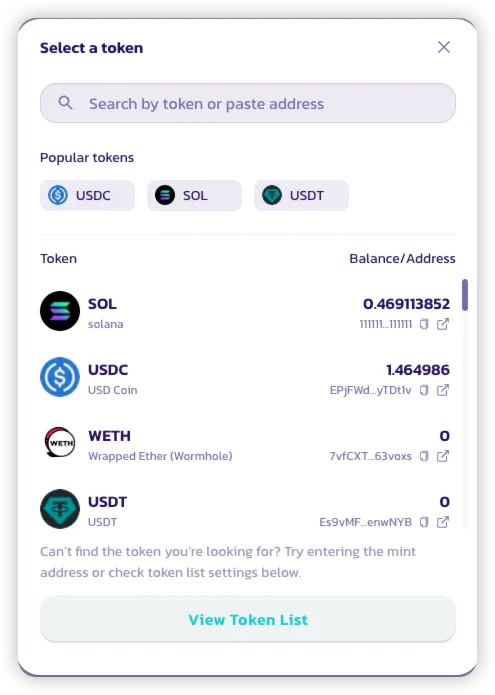
* Havuz oluşturma arayüzünde token seçicisini aç.
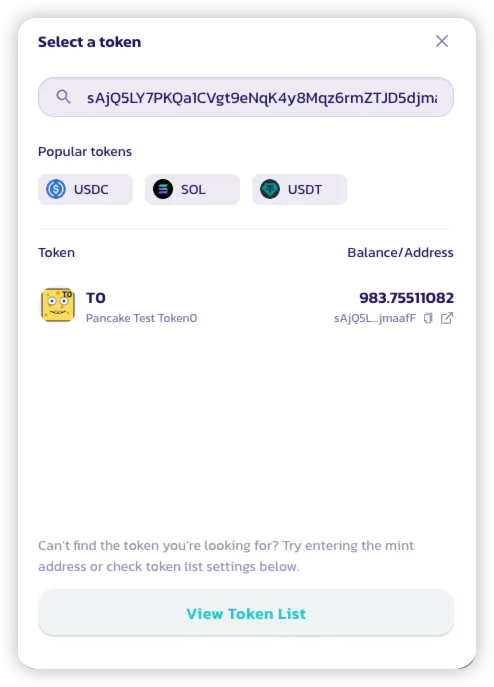
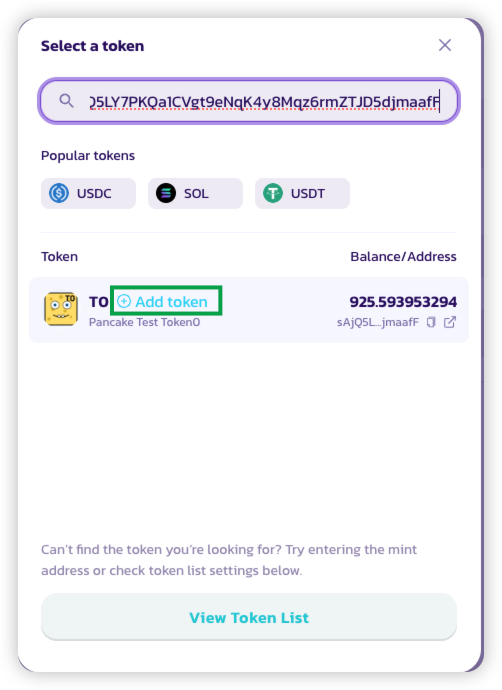
* Token'ın adresini arama çubuğuna yapıştır.
* **"Add Token"**'a tıkla.
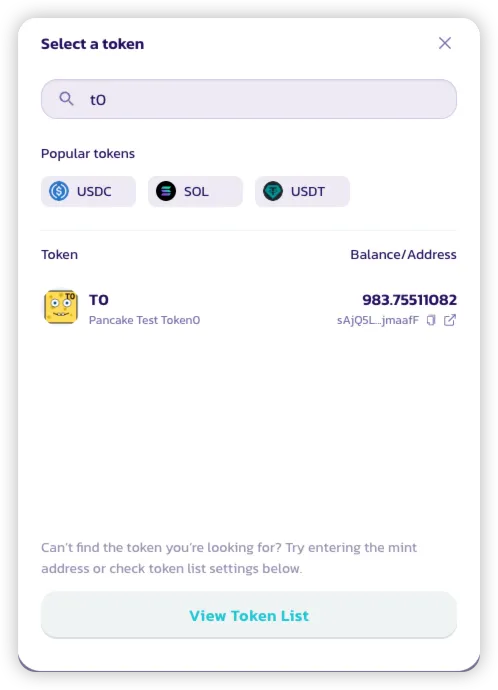
* Token artık listede aranabilir olacak.
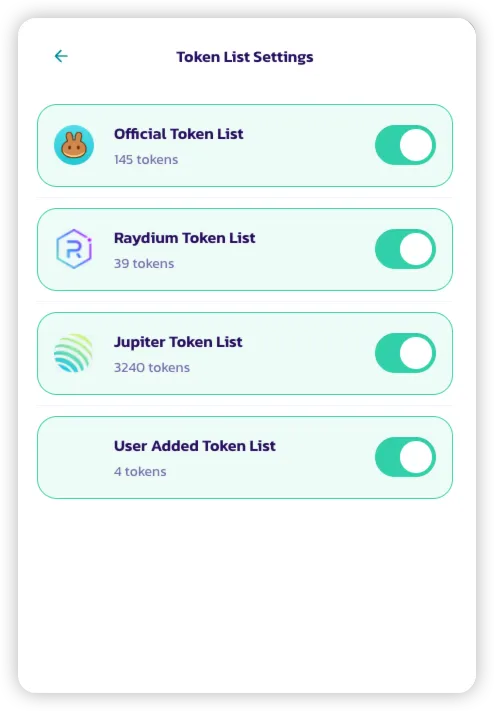
* Token'ları yönetmek için:
* **"View Token List"**'e tıkla.
* Manüel olarak eklenen token'ları içeren **Kullanıcı Eklenen Token Listesi** de dahil olmak üzere farklı listeleri açıp kapatabilirsin.
#### 6. Solana'daki ilk işlemim neden daha pahalı görünüyor?
Solana, her cüzdan için token bakiyelerini yönetmek amacıyla **İlişkili Token Hesapları (ATA)** kullanır. Bir token ile ilk kez etkileşime girerken cüzdanın bir ATA oluşturmalıdır; bu da tek seferlik bir başlangıç maliyeti (SOL cinsinden) gerektirir.
* Bu ATA oluşturma ücreti Solana protokolü tarafından zorunlu kılınmakta olup PancakeSwap'a özgü değildir.
* ATA daha sonra kapatılırsa, **başlangıçta kullanılan SOL iade alınabilir**.
---
# Agent Instructions
This documentation is published with GitBook. GitBook is the documentation platform designed so that both humans and AI agents can read, navigate, and reason over technical content effectively. Learn more at gitbook.com.
## Querying This Documentation
If you need additional information that is not directly available in this page, you can query the documentation by asking a question.
Perform an HTTP GET request on the following URL with the `ask` and `goal` query parameters:
```
GET https://docs.pancakeswap.finance/turkish/pancakeswapa-hos-geldiniz/how-to-guides/get-started-sol/solana-faq.md?ask=&goal=
```
`ask` is the immediate question: it should be specific, self-contained, and written in natural language.
`goal` is what the user is ultimately trying to achieve, the reason they need the answer. Sharing it helps GitBook give you a better, more relevant answer. A goal is most helpful when it describes the outcome the user wants rather than restating the question. For example, with `ask=how do I create an API token`, a goal like `automate deployments from our CI pipeline` lets GitBook tailor the answer to that use case.
The response will contain a direct answer to the question and relevant excerpts and sources from the documentation.
Use this mechanism when the answer is not explicitly present in the current page, you need clarification or additional context, or you want to retrieve related documentation sections.