> For the complete documentation index, see [llms.txt](https://docs.pancakeswap.finance/llms.txt). Markdown versions of documentation pages are available by appending `.md` to page URLs; this page is available as [Markdown](https://docs.pancakeswap.finance/turkish/archive/archived-affiliate-program/dashboard-and-link.md).
# Panel ve Bağlantı
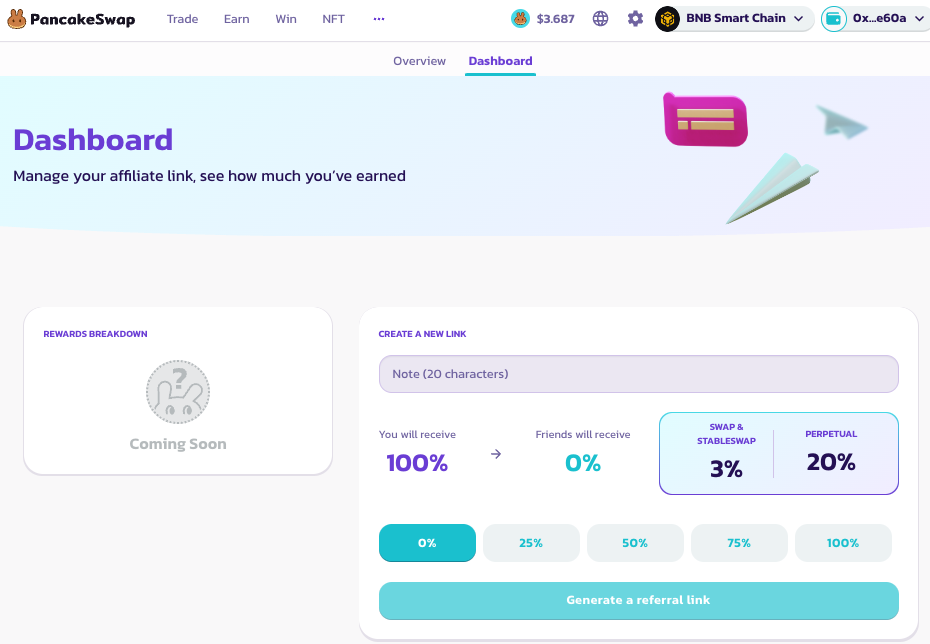
Affiliate kontrol paneli, affiliate programının merkezidir. Burada linkleri oluşturup paylaşabilir, aynı zamanda ödülleri takip edip kullanabilirsin.
Kontrol paneline erişmek ve bir affiliate linki oluşturmak için şu adımları izle:
1. **Affiliate Kontrol Paneline Erişim**
1. [Affiliate Program](https://pancakeswap.finance/affiliates-program) Sayfasına git
2. Başvuru gönderiminde kullanılan cüzdanla giriş yap
3. 'Kontrol Paneli' sekmesine tıkla
4. Giriş yapman istenebilir. Tercih ettiğin kripto cüzdanıyla giriş yap.
2. **Link Oluştur**
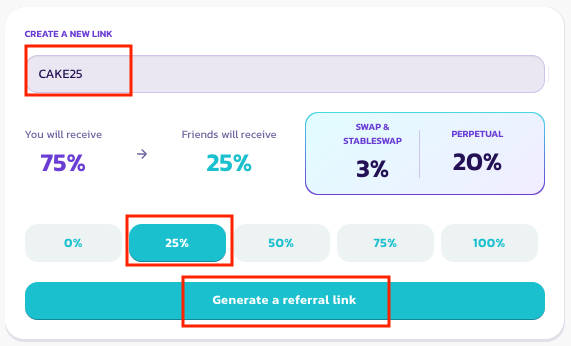
1. Kontrol Paneli sayfasında link oluşturma bölümüne git.
2. Belirli link için benzersiz kodu ve kâr paylaşım oranını ayarla. Bu konuda daha fazla bilgi [burada](/turkish/archive/archived-affiliate-program/commission-structure-and-payment.md) bulunabilir
3. "Link Oluştur"a bas ve imzayı onayla. Bir linkin oluşturulduğunu bildiren bir açılır pencere çıkmalıdır.
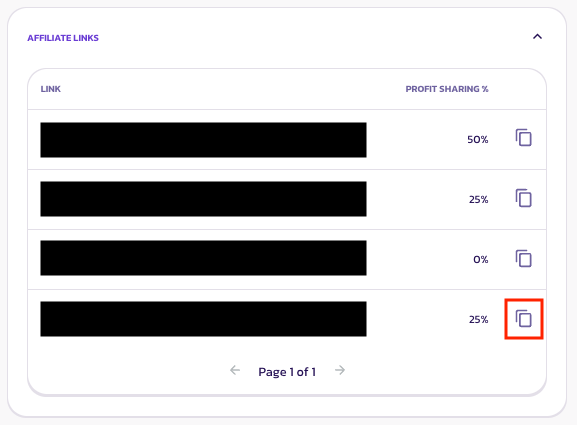
4. Alttaki linkler bölümüne geç ve oluşturulan linki kopyala.
Tamamlandıktan sonra affiliate linkini topluluğunla paylaşabilir ve arkadaşların PancakeSwap'ta işlem yaptığında komisyon ücreti kazanabilirsin. Yeni bir kullanıcıyı nasıl nitelendirdiğimiz hakkında daha fazla bilgi için lütfen [Kullanım Koşulları](/turkish/archive/archived-affiliate-program/terms-and-conditions.md) sayfasını ziyaret et.
---
# Agent Instructions
This documentation is published with GitBook. GitBook is the documentation platform designed so that both humans and AI agents can read, navigate, and reason over technical content effectively. Learn more at gitbook.com.
## Querying This Documentation
If you need additional information that is not directly available in this page, you can query the documentation dynamically by asking a question.
Perform an HTTP GET request on the current page URL with the `ask` query parameter, and the optional `goal` query parameter:
```
GET https://docs.pancakeswap.finance/turkish/archive/archived-affiliate-program/dashboard-and-link.md?ask=&goal=
```
`ask` is the immediate question: it should be specific, self-contained, and written in natural language.
`goal` is optional and describes the broader end goal you are ultimately trying to accomplish on behalf of the user. GitBook uses it to tailor the answer towards what is most useful for that goal.
The response will contain a direct answer to the question and relevant excerpts and sources from the documentation.
Use this mechanism when the answer is not explicitly present in the current page, you need clarification or additional context, or you want to retrieve related documentation sections.