> For the complete documentation index, see [llms.txt](https://docs.pancakeswap.finance/llms.txt). Markdown versions of documentation pages are available by appending `.md` to page URLs; this page is available as [Markdown](https://docs.pancakeswap.finance/trading-tools/pancake-gifts/pancake-gifts-how-to-guide.md).
# Pancake Gifts: How-To Guide
Pancake Gifts lets you send tokens — including optional gas — to friends, users, or community members using just a **link or QR code**. The process is quick, seamless, and beginner-friendly.
This guide walks you through:
* ✅ How to **create** a Pancake Gift
* ✅ How to **send or share** it
* ✅ How to **claim** a gift
* ✅ How to **cancel** a gift (if unclaimed)
***
### 🧑🍳 Step 1: Create a Gift
#### 1. Navigate to the Gift Creation Tab
Go to the **Gift tab** inside the PancakeSwap Wallet UI.
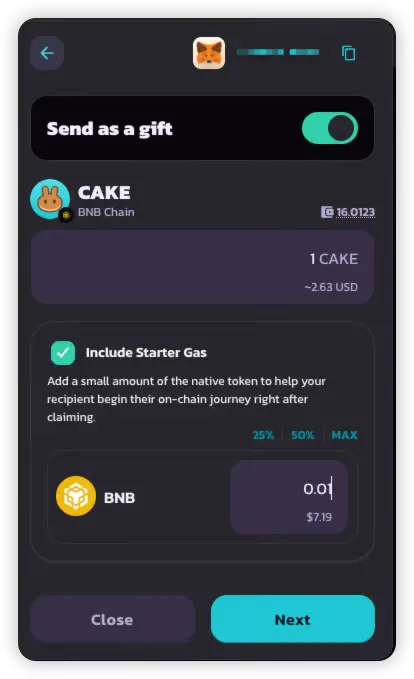
#### 2. Select Tokens and Amounts
Choose up to **two tokens** to include in your gift:
* **One BEP-20 token** (required) — e.g., CAKE
* **One native gas token** (optional) — e.g., BNB
This setup lets you:
* Send usable tokens to the recipient
* Cover their gas so they can transact immediately
#### 3. Choose Gift Type
Select one of the following:
* 🔗 **Link** — Easy to copy and share via chat or socials
* 📱 **QR Code** — Perfect for in-person events or mobile users
> 💡 Each gift can only be claimed once, and only supports one delivery format (link or QR).
#### 4. Review Summary & Pay
Before confirming, review:
* **Gift Amount** — Total tokens included in the gift
* **Gift Claim Gas Fee** — Native tokens sender included for recipient to enjoy gasless claiming (\~$0.05 in BNB)
Once confirmed:
* The gift is created and stored on-chain
* You’ll receive a **link or QR code** — make sure to **save it before closing the popup**
{% hint style="danger" %}
If you close the popup without saving, the gift code cannot be retrieved later.
{% endhint %}
***
### 📤 Step 2: Send or Share the Gift
After creation, you'll receive either:
* A **shareable Link**, and / or
* A **scannable QR Code**
You can share this via:
* Chat apps (Telegram, WhatsApp)
* Email
* Social media
* Direct message at events
Shareable Link
> Just sent you ${Gift\_Amount}! 🎉
>
> Tap this link to claim it: 👉 [https://pancakeswap.finance/invite/{Gift\_Code}](https://pancakeswap.finance/invite/%7BGift_Code%7D)
>
> Connect your wallet to complete the claim.
>
> Or, enter the code `{Gift_Code}` manually in the PancakeSwap Wallet.
QR Code
***
### 🎉 Step 3: Claim a Gift
#### 1. After connecting wallet, tap the Link or Scan the QR Code
When the recipient:
* **Opens the link** or
* **Scans the QR code**
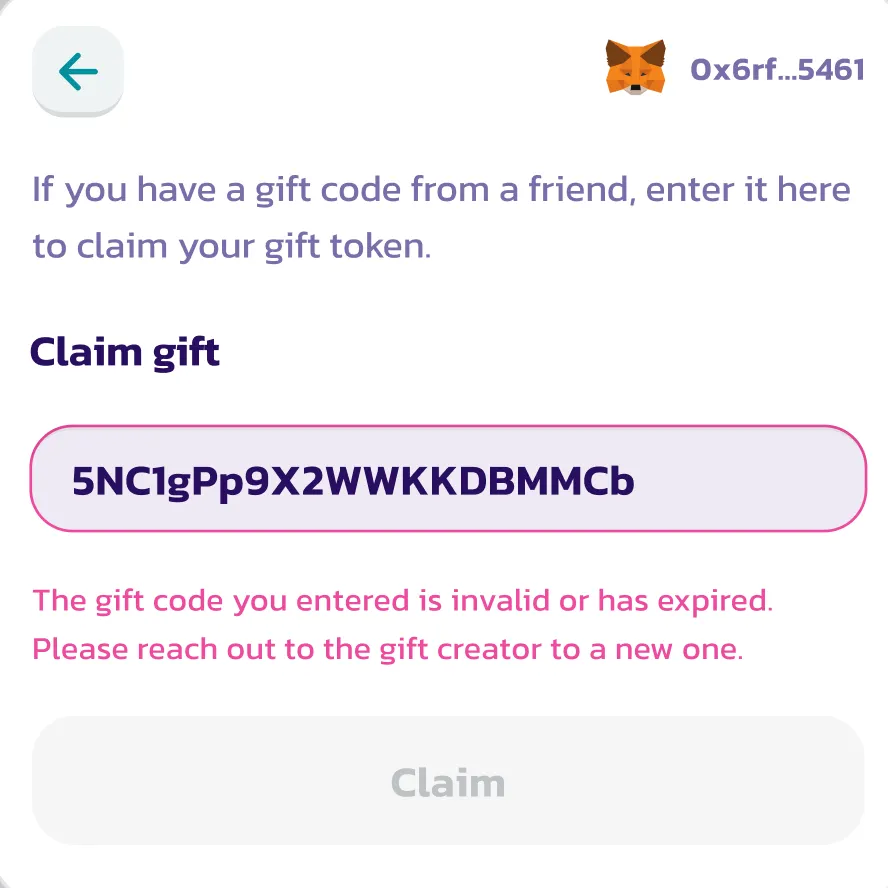
The app will autofill the gift code. If eligible and unclaimed, the gift claim UI will load.
If not, an error message will show (e.g. expired or already claimed).
***
#### 2. Approve & Receive Tokens
The recipient can claim **without paying any gas** (it’s already covered).
Once approved:
* The BEP-20 tokens (and gas token, if included) are deposited into their wallet
* The gift is marked as **claimed**
***
### ❌ Step 4: Cancel a Gift (If Unclaimed)
You can cancel a gift only if:
* It’s still **unclaimed**
* It’s still **within the expiry window** (default: 7 days)
To cancel:
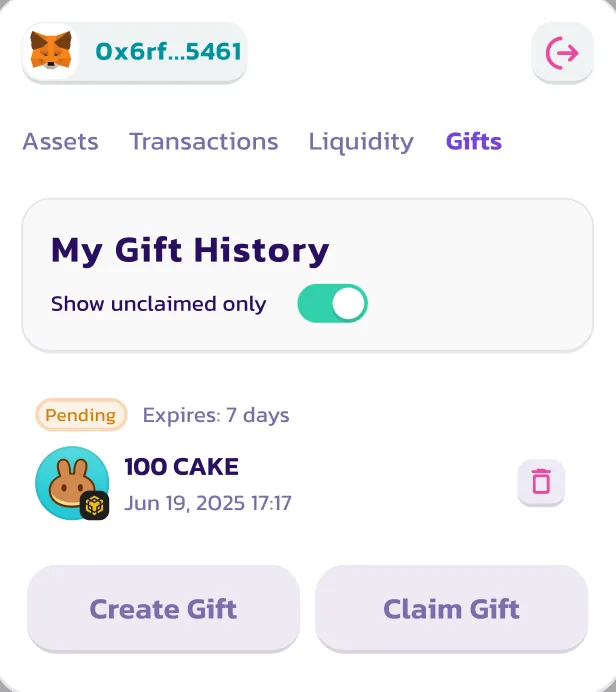
1. Go to the **Gift History** tab
2. Find the gift
3. Click **Cancel**
The tokens will be returned to your wallet (minus the gas sponsorship fee).
> ⚠️ Cancelled gifts cannot be reactivated or reused.
***
### ✅ That’s It!
You now know how to:
1. Create a Pancake Gift
2. Send it to someone via link or QR
3. Claim a gift sent to you
4. Cancel a gift if needed
Want to view your full gift history or check statuses? Just return to the **Gift tab** in the PancakeSwap Wallet.
---
# Agent Instructions
This documentation is published with GitBook. GitBook is the documentation platform designed so that both humans and AI agents can read, navigate, and reason over technical content effectively. Learn more at gitbook.com.
## Querying This Documentation
If you need additional information that is not directly available in this page, you can query the documentation by asking a question.
Perform an HTTP GET request on the following URL with the `ask` and `goal` query parameters:
```
GET https://docs.pancakeswap.finance/trading-tools/pancake-gifts/pancake-gifts-how-to-guide.md?ask=&goal=
```
`ask` is the immediate question: it should be specific, self-contained, and written in natural language.
`goal` is what the user is ultimately trying to achieve, the reason they need the answer. Sharing it helps GitBook give you a better, more relevant answer. A goal is most helpful when it describes the outcome the user wants rather than restating the question. For example, with `ask=how do I create an API token`, a goal like `automate deployments from our CI pipeline` lets GitBook tailor the answer to that use case.
The response will contain a direct answer to the question and relevant excerpts and sources from the documentation.
Use this mechanism when the answer is not explicitly present in the current page, you need clarification or additional context, or you want to retrieve related documentation sections.