> For the complete documentation index, see [llms.txt](https://docs.pancakeswap.finance/llms.txt). Markdown versions of documentation pages are available by appending `.md` to page URLs; this page is available as [Markdown](https://docs.pancakeswap.finance/russian/torgovlya/perpetual-trading/perpetual-trading-v2/madbtcusd/madbtcusd-faq.md).
# MADBTCUSD FAQ
### Как рассчитывается индекс MADBTCUSD?
MADBTCUSD рассчитывается по следующей формуле:
**Индекс MADBTCUSD**
$$
\begin{align\*}
\text{drift} &= \left( \frac{\text{btcCurrentPrice} - 1}{\text{btcLastSecondPrice}} \right) \times 5 \\
\\
\sigma &= \frac{\text{expectedvol}}{\sqrt{3600 \times 24 \times 365}} \\
\\
norm &= \text{norminv}(\text{Random}, 0, 1) \\
\\
S\_{n+1} &= S\_{n} \times e^{\left\[\left(\text{drift} - \frac{\sigma^2}{2}\right) \times \text{dt} + \sigma \times \sqrt{\text{dt}} \times norm\right]}
\end{align\*}
$$
где:
* Начальное Sn=1000
* dt=1
* ожидаемая волатильность:100% (ожидаемая временная волатильность MADBTC)
* «**Случайное число**» рассчитывается на основе текущей **цены BTC с точностью до 8 знаков после запятой**
**Расчёт случайного числа:**
```python
import hashlib
from decimal import Decimal
# Предположим, текущая цена Bitcoin составляет 48923.56789101
bitcoin_price = Decimal("48923.56789101")
# Рассчитываем SHA-256 хеш цены Bitcoin
price_hash = hashlib.sha256(str(bitcoin_price).encode('utf-8')).hexdigest()
# Извлекаем первые 8 шестнадцатеричных символов хеша
hash_substring = price_hash[:8]
# Конвертируем шестнадцатеричную строку в целое число
hash_integer = int(hash_substring, 16)
# Делим целое число на 4294967296 (десятичное число, соответствующее шестнадцатеричному FFFFFFFF) для получения числа
random_number = hash_integer / 4294967296
# Выводим случайное число
print(random_number)
```
Если определённое случайное число равно 0, расчёт повторяется.
### Где можно верифицировать исторические цены BTC и MADBTCUSD?
Ценовые потоки BTC и MADBTCUSD можно найти здесь:
[BTCUSD](https://www.apollox.finance/bapi/futures/v1/public/future/apx/V2MarkPriceKline?symbol=BTCUSD\&limit=1800)
[MADBTCUSD](https://www.apollox.finance/bapi/futures/v1/public/future/apx/V2MarkPriceKline?symbol=MADBTCUSD\&limit=1800)
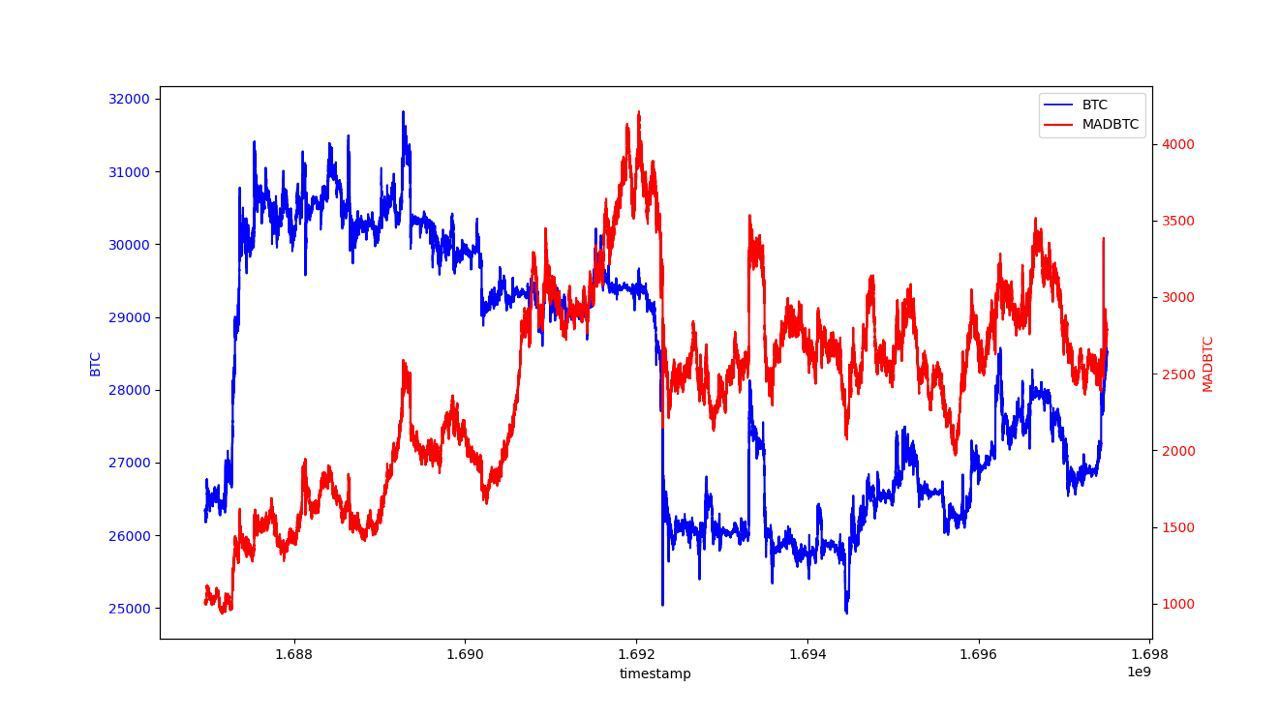
### Исторические данные бэктестирования BTC & MADBTC
Для верификации исторических цен BTC & MADBTC мы предоставляем ниже график бэктестирования.
---
# Agent Instructions
This documentation is published with GitBook. GitBook is the documentation platform designed so that both humans and AI agents can read, navigate, and reason over technical content effectively. Learn more at gitbook.com.
## Querying This Documentation
If you need additional information that is not directly available in this page, you can query the documentation dynamically by asking a question.
Perform an HTTP GET request on the current page URL with the `ask` query parameter, and the optional `goal` query parameter:
```
GET https://docs.pancakeswap.finance/russian/torgovlya/perpetual-trading/perpetual-trading-v2/madbtcusd/madbtcusd-faq.md?ask=&goal=
```
`ask` is the immediate question: it should be specific, self-contained, and written in natural language.
`goal` is optional and describes the broader end goal you are ultimately trying to accomplish on behalf of the user. GitBook uses it to tailor the answer towards what is most useful for that goal.
The response will contain a direct answer to the question and relevant excerpts and sources from the documentation.
Use this mechanism when the answer is not explicitly present in the current page, you need clarification or additional context, or you want to retrieve related documentation sections.