> For the complete documentation index, see [llms.txt](https://docs.pancakeswap.finance/llms.txt). Markdown versions of documentation pages are available by appending `.md` to page URLs; this page is available as [Markdown](https://docs.pancakeswap.finance/russian/dobro-pozhalovat-v-pancakeswap/vecake-sunset/bcake/migration-guide.md).
# Руководство по миграции
Мигрируй ликвидность V2, StableSwap или менеджера позиций для использования буста bCAKE
Для начала буста ликвидности V2, StableSwap или менеджера позиций через bCAKE необходимо выполнить миграцию: вывести LP из старого контракта и повторно застейкать их в новом.
### Перейди к мастеру миграции
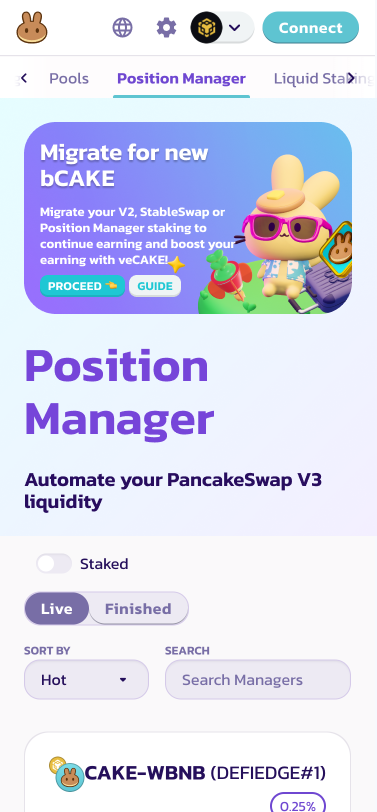
Найди баннер в верхней части страницы Farm или Position Manager, нажми «Proceed» для начала процесса миграции.
[Перейти на Farm](https://pancakeswap.finance/farms)
[Перейти на Position Manager](https://pancakeswap.finance/position-managers)
### Выведи токены LP из старых контрактов
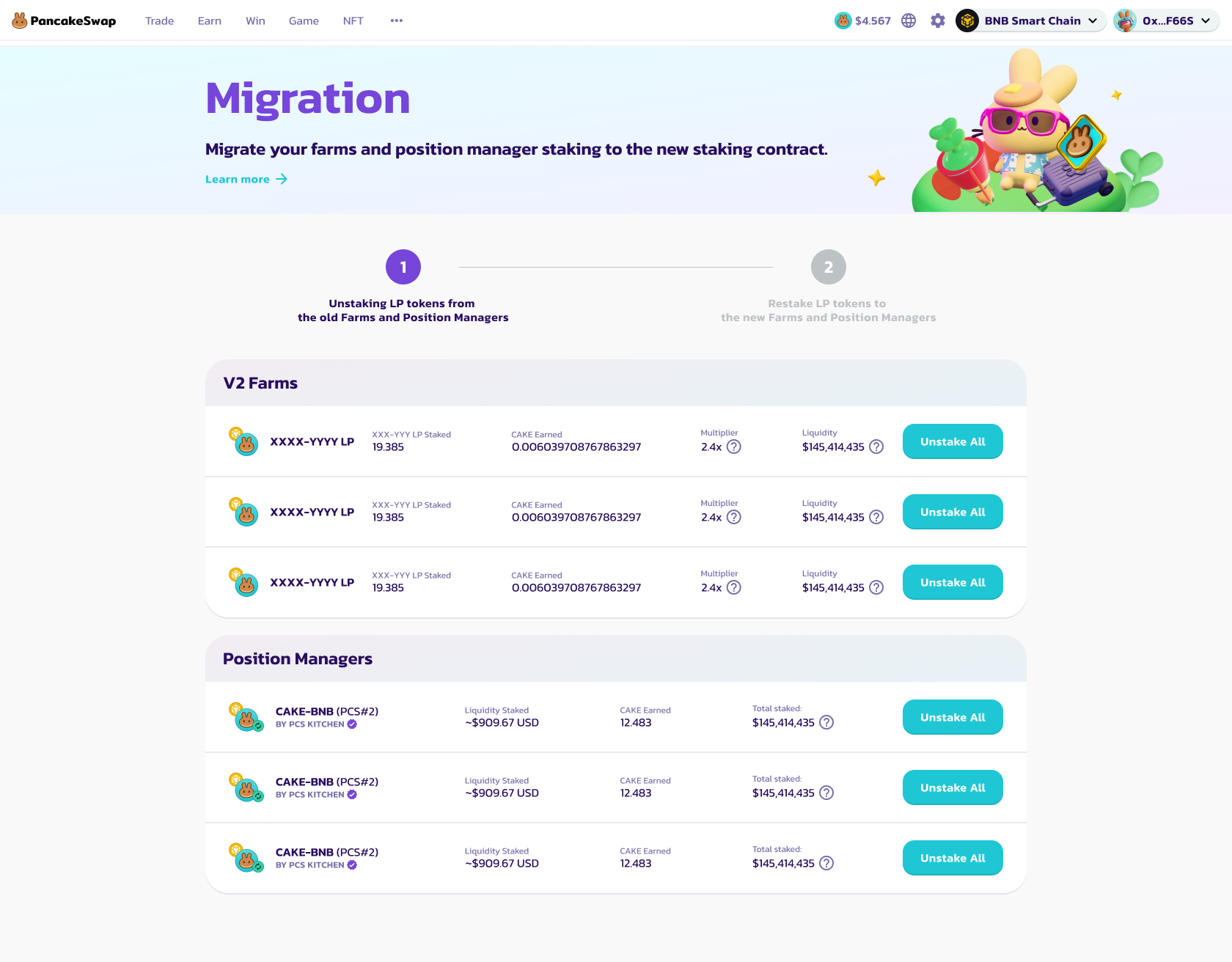
На первом шаге ты увидишь полный список ферм V2, StableSwap и менеджеров позиций, требующих миграции для использования буста bCAKE.
Нажми кнопки «Unstake All» справа и подтверди транзакцию в кошелёк-приложении, чтобы вывести ВСЕ токены LP из старых контрактов.
Необходимо выводить каждый из них по отдельности.
После вывода всех LP нажми «Go to Stake» для перехода к следующему шагу.
### Повторно застейкай токены LP в новые контракты
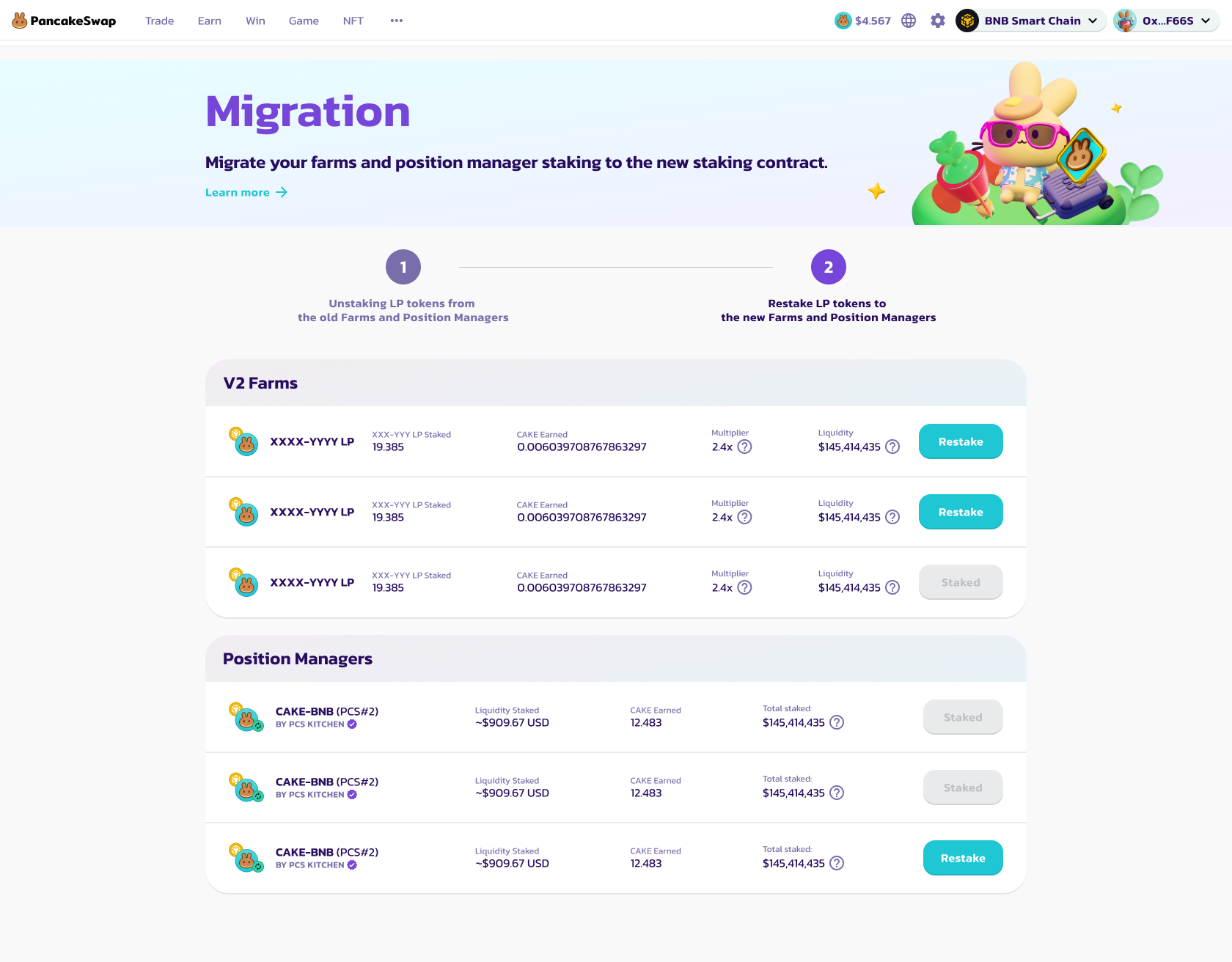
На втором шаге ты увидишь полный список ферм V2, StableSwap и менеджеров позиций, доступных для повторного стейкинга.
Сначала нажми кнопки «Enable» для разрешения депозитов.
Затем нажми кнопки «Restake» для повторного стейкинга токенов LP в новый контракт.
* Для ферм V2 и StableSwap необходимо указать количество токенов LP для повторного стейкинга в новом всплывающем модальном окне.
Рекомендуется повторно застейкать все токены LP, чтобы максимизировать доходность.
* Для менеджеров позиций просто подтверди транзакцию в кошельке — все LP менеджеров позиций будут повторно застейканы в новые контракты.
Поскольку LP менеджеров позиций нельзя обрабатывать по отдельности, настоятельно рекомендуется повторно застейкать ВСЕ LP менеджеров позиций в новые контракты.
После повторного стейкинга кнопки изменятся на «Staked».
Необходимо повторно застейкать каждый из них по отдельности.
После повторного стейкинга всех LP нажми «Finish» для возврата на страницу Farm.
---
# Agent Instructions
This documentation is published with GitBook. GitBook is the documentation platform designed so that both humans and AI agents can read, navigate, and reason over technical content effectively. Learn more at gitbook.com.
## Querying This Documentation
If you need additional information that is not directly available in this page, you can query the documentation by asking a question.
Perform an HTTP GET request on the following URL with the `ask` and `goal` query parameters:
```
GET https://docs.pancakeswap.finance/russian/dobro-pozhalovat-v-pancakeswap/vecake-sunset/bcake/migration-guide.md?ask=&goal=
```
`ask` is the immediate question: it should be specific, self-contained, and written in natural language.
`goal` is what the user is ultimately trying to achieve, the reason they need the answer. Sharing it helps GitBook give you a better, more relevant answer. A goal is most helpful when it describes the outcome the user wants rather than restating the question. For example, with `ask=how do I create an API token`, a goal like `automate deployments from our CI pipeline` lets GitBook tailor the answer to that use case.
The response will contain a direct answer to the question and relevant excerpts and sources from the documentation.
Use this mechanism when the answer is not explicitly present in the current page, you need clarification or additional context, or you want to retrieve related documentation sections.