> For the complete documentation index, see [llms.txt](https://docs.pancakeswap.finance/llms.txt). Markdown versions of documentation pages are available by appending `.md` to page URLs; this page is available as [Markdown](https://docs.pancakeswap.finance/portuguese-brazilian/negociacao/perpetual-trading/perpetual-trading-v2/madbtcusd/madbtcusd-faq.md).
# FAQ do MADBTCUSD
### Como o Índice MADBTCUSD é Calculado?
O MADBTCUSD é calculado com base na seguinte fórmula:
**Índice MADBTCUSD**
$$
\begin{align\*}
\text{drift} &= \left( \frac{\text{btcCurrentPrice} - 1}{\text{btcLastSecondPrice}} \right) \times 5 \\
\\
\sigma &= \frac{\text{expectedvol}}{\sqrt{3600 \times 24 \times 365}} \\
\\
norm &= \text{norminv}(\text{Random}, 0, 1) \\
\\
S\_{n+1} &= S\_{n} \times e^{\left\[\left(\text{drift} - \frac{\sigma^2}{2}\right) \times \text{dt} + \sigma \times \sqrt{\text{dt}} \times norm\right]}
\end{align\*}
$$
onde:
* Sn inicial=1000
* dt=1
* vol esperado:100% (o vol esperado é a volatilidade temporal esperada do MADBTC)
* o "**Número aleatório**" é calculado com base no **preço atual do BTC com 8 casas decimais de precisão**
**Cálculo do Número Aleatório:**
```python
import hashlib
from decimal import Decimal
# Assuma que o preço atual do Bitcoin é 48923.56789101
bitcoin_price = Decimal("48923.56789101")
# Calcule o hash SHA-256 do preço do Bitcoin
price_hash = hashlib.sha256(str(bitcoin_price).encode('utf-8')).hexdigest()
# Extraia os primeiros 8 números hexadecimais do hash
hash_substring = price_hash[:8]
# Converte uma string hexadecimal em um inteiro
hash_integer = int(hash_substring, 16)
# Divide o inteiro por 4294967296 (o número decimal correspondente ao número hexadecimal FFFFFFFF) para obter um num
random_number = hash_integer / 4294967296
# Imprima o número aleatório
print(random_number)
```
Se o número aleatório determinado for 0, ele será recalculado novamente
### Onde posso verificar o histórico de preços do BTC e MADBTCUSD?
O feed de preços do BTC e MADBTCUSD pode ser encontrado aqui:
[BTCUSD](https://www.apollox.finance/bapi/futures/v1/public/future/apx/V2MarkPriceKline?symbol=BTCUSD\&limit=1800)
[MADBTCUSD](https://www.apollox.finance/bapi/futures/v1/public/future/apx/V2MarkPriceKline?symbol=MADBTCUSD\&limit=1800)
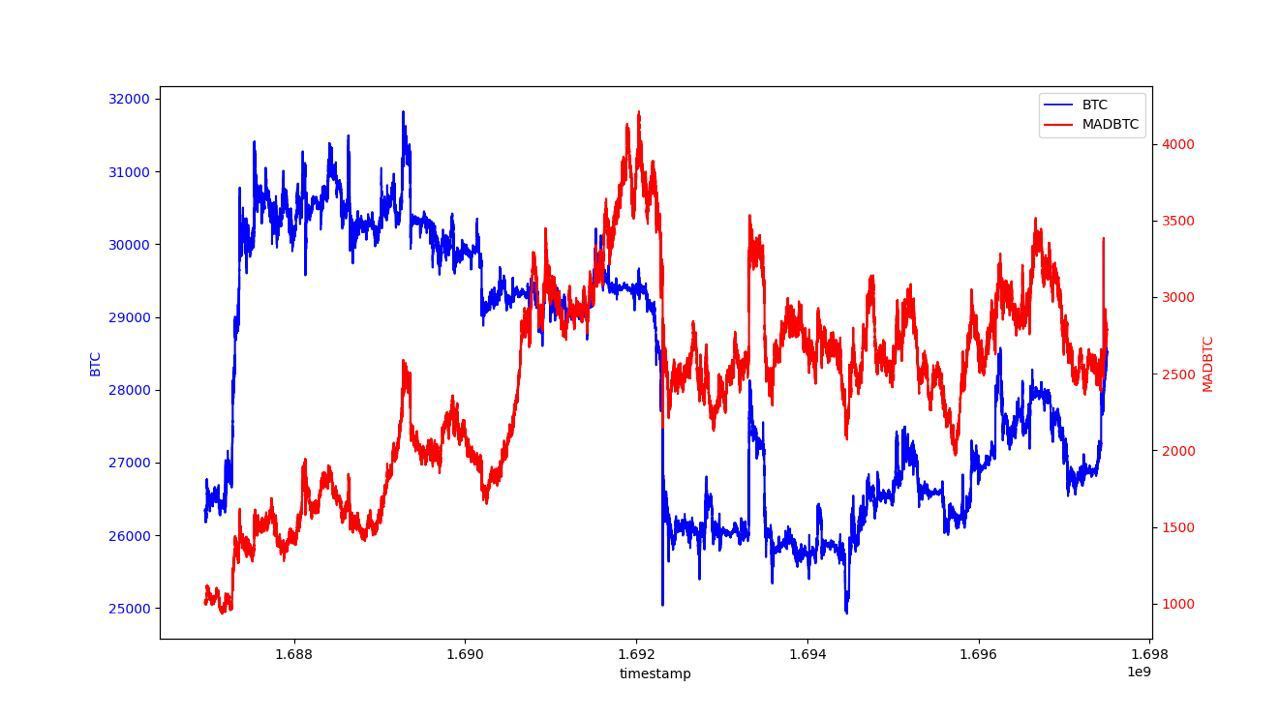
### Dados históricos de backtest do BTC e MADBTC
Para verificar os preços históricos do BTC e MADBTC, fornecemos um gráfico de backtest abaixo.
---
# Agent Instructions
This documentation is published with GitBook. GitBook is the documentation platform designed so that both humans and AI agents can read, navigate, and reason over technical content effectively. Learn more at gitbook.com.
## Querying This Documentation
If you need additional information that is not directly available in this page, you can query the documentation by asking a question.
Perform an HTTP GET request on the following URL with the `ask` and `goal` query parameters:
```
GET https://docs.pancakeswap.finance/portuguese-brazilian/negociacao/perpetual-trading/perpetual-trading-v2/madbtcusd/madbtcusd-faq.md?ask=&goal=
```
`ask` is the immediate question: it should be specific, self-contained, and written in natural language.
`goal` is what the user is ultimately trying to achieve, the reason they need the answer. Sharing it helps GitBook give you a better, more relevant answer. A goal is most helpful when it describes the outcome the user wants rather than restating the question. For example, with `ask=how do I create an API token`, a goal like `automate deployments from our CI pipeline` lets GitBook tailor the answer to that use case.
The response will contain a direct answer to the question and relevant excerpts and sources from the documentation.
Use this mechanism when the answer is not explicitly present in the current page, you need clarification or additional context, or you want to retrieve related documentation sections.