> For the complete documentation index, see [llms.txt](https://docs.pancakeswap.finance/llms.txt). Markdown versions of documentation pages are available by appending `.md` to page URLs; this page is available as [Markdown](https://docs.pancakeswap.finance/kr/undefined/perpetual-trading/perpetual-trading-v2/perpetual-trading-faq/arbitrum/alp-syrup-pool-arbitrum.md).
# ALP 시럽 풀 (Arbitrum)
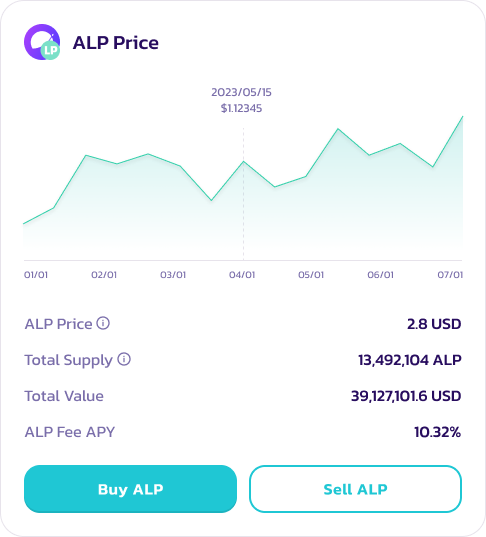
ALP는 PancakeSwap 무기한 선물 V2의 유동성을 뒷받침하는 토큰입니다. 사용자는 USDC, USDT, DAI, ETH, BTC 같은 담보 토큰으로 ALP를 발행(mint)/구매합니다. 이 토큰들은 ApolloX가 구동하는 PancakeSwap 무기한 선물 거래 엔진에 유동성을 공급합니다. ALP 토큰은 **지갑 간에 전송할 수 없으며**, **ALP 컨트랙트를 통해서만 발행/판매하고 ALP 풀에 스테이킹**할 수 있습니다.
### 단계별 가이드
#### ALP 구매/발행하기
1. [PancakeSwap ALP 풀 (V2)](https://perp.pancakeswap.finance/en/ALP) 페이지에 접속하여 지갑을 연결합니다.
2. 지갑을 연결한 후 **Buy ALP**를 클릭합니다. ALP 풀의 어떤 자산으로도 ALP를 구매할 수 있습니다.
3. 정보를 확인한 후 **Buy ALP**를 클릭하여 트랜잭션을 완료합니다.
**ALP 스테이킹하기 (Arbitrum)**
1. Pancake ALP 대시보드 페이지에서 **Stake Now**를 클릭하거나 [여기](https://pancakeswap.finance/pools?chain=arb)를 클릭합니다.
2. CAKE-ALP 시럽 풀을 선택합니다.
3. ALP를 **Enable**한 뒤 **Stake**를 클릭합니다.
4. 스테이킹할 ALP 수량을 선택하고 **confirm**을 클릭합니다.
**ALP 판매하기**
1. ALP 풀 (V2) 페이지에 접속하여 지갑을 연결합니다.
2. 지갑을 연결한 후 **Sell ALP**를 클릭합니다.
ALP 판매 조건:
* 사용자는 구매 시점으로부터 48시간 후에 ALP를 판매할 수 있습니다.
* 판매 가능한 ALP 토큰 수량: min\[(유동성 풀의 가치 - 사용자 포지션의 가치)\*50%]/ALP 시장 가격. 예를 들어 유동성 풀의 가치가 10,000,000 USDT, 사용자 포지션의 가치가 5,000,000 USDT, ALP 시장 가격이 2 USDT라면 ALP 사용자가 판매할 수 있는 최대 수량은 1,250,000입니다.
* 동시에, ALP 토큰을 판매한 후 사용자가 받는 자산의 양은 ALP 유동성 풀을 초과할 수 없습니다. 예를 들어 유동성 풀에 1000 USDT만 있다면 사용자가 받을 수 있는 USDT의 최대 수량은 1000 USDT이며, 남은 ALP는 다른 암호화폐로 판매할 수 있습니다.
---
# Agent Instructions
This documentation is published with GitBook. GitBook is the documentation platform designed so that both humans and AI agents can read, navigate, and reason over technical content effectively. Learn more at gitbook.com.
## Querying This Documentation
If you need additional information that is not directly available in this page, you can query the documentation by asking a question.
Perform an HTTP GET request on the following URL with the `ask` and `goal` query parameters:
```
GET https://docs.pancakeswap.finance/kr/undefined/perpetual-trading/perpetual-trading-v2/perpetual-trading-faq/arbitrum/alp-syrup-pool-arbitrum.md?ask=&goal=
```
`ask` is the immediate question: it should be specific, self-contained, and written in natural language.
`goal` is what the user is ultimately trying to achieve, the reason they need the answer. Sharing it helps GitBook give you a better, more relevant answer. A goal is most helpful when it describes the outcome the user wants rather than restating the question. For example, with `ask=how do I create an API token`, a goal like `automate deployments from our CI pipeline` lets GitBook tailor the answer to that use case.
The response will contain a direct answer to the question and relevant excerpts and sources from the documentation.
Use this mechanism when the answer is not explicitly present in the current page, you need clarification or additional context, or you want to retrieve related documentation sections.