> For the complete documentation index, see [llms.txt](https://docs.pancakeswap.finance/llms.txt). Markdown versions of documentation pages are available by appending `.md` to page URLs; this page is available as [Markdown](https://docs.pancakeswap.finance/japanese/qu-yin/perpetual-trading/perpetual-trading-v2/trading-rewards-program.md).
# トレーディングリワードプログラム
### 報酬プログラムの概要
詳細は以下の通りです:
活動期間:サイクルとチェーンごとに異なります。
報酬配布時間:各サイクルは毎日00:00(UTC)〜23:59(UTC)です。報酬は翌日の約03:00(UTC)に発行されます。ユーザーは報酬発行から30日以内に受け取る必要があります。受け取らない場合、プラットフォームが報酬を没収します。
報酬額:1日あたり最大$15,000相当のAPX
活動ルール:V2で取引するユーザーは報酬プールから獲得します。APXをDAOにステークしてveNFTを取得したユーザーは、veNFTから計算されたPower値に対応するブースト乗数を享受できます。
| Power値 | ブースト乗数 |
| ------------------------- | ------ |
| 50,000 < Power =<100,000 | 1.5 |
| 100,000 < Power =<300,000 | 2 |
| Power > 300,000 | 2.5 |
トレーディング報酬の計算式:
各トレーディング報酬サイクルの終了時に、そのサイクルにおけるユーザーの有効取引手数料とステーキング額が計算され、ウェイトとAPX報酬の量が決定されます。計算式は以下の通りです:
r = R\*W / sum(Wi)
パラメーター:
| r | このサイクルにおけるユーザーのAPX報酬 |
| ------- | -------------------------------------------------------------------------------------------------------------------------------------------- |
| R | 前日のユーザーのV2取引手数料貢献と最新のAPXトークン価格によって決定されます。 |
| W |
|
| sum(Wi) | 全ユーザーの総スコア。Wiは個々のユーザーのスコアを表し、sum(Wi)は全ユーザースコアの合計を表します。 |
Rの計算式は以下の通りです:
R=Min(ドル価値乗数 \* 取引手数料, ドル価値上限) / Max(APX最終価格, APX価格フロア)
* ドル価値乗数:今回のエポックは0.70
* 取引手数料:前日のV2手数料収入をUSDに換算した値
* ドル価値上限:システム設定に基づき15,000
* APX最終価格:最新のAPXトークン価格
* APX価格フロア:今回のエポックは0.04
利用規約
* 各サイクル終了後、ApolloXはユーザーのフィードバックと市場状況に応じてプログラムルールを変更する場合があります。報酬は非線形に配布されます。
* 活動期間中、プラットフォームはALPプールに注入するV2取引手数料収入の割合を50%から20%に削減します。残りの30%はAPXの買い戻しに使用されます。
* V2の各取引ペアの取引手数料が異なるため、有効取引量が同じであっても受け取る報酬が異なる場合があります。
* 各サイクルで配布される報酬は以下のコントラクトアドレスに保管されます:0x6bE863e01E17A226c945e3629D0D9Cb6E52Ce90E
* ApolloXはこの活動の最終解釈権を留保します。
リスク警告:暗号資産先物取引は多大なリスクを伴います。すべての取引活動はご自身の判断と責任で行われます。ここに記載されている情報はApolloXからの金融投資アドバイスとはみなされません。ApolloXはApolloXの使用から生じる損失に対して一切の責任を負いません。
### 報酬の請求
トレーディング報酬プログラムはApolloXが主催しているため、以下の手順で報酬を請求してください:\
\
ステップ1:[PancakeSwap Perpetualsページ](https://perp.pancakeswap.finance/en/futures/v2/)にアクセスします。
ステップ2:ページ上部の「Trading Reward(V2)」タブをクリックします。
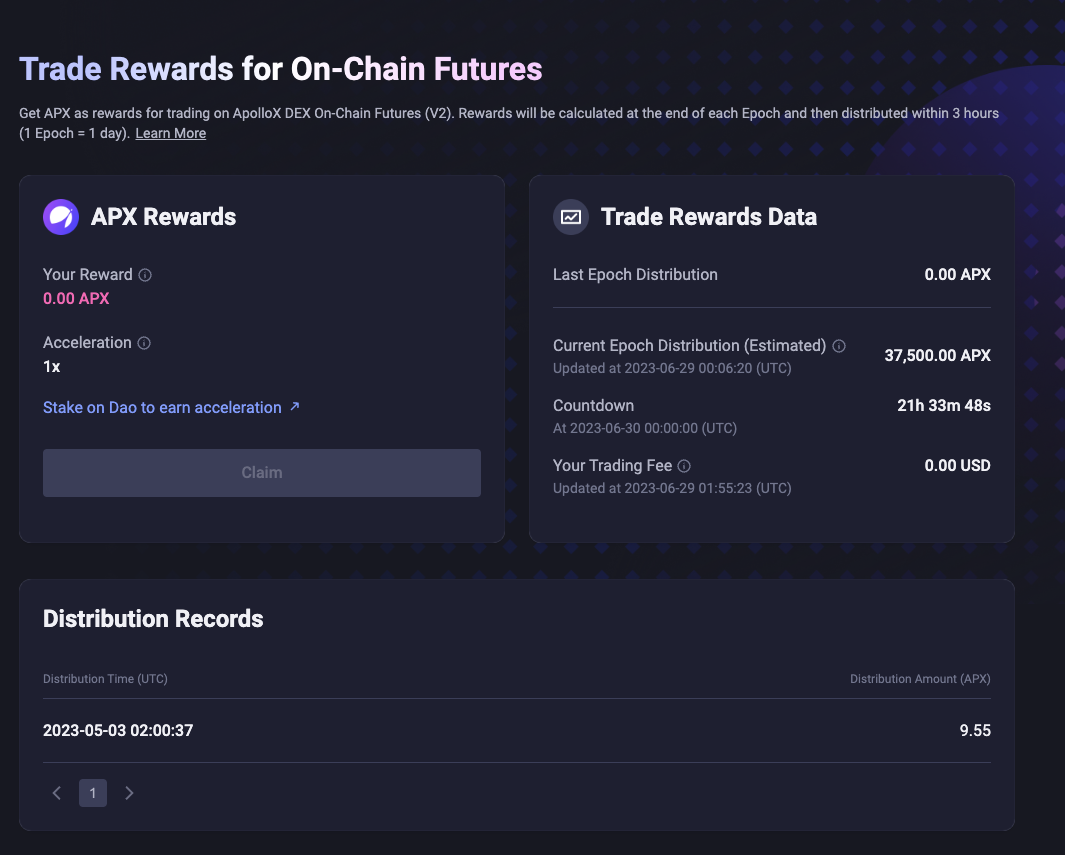
ステップ3:ApolloXの報酬請求ページにリダイレクトされ、現在の報酬状況を確認できます。活動期間中に「Claim(請求)」をクリックして報酬を受け取ります。
---
# Agent Instructions
This documentation is published with GitBook. GitBook is the documentation platform designed so that both humans and AI agents can read, navigate, and reason over technical content effectively. Learn more at gitbook.com.
## Querying This Documentation
If you need additional information that is not directly available in this page, you can query the documentation dynamically by asking a question.
Perform an HTTP GET request on the current page URL with the `ask` query parameter, and the optional `goal` query parameter:
```
GET https://docs.pancakeswap.finance/japanese/qu-yin/perpetual-trading/perpetual-trading-v2/trading-rewards-program.md?ask=&goal=
```
`ask` is the immediate question: it should be specific, self-contained, and written in natural language.
`goal` is optional and describes the broader end goal you are ultimately trying to accomplish on behalf of the user. GitBook uses it to tailor the answer towards what is most useful for that goal.
The response will contain a direct answer to the question and relevant excerpts and sources from the documentation.
Use this mechanism when the answer is not explicitly present in the current page, you need clarification or additional context, or you want to retrieve related documentation sections.