> For the complete documentation index, see [llms.txt](https://docs.pancakeswap.finance/llms.txt). Markdown versions of documentation pages are available by appending `.md` to page URLs; this page is available as [Markdown](https://docs.pancakeswap.finance/japanese/qu-yin/perpetual-trading/perpetual-trading-v2/perpetuals-glossary.md).
# レガシーモード用語集
**先物取引に関連するすべての用語の定義をここでご確認いただけます。**
### **無期限取引**
パーペチュアル(無期限先物、またはパーペチュアルスワップ)とは、満期日のない特殊な先物契約の一種です。
### **レバレッジ**
レバレッジは取引の仕組みです。投資全額を支払わずに市場へのエクスポージャーを高めることができます。簡単に言うと、投資をレバレッジするためにお金を借りることです。
### 注文
\*\*ロング:\*\*ロング注文を建てます。この注文ではアセットを購入し、価格が上昇したときに売ることを待ちます。「Buy」と「Long」は同義で使用されます。
\*\*ショート:\*\*ショート注文を建てます。この注文ではアセットを借りて売り、価格が下落したときに買い戻すことを期待します。「Sell」と「Short」は同義で使用されます。
\*\*指値注文(Limit Order):\*\*指値注文とは、特定の価格またはそれより有利な価格で買いまたは売りを行うことです。指値注文の約定は保証されません。
\*\*成行注文(Market Order):\*\*成行注文とは、現在最も有利な価格で買いまたは売りを行う注文です。
#### ポジション管理
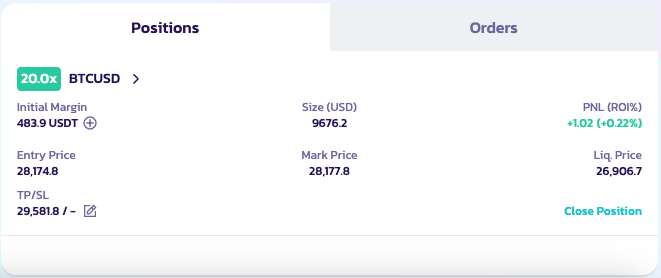
ユーザーは取引ページ下部の「Position」をクリックすることで、建値などオープンポジションの詳細を確認できます。建値、ポジション数量、最新価格、強制清算価格などの詳細を表示できます。
**ポジションモード**
PancakeSwapはV2の各取引ペアにアイソレートレバレッジモードを採用しています。ペアは独立して運用されます:
* 各取引ペアはアイソレートポジションとなり、ユーザーは複数のアイソレートポジションを持てます。
* すべてのポジション(取引ペア)は独立して運用されます。マージンを追加する必要がある場合、他の別々のポジションに利用可能な資産があっても手動で行う必要があります(ApolloXは将来的に自動追加をサポートする予定です)。
* すべてのアイソレート取引ポジションには独自のリスク率と清算価格があり、個別に決済されます。
* 清算リスクは各取引ペアで分離されています。あるポジションが清算されても、他のポジションには影響しません。
**ポジションのクローズ**
「Close Position(ポジションをクローズ)」をクリックしてポジションをクローズできます。
#### 手数料とスリッページ
手数料の詳細については[Asterのページ](https://docs.asterdex.com/product/asterex-simple/fees-and-slippage)をご参照ください。
---
# Agent Instructions
This documentation is published with GitBook. GitBook is the documentation platform designed so that both humans and AI agents can read, navigate, and reason over technical content effectively. Learn more at gitbook.com.
## Querying This Documentation
If you need additional information that is not directly available in this page, you can query the documentation dynamically by asking a question.
Perform an HTTP GET request on the current page URL with the `ask` query parameter, and the optional `goal` query parameter:
```
GET https://docs.pancakeswap.finance/japanese/qu-yin/perpetual-trading/perpetual-trading-v2/perpetuals-glossary.md?ask=&goal=
```
`ask` is the immediate question: it should be specific, self-contained, and written in natural language.
`goal` is optional and describes the broader end goal you are ultimately trying to accomplish on behalf of the user. GitBook uses it to tailor the answer towards what is most useful for that goal.
The response will contain a direct answer to the question and relevant excerpts and sources from the documentation.
Use this mechanism when the answer is not explicitly present in the current page, you need clarification or additional context, or you want to retrieve related documentation sections.