> For the complete documentation index, see [llms.txt](https://docs.pancakeswap.finance/llms.txt). Markdown versions of documentation pages are available by appending `.md` to page URLs; this page is available as [Markdown](https://docs.pancakeswap.finance/japanese/qu-yin/perpetual-trading/perpetual-trading-v2/dumb-mode/dumb-mode-guide.md).
# ダムモードガイド
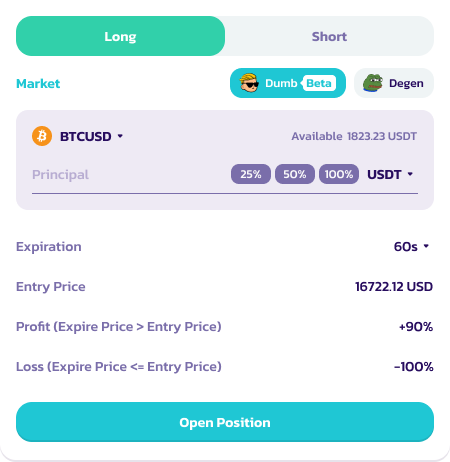
### ダムモードでの注文方法
PancakeSwapのダムモードで注文するには、以下の手順に従ってください:
1. マーケットを選択:BSCの[**PancakeSwap Perpetuals**](https://perp.pancakeswap.finance/en/futures/v2/BTCUSD?theme=light\&chain=bsc)にアクセスします。BTCUSD、ETHUSDなどの利用可能なマーケットから選択します。
2. **ダム(ベータ)アイコン**をクリックします。ポジションインターフェースがダムモードに切り替わります。
2. ポジションを選択:原資産のロングまたはショートを選択します\*
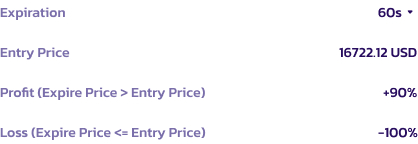
1. ロングポジションの場合:満期価格が建値より高ければ、ユーザーはトレードに勝ち利益を得ます。
2. ショートポジションの場合:満期価格が建値より低ければ、ユーザーはトレードに勝ち利益を得ます。
3. それ以外の場合、ユーザーは担保全額を失います。
4. ポジションの詳細については注記をご参照ください。
3. マージンと金額を設定:マージンアセット(USDC、USDT、CAKEなど)を選択し、担保の金額を指定します。
4. 期間を選択:取引の有効期限(60秒、5分、10分)を決定します。
5. 注文を出す:ROIを確認し、詳細を確認してから\*\*Open Position(ポジションを開く)\*\*をクリックして取引を確定します\*
5. 取引をモニタリング:取引が成立したら、「Position(ポジション)」タブで完了するまで進捗を確認します。**有効期限前にトレードをクローズすることはできません。**
7. 決済:取引が完了した際、成功の場合は6%の手数料を差し引いたROIが付与されます。取引が成功しなかった場合、損失は100%となります。
### ポジションに関する補足
* 「Open Position」ボタンをクリックした時点では有効期限タイマーは開始されません。60秒/選択した期間のカウントダウンは、トランザクションがブロックチェーン上で確認された瞬間から開始されます。
* 表示される価格はあくまでも参考値です。最終的な建値は、トランザクションがブロックチェーン上で確認された正確な瞬間の価格によって決定されます。これは「position(ポジション)」タブで更新されます。
### ダムモード使用のヒント
* リスクを理解する:特に損失時に-100%のROIとなる高いリスクを認識してください。
* 担保を管理する:損失しても許容できる金額のみを投資してください。
* 最新情報を把握する:取引する資産の市場トレンドを常に把握してください。
---
# Agent Instructions
This documentation is published with GitBook. GitBook is the documentation platform designed so that both humans and AI agents can read, navigate, and reason over technical content effectively. Learn more at gitbook.com.
## Querying This Documentation
If you need additional information that is not directly available in this page, you can query the documentation by asking a question.
Perform an HTTP GET request on the following URL with the `ask` and `goal` query parameters:
```
GET https://docs.pancakeswap.finance/japanese/qu-yin/perpetual-trading/perpetual-trading-v2/dumb-mode/dumb-mode-guide.md?ask=&goal=
```
`ask` is the immediate question: it should be specific, self-contained, and written in natural language.
`goal` is what the user is ultimately trying to achieve, the reason they need the answer. Sharing it helps GitBook give you a better, more relevant answer. A goal is most helpful when it describes the outcome the user wants rather than restating the question. For example, with `ask=how do I create an API token`, a goal like `automate deployments from our CI pipeline` lets GitBook tailor the answer to that use case.
The response will contain a direct answer to the question and relevant excerpts and sources from the documentation.
Use this mechanism when the answer is not explicitly present in the current page, you need clarification or additional context, or you want to retrieve related documentation sections.