> For the complete documentation index, see [llms.txt](https://docs.pancakeswap.finance/llms.txt). Markdown versions of documentation pages are available by appending `.md` to page URLs; this page is available as [Markdown](https://docs.pancakeswap.finance/japanese/pancakeswapheyoukoso/vecake-sunset/bcake/migration-guide.md).
# 移行ガイド
bCAKE を通じて V2、StableSwap、またはポジションマネージャーの流動性のブーストを開始するには、古いコントラクトから LP をアンステークし、新しいコントラクトに再ステークする移行を行う必要があります。
### 移行ウィザードに移動する
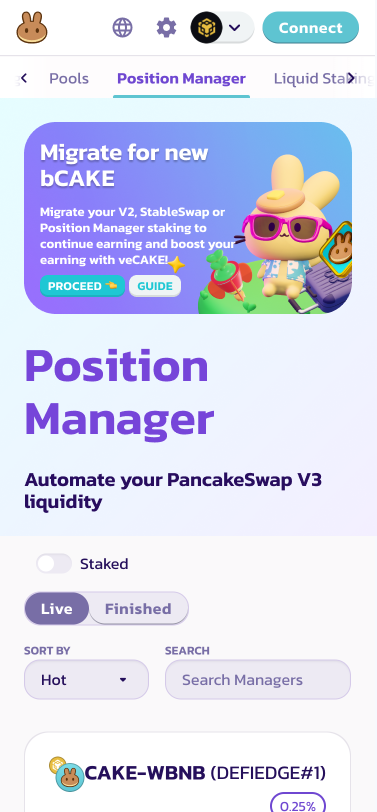
Farm またはポジションマネージャーページの上部にあるバナーを見つけ、「Proceed」をクリックして移行プロセスを開始してください。
[Farm に移動](https://pancakeswap.finance/farms)
[ポジションマネージャーに移動](https://pancakeswap.finance/position-managers)
### 古いコントラクトから LP トークンをアンステークする
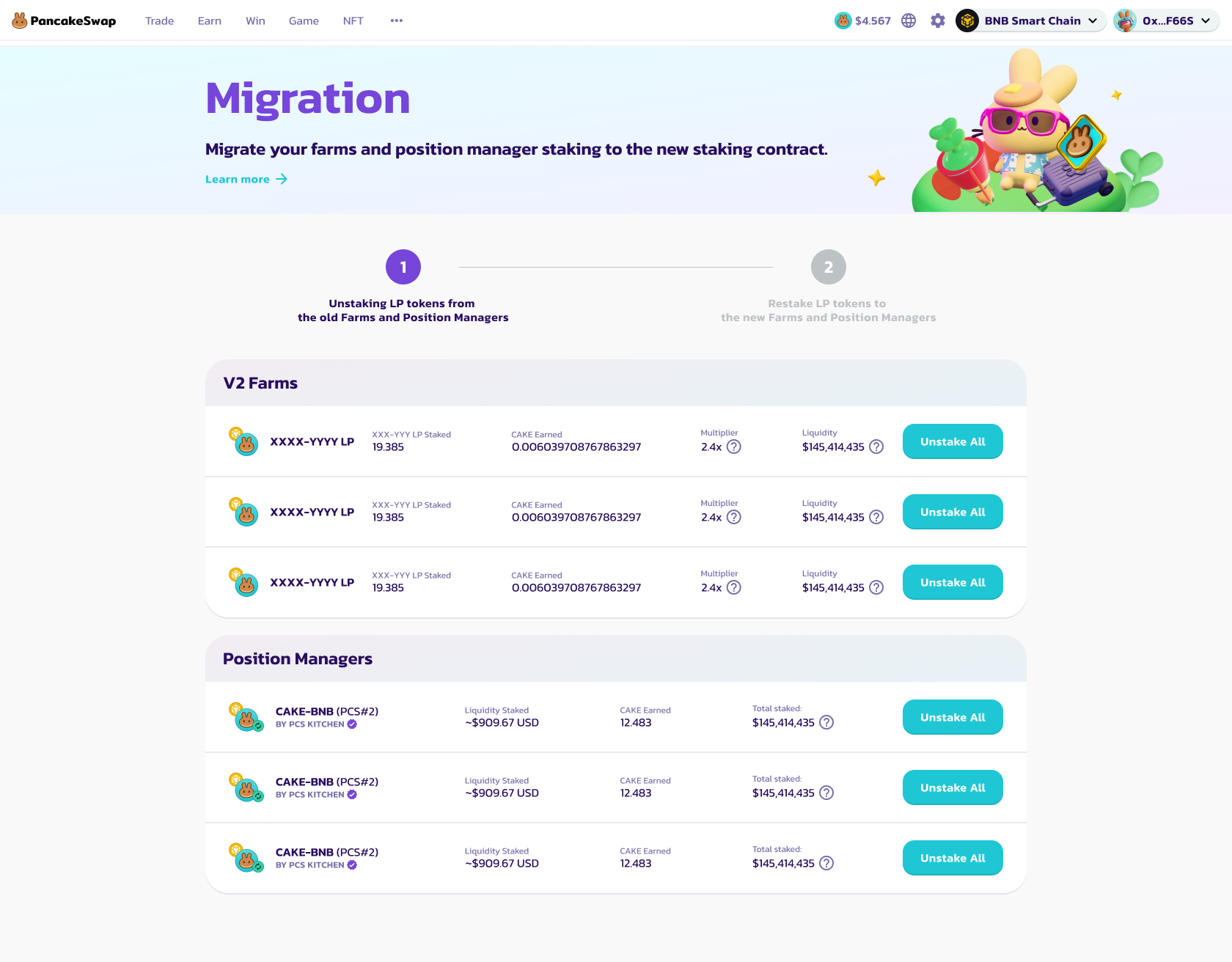
最初のステップでは、bCAKE ブーストを利用するために移行が必要な V2、StableSwap ファーム、およびポジションマネージャーの完全なリストが表示されます。
右側の「Unstake All」ボタンをクリックし、ウォレットアプリでトランザクションを承認して、古いコントラクトからすべての LP トークンをアンステークしてください。
それぞれを個別にアンステークする必要があります。
すべての LP をアンステークしたら、「Go to Stake」をクリックして次のステップに進みます。
### LP トークンを新しいコントラクトに再ステークする
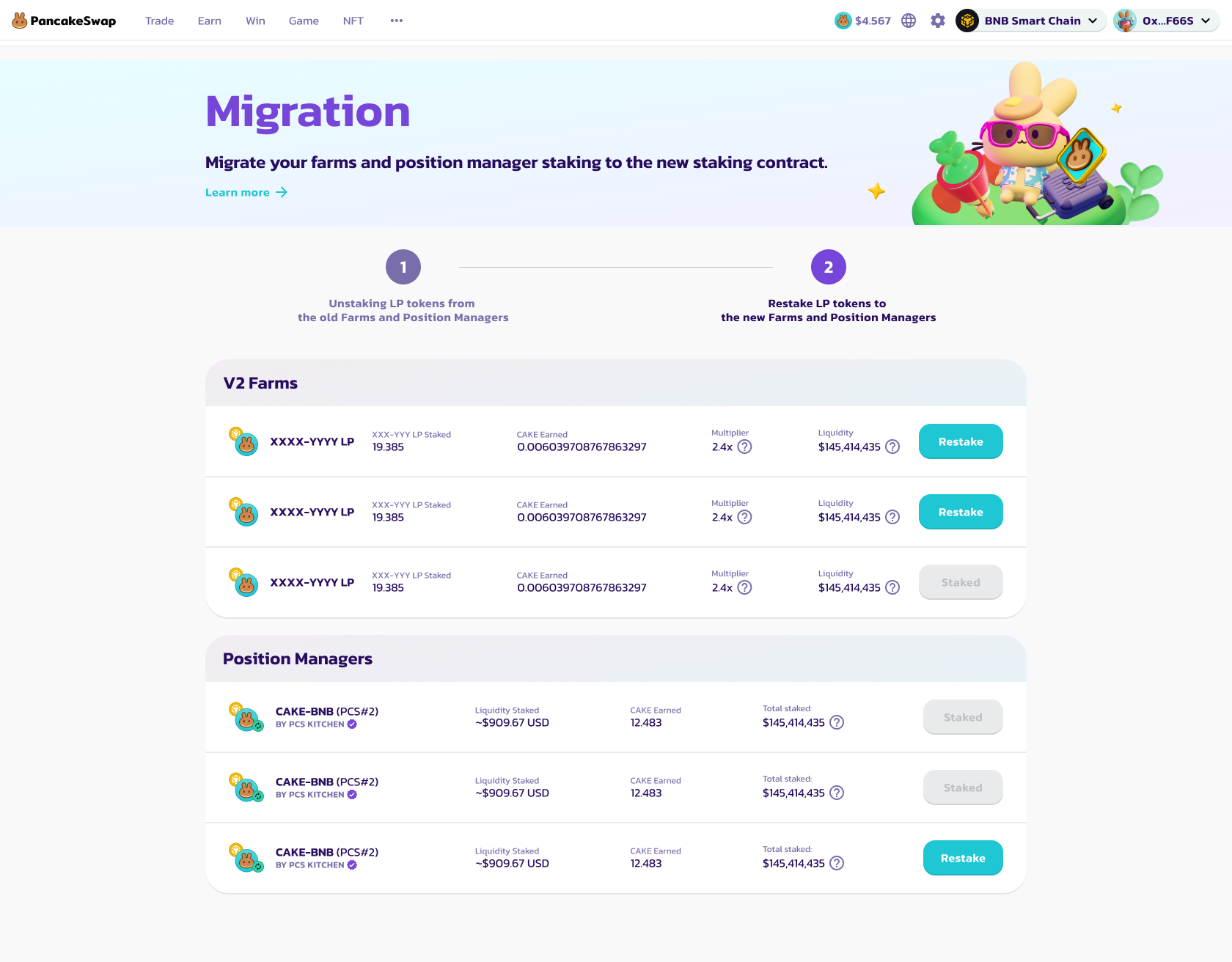
2番目のステップでは、再ステーク可能な V2、StableSwap ファーム、およびポジションマネージャーの完全なリストが表示されます。
まず、「Enable」ボタンをクリックしてデポジットを有効化します。
次に、「Restake」ボタンをクリックして LP トークンを新しいコントラクトに再ステークします。
* V2 および StableSwap ファームの場合、新しいポップアップモーダルで再ステークする LP トークンの数量を指定する必要があります。
最大の収益を確保するために、すべての LP トークンを再ステークすることをお勧めします。
* ポジションマネージャーの場合は、ウォレットでトランザクションを承認するだけで、すべてのポジションマネージャー LP が新しいコントラクトに再ステークされます。
ポジションマネージャーの LP は個別に処理できないため、すべてのポジションマネージャー LP を新しいコントラクトに再ステークすることを強くお勧めします。
再ステーク後、ボタンは「Staked」に変わります。
それぞれを個別に再ステークする必要があります。
すべての LP を再ステークしたら、「Finish」をクリックして Farm ページに戻ります。
---
# Agent Instructions
This documentation is published with GitBook. GitBook is the documentation platform designed so that both humans and AI agents can read, navigate, and reason over technical content effectively. Learn more at gitbook.com.
## Querying This Documentation
If you need additional information that is not directly available in this page, you can query the documentation dynamically by asking a question.
Perform an HTTP GET request on the current page URL with the `ask` query parameter, and the optional `goal` query parameter:
```
GET https://docs.pancakeswap.finance/japanese/pancakeswapheyoukoso/vecake-sunset/bcake/migration-guide.md?ask=&goal=
```
`ask` is the immediate question: it should be specific, self-contained, and written in natural language.
`goal` is optional and describes the broader end goal you are ultimately trying to accomplish on behalf of the user. GitBook uses it to tailor the answer towards what is most useful for that goal.
The response will contain a direct answer to the question and relevant excerpts and sources from the documentation.
Use this mechanism when the answer is not explicitly present in the current page, you need clarification or additional context, or you want to retrieve related documentation sections.