> For the complete documentation index, see [llms.txt](https://docs.pancakeswap.finance/llms.txt). Markdown versions of documentation pages are available by appending `.md` to page URLs; this page is available as [Markdown](https://docs.pancakeswap.finance/japanese/pancakeswapheyoukoso/vecake-sunset/archive-vecake/earn-cake-weekly.md).
# 毎週CAKEを稼ぐ
veCAKE を保有すると、毎週の CAKE 報酬プール2つに自動的に登録されます。どちらも CAKE で報酬を配布します。1つは毎週の収益分配から報酬を配布し、もう1つは旧来の CAKE ステーキングプールに代わるもので、エミッションベースの CAKE 報酬を配布します。
## 参加方法
### 1 - 参加資格を得る
参加資格を得るには、アクティブな veCAKE ステーキングポジションが必要です。
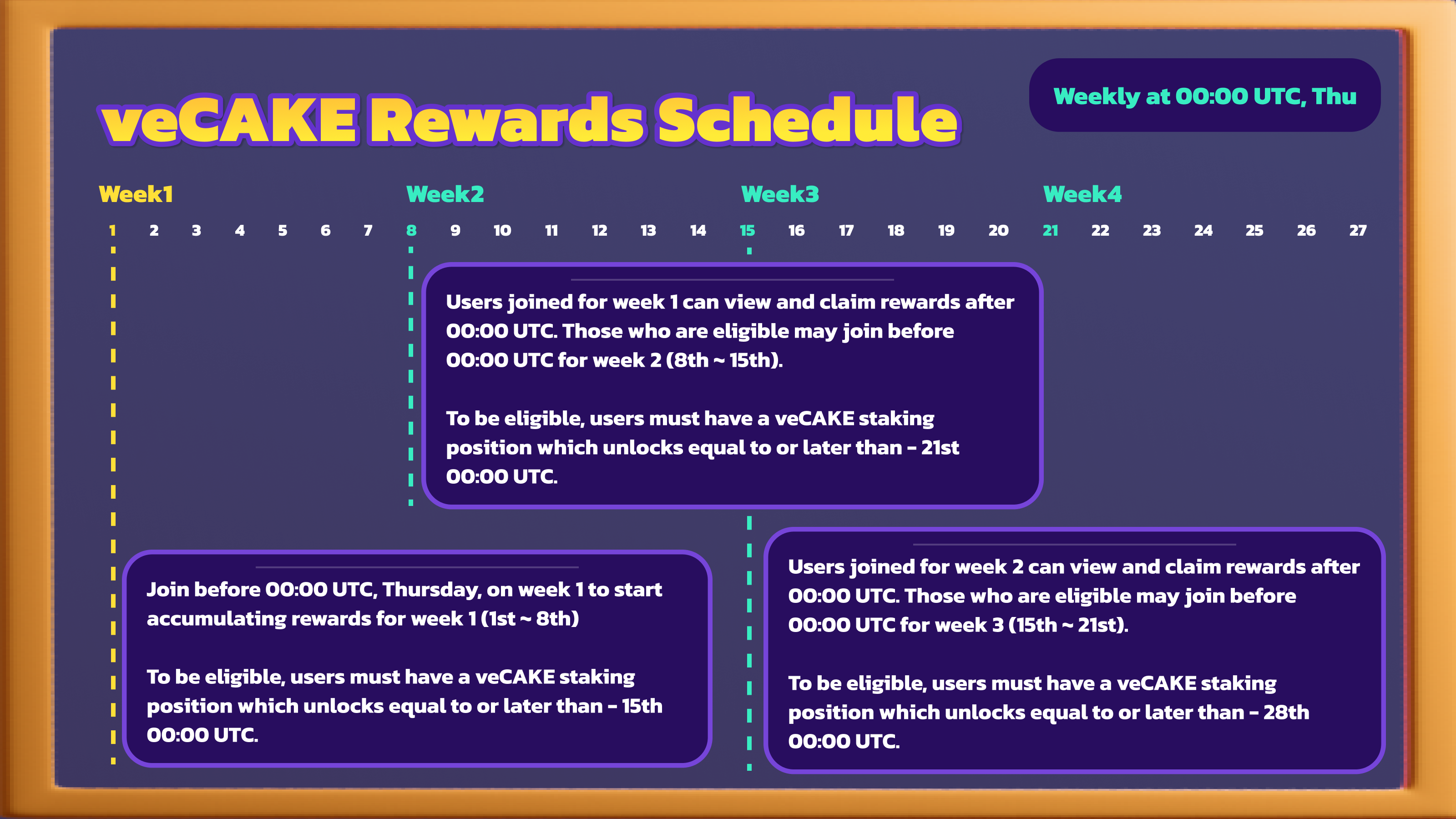
さらに、次の期間の報酬を積み立てるには、ポジションのロック解除日が次の次の週次配布日(毎週木曜日 00:00 UTC)以降である必要があります(**必須条件**)。
例として、第1週の配布に参加する場合:
* 第1週の木曜日 00:00 UTC より前に参加すること
* 第3週の木曜日 00:00 UTC 以降にアンロックされる、アクティブな固定期間 CAKE ステーキングポジションを保有すること
### 2 - 報酬を確認する
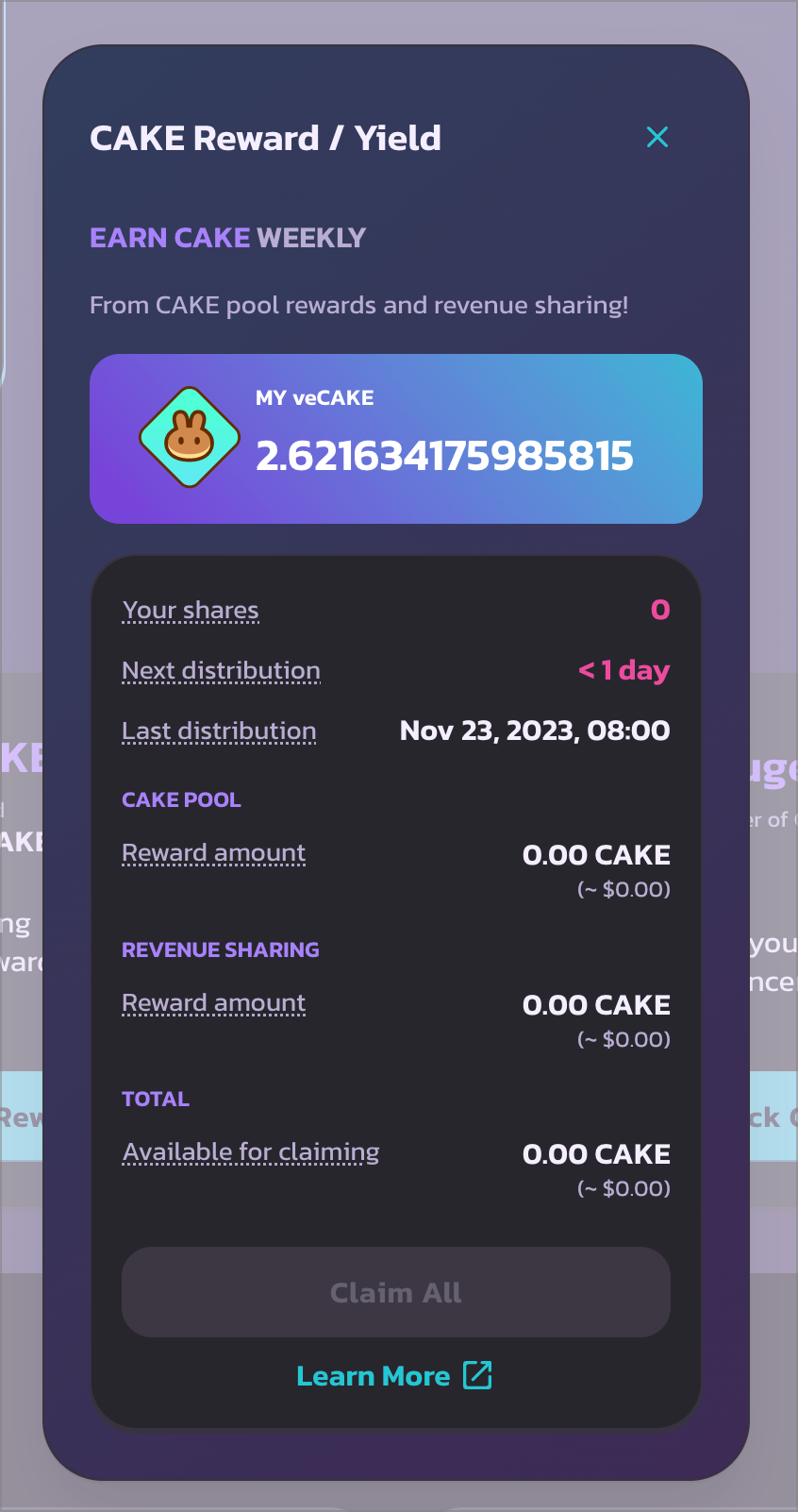
CAKE ステーキングページにアクセスし、下にスクロールして「veCAKE の特典」の下にある「Earn CAKE」セクションを探してください。
上部セクションでは、veCAKE の数量を確認できます。
下部では以下の情報を確認できます。
* **Your shares(あなたのシェア)** - 報酬プール内のシェア数。これは次回配布時点での veCAKE 残高と同じです。veCAKE 残高はロック残存期間に応じて継続的に減少することにご注意ください。
* **Next distribution(次回配布)** - 次回配布までの時間
* **Last distribution(前回配布)** - 前回の収益配布時刻とシェア数の更新時刻
* **Available for claiming(クレーム可能額)** - クレーム可能な CAKE の数量
{% hint style="info" %}
シェアは週次配布のタイミングでのみ更新されます。そのため、ステーキングポジションを更新した直後はシェアが0と表示される場合があります。次回配布後に再度ご確認ください。
{% endhint %}
### 3 - 報酬をクレームする
ロックを開始した後、または veCAKE にポジションを移行した後、次回の週次配布時にシェアが更新されます。プール全体に対するシェアの割合に基づいて、報酬の積み立てが始まります。
1週間のカレンダー期間が経過し、プールが次の週次配布(木曜日)を迎えると、特典パネルに戻って「Claim All」ボタンをクリックすることで、前の期間の報酬をクレームできます。
### 4 - 参加資格を維持してシェアを増やす
週次配布のたびに、シェアは以下に基づいて再調整されます。
* veCAKE 残高
* 次回配布時点(木曜日 00:00 UTC) \*(veCAKE はロック残存期間に応じて徐々に減少することに注意)
例:ユーザーが `50` CAKE をロックしており、現在のロック残存期間が `4.2` 週の場合、次回配布時のシェアは `50 * (4 / 209) ~= 0.95` veCAKE/シェアとなります。
より多くのシェアを得るには、CAKE を追加でロックするか、ロック期間を更新して残存ロック時間を延ばしてください。
また、残存ロック期間は週単位で切り捨てられるため、シェアを受け続けるには、ステーキングポジションが次の次の配布日以降にアンロックされるようにする必要があります。
例として、第1週の配布に参加する場合:
* 第1週の木曜日 00:00 UTC より前に参加すること
* 第3週の木曜日 00:00 UTC 以降にアンロックされる、アクティブな固定期間 CAKE ステーキングポジションを保有すること
---
# Agent Instructions
This documentation is published with GitBook. GitBook is the documentation platform designed so that both humans and AI agents can read, navigate, and reason over technical content effectively. Learn more at gitbook.com.
## Querying This Documentation
If you need additional information that is not directly available in this page, you can query the documentation by asking a question.
Perform an HTTP GET request on the following URL with the `ask` and `goal` query parameters:
```
GET https://docs.pancakeswap.finance/japanese/pancakeswapheyoukoso/vecake-sunset/archive-vecake/earn-cake-weekly.md?ask=&goal=
```
`ask` is the immediate question: it should be specific, self-contained, and written in natural language.
`goal` is what the user is ultimately trying to achieve, the reason they need the answer. Sharing it helps GitBook give you a better, more relevant answer. A goal is most helpful when it describes the outcome the user wants rather than restating the question. For example, with `ask=how do I create an API token`, a goal like `automate deployments from our CI pipeline` lets GitBook tailor the answer to that use case.
The response will contain a direct answer to the question and relevant excerpts and sources from the documentation.
Use this mechanism when the answer is not explicitly present in the current page, you need clarification or additional context, or you want to retrieve related documentation sections.