> For the complete documentation index, see [llms.txt](https://docs.pancakeswap.finance/llms.txt). Markdown versions of documentation pages are available by appending `.md` to page URLs; this page is available as [Markdown](https://docs.pancakeswap.finance/japanese/pancakeswapheyoukoso/vecake-sunset/archive-vecake/bridge-your-vecake.md).
# veCAKEをブリッジする
他のチェーンで bCAKE(ファームの収益ブースト)や iCAKE(IFO パブリックセール参加枠)などの veCAKE の特典を享受するには、BNB Chain 上でシンプルなブリッジリクエストを実行して、veCAKE 残高と PancakeProfile を他のチェーンに同期する必要があります。
## ブリッジの方法
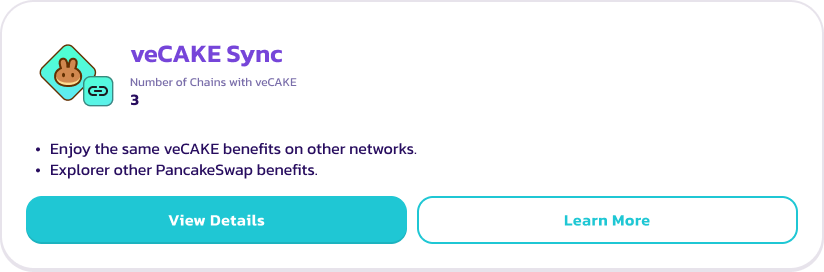
[CAKE Staking](https://pancakeswap.finance/cake-staking) ページにアクセスし、veCAKE 特典の下にある「veCAKE Sync」カードを見つけてください。「View Details」をクリックすると、同期モーダルが開きます。
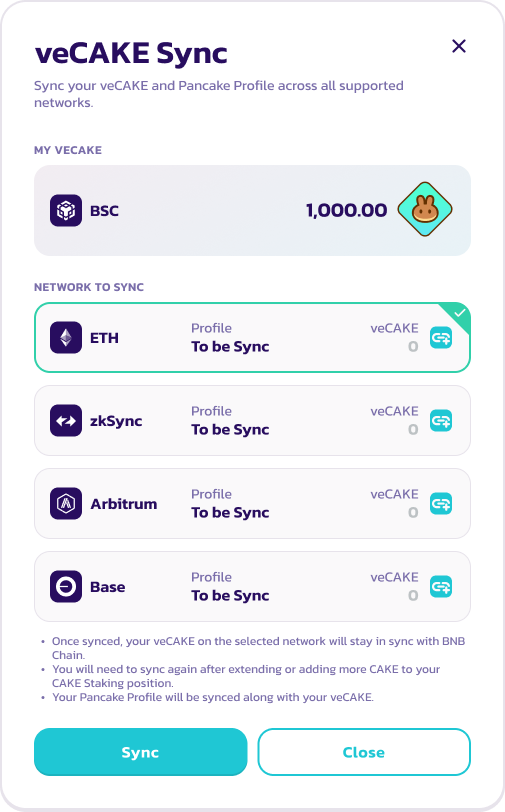
モーダル内では、BNB Chain 上の veCAKE 残高を確認できます。また、veCAKE と Pancake Profile をブリッジできる送信先チェーンの一覧と、各チェーンでの veCAKE および Pancake Profile のステータスを確認できます。
同期するには、チェーンを選択して「Sync」をクリックし、ウォレットのポップアップで確認してください。
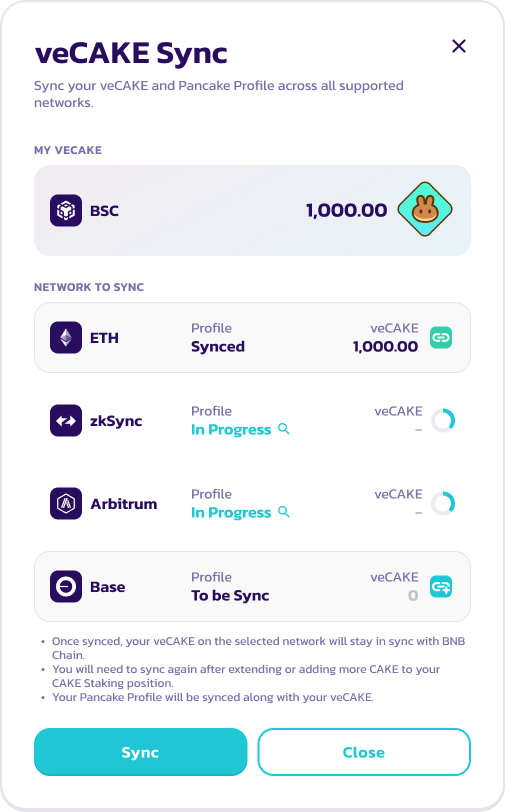
ブリッジの完了には最大20分かかる場合があります。同期モーダルでブリッジの進捗を確認できます。
注意事項:
* 一度にブリッジできるチェーンは1つのみです。複数のチェーンに veCAKE を同期する場合は、上記の手順を繰り返してください。
* ブリッジリクエスト時には、送信先チェーンのガス代として BNB が徴収されます。BNB の金額は送信先チェーンによって異なります。Ethereum メインネットなどのチェーンはガス代が高いため、同期コストが大幅に高くなります。
* 不要なガス消費を避けるため、特典を利用したいチェーンにのみ veCAKE を同期してください。
* CAKE を追加したり veCAKE のステーキングポジションを延長した後は、上記の手順を繰り返して送信先チェーンの veCAKE 残高を更新し、特典を最新の状態に保ってください。
## よくある質問
**Q: veCAKE と Pancake Profile はどのくらいの頻度で同期する必要がありますか?**
A: veCAKE については、CAKE を追加したとき、ロック期間を延長したとき、またはリロックを実行したときにのみ同期が必要です。送信先チェーン上の veCAKE 残高は、BNB Chain の残高と同様に直線的に減少していきます。
Pancake Profile とその NFT については、プライベートセールに参加するために2回の同期が必要です。1回目は IFO が公開されて UI に表示されたとき、2回目は IFO のセールが終了してクレームを有効にするときに行ってください。
**Q: ブリッジにはどのくらいの時間がかかりますか?**
送信先チェーンにより異なりますが、通常はブリッジと完全な同期に約2〜5分かかります。一部の処理が遅いチェーンでは最大30分かかる場合があります。ブリッジリクエストの進捗を追跡するには、同期モーダルで LayerZero エクスプローラーのリンクを確認するか、 にアクセスして BNB Chain のトランザクション ID で検索してください。
**Q: BNB Chain 上のブリッジトランザクションが失敗するのはなぜですか?**
A:
* 送信先チェーンのガス見積もりが古い可能性があります。ページを更新して再試行してください。
* また、送信先チェーンで必要なガス代を支払うために、ウォレットに十分な BNB があることをご確認ください。
**Q: veCAKE または Pancake Profile がブリッジされないのはなぜですか?**
A:
* ロック残存期間が1日未満の veCAKE ポジションはブリッジされません。まずロックを延長してから同期を再試行してください。
* 同期の完了には最大30分かかる場合があります。 にアクセスし、BNB Chain のトランザクション ID で検索して、ブリッジのステータスが「Delivered」になっているか確認してください。
* ブリッジのステータスが「Failed」または「Blocked」の場合は、パブリックチャンネルから大使のいずれかにお問い合わせください。
---
# Agent Instructions
This documentation is published with GitBook. GitBook is the documentation platform designed so that both humans and AI agents can read, navigate, and reason over technical content effectively. Learn more at gitbook.com.
## Querying This Documentation
If you need additional information that is not directly available in this page, you can query the documentation dynamically by asking a question.
Perform an HTTP GET request on the current page URL with the `ask` query parameter, and the optional `goal` query parameter:
```
GET https://docs.pancakeswap.finance/japanese/pancakeswapheyoukoso/vecake-sunset/archive-vecake/bridge-your-vecake.md?ask=&goal=
```
`ask` is the immediate question: it should be specific, self-contained, and written in natural language.
`goal` is optional and describes the broader end goal you are ultimately trying to accomplish on behalf of the user. GitBook uses it to tailor the answer towards what is most useful for that goal.
The response will contain a direct answer to the question and relevant excerpts and sources from the documentation.
Use this mechanism when the answer is not explicitly present in the current page, you need clarification or additional context, or you want to retrieve related documentation sections.