> For the complete documentation index, see [llms.txt](https://docs.pancakeswap.finance/llms.txt). Markdown versions of documentation pages are available by appending `.md` to page URLs; this page is available as [Markdown](https://docs.pancakeswap.finance/japanese/gu/pancakeswap-pools/zap/zap-v2.md).
# Zap (V2)
 ### Zapとは?
Zapはシンプルな流動性提供を可能にします。手動でスワップやトークンのバランス調整を行うことなく、1つのトークンとシングルクリックで流動性を追加できます。
* 1つのトークンのみで流動性を追加:トレーディングペアの1つのトークンのみを使用して流動性を追加できます。Zapは提供した1つのトークンを使用して自動的にスワップを実行し、流動性を追加する前にトレーディングペアを50/50の比率に自動的にバランスします。
* 不均衡なトークン数量でのトレーディングペアへの流動性追加:トレーディングペアに提供するトークンの数量がデフォルトのプール比率(50:50)に完全に一致していなくても、流動性を追加できます。例えば30:70。Zapは流動性を追加する前にトークンを50/50に自動的にリバランスします。
* 流動性を削除して受け取りたいトークンを選択:流動性を削除する際、Zapを使えばトレーディングペアの1つのトークンのみを受け取ることができます。Zapはトークンを返す前に自動的にスワップを実行します。
### Zapを有効にする
デフォルトでは、すべてのユーザーに対してZap機能がオンになっています。流動性の追加または削除時に新しいZap UIが表示されない場合は、設定パネルで有効にしてください。歯車アイコンをクリックすると設定パネルを開けます。

{% hint style="warning" %}
注意:現在、Zap機能はベータ版です。手数料のあるトークンなど、一部のトークンはサポートされていません。流動性の追加または削除中に問題が発生した場合は、設定パネルで無効にしてください。
{% endhint %}
### Zap In(流動性の追加)
[流動性ページ](https://pancakeswap.finance/liquidity)にアクセスし、「Add Liquidity」を選択します。
流動性を提供したいトレーディングペアを2つの入力トークンを選択して選びます。詳細は[流動性ガイド](https://docs.pancakeswap.finance/products/pancakeswap-exchange/liquidity-guide)をご確認ください。

「Add Liquidity」ボタンをクリックして続行します。
流動性を追加しようとしているトレーディングペアのトークンがウォレットに残高があれば、そのトークンのチェックボックスは自動的にチェックされます。両方のトークンの残高がウォレットにある場合、両方のチェックボックスがチェックされます。

### 1つのトークンを使用したZap
トレーディングペアの1つのトークンのみを使用して流動性を追加できます。使用したいトークンの1つのチェックボックスだけをチェックします。Zapはチェックしたトークンの半分を自動的にトレーディングペアの別のトークンにスワップしてから流動性を追加します。どのトークンが変換されるかを示す警告メッセージが表示されます。

{% hint style="info" %}
価格インパクトが高すぎる場合、Zapはスリッページによって保護します。「Reduce TOKEN」をクリックして推奨上限まで削減してください。
{% endhint %}

### 不均衡な数量の2つのトークンを使用したZap
両方のトークンがチェックされているが、入力トークンの数量が50/50の比率に一致しない場合、Zapのバランス調整が適用されます。「一部のトークンAがトークンBに変換されます」というメッセージが表示されます。

{% hint style="info" %}
流動性を追加する前にZapがトークン数量をバランスしないようにする場合は、「Don't Convert」をクリックします。この場合、Zapはスワップとリバランスを試みる代わりに、50/50の比率に合わせるよう入力トークンの数量を調整します。
{% endhint %}
### Zapを続行する
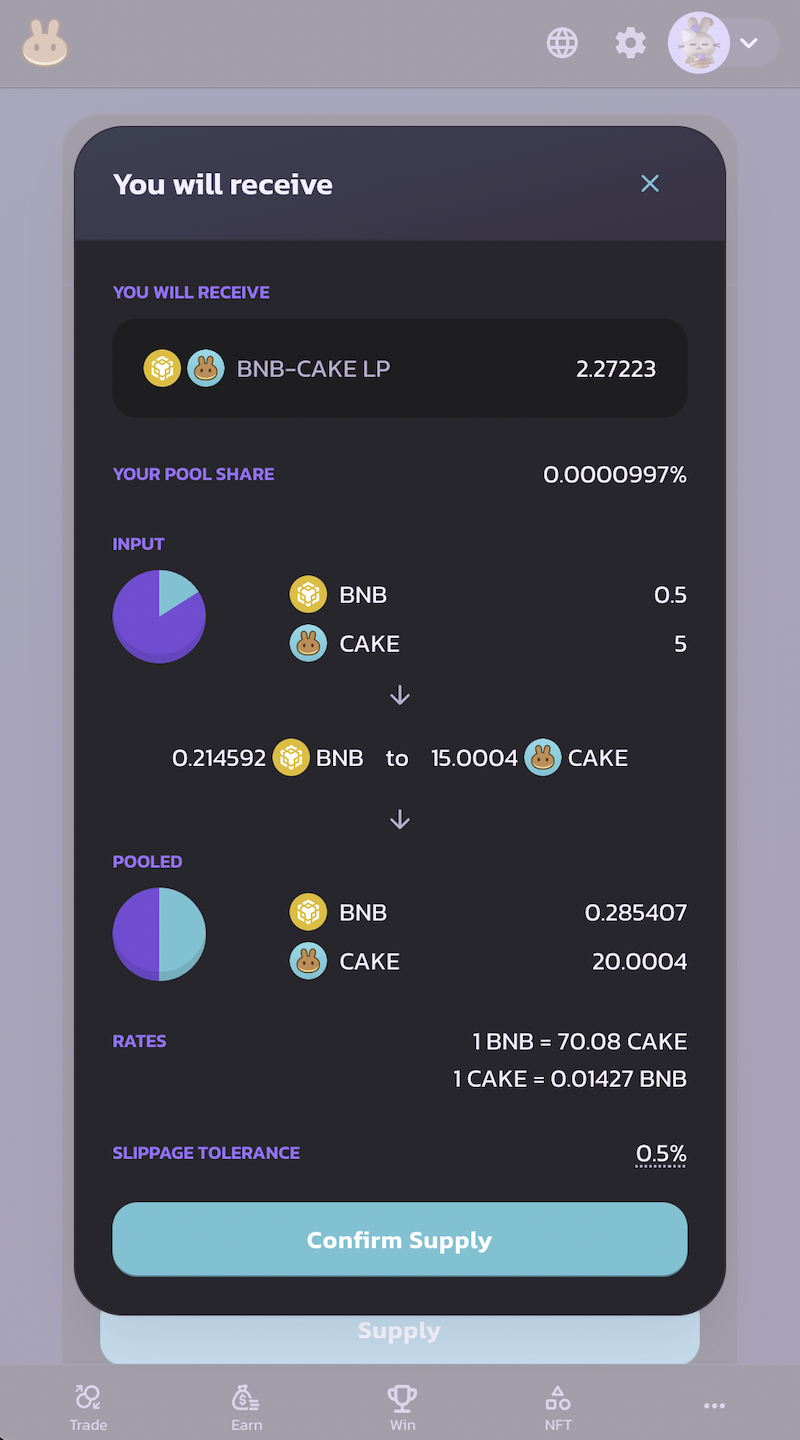
「Supply」をクリックすると、Zapの詳細が表示され、確認を待ちます。
以下が表示されます:
1. 受け取るLPトークンの数量。
2. 入力トークンとコミットするトークン数量。
3. 50/50の比率に合わせるための入力トークンの取引方法。
4. 使用しているスリッページ許容範囲。

### Zap Out(流動性の削除)
Zapを使えば、流動性を削除する際にトレーディングペアの1つのトークンのみを受け取ることもできます。
1. [流動性ページ](https://pancakeswap.finance/swap#/pool)にアクセスします。
2. 「Your Liquidity」の下にある流動性を削除したいペアをクリックします。
3. 「Remove」をクリックします。新しいポップアップが表示されます。
「You Will Receive」セクションで、受け取りたくないトークンのチェックを外します。Zapは流動性を削除する際に、チェックしたトークンにリターンの100%を自動的にスワップ・変換します。

---
# Agent Instructions
This documentation is published with GitBook. GitBook is the documentation platform designed so that both humans and AI agents can read, navigate, and reason over technical content effectively. Learn more at gitbook.com.
## Querying This Documentation
If you need additional information that is not directly available in this page, you can query the documentation dynamically by asking a question.
Perform an HTTP GET request on the current page URL with the `ask` query parameter, and the optional `goal` query parameter:
```
GET https://docs.pancakeswap.finance/japanese/gu/pancakeswap-pools/zap/zap-v2.md?ask=&goal=
```
`ask` is the immediate question: it should be specific, self-contained, and written in natural language.
`goal` is optional and describes the broader end goal you are ultimately trying to accomplish on behalf of the user. GitBook uses it to tailor the answer towards what is most useful for that goal.
The response will contain a direct answer to the question and relevant excerpts and sources from the documentation.
Use this mechanism when the answer is not explicitly present in the current page, you need clarification or additional context, or you want to retrieve related documentation sections.
### Zapとは?
Zapはシンプルな流動性提供を可能にします。手動でスワップやトークンのバランス調整を行うことなく、1つのトークンとシングルクリックで流動性を追加できます。
* 1つのトークンのみで流動性を追加:トレーディングペアの1つのトークンのみを使用して流動性を追加できます。Zapは提供した1つのトークンを使用して自動的にスワップを実行し、流動性を追加する前にトレーディングペアを50/50の比率に自動的にバランスします。
* 不均衡なトークン数量でのトレーディングペアへの流動性追加:トレーディングペアに提供するトークンの数量がデフォルトのプール比率(50:50)に完全に一致していなくても、流動性を追加できます。例えば30:70。Zapは流動性を追加する前にトークンを50/50に自動的にリバランスします。
* 流動性を削除して受け取りたいトークンを選択:流動性を削除する際、Zapを使えばトレーディングペアの1つのトークンのみを受け取ることができます。Zapはトークンを返す前に自動的にスワップを実行します。
### Zapを有効にする
デフォルトでは、すべてのユーザーに対してZap機能がオンになっています。流動性の追加または削除時に新しいZap UIが表示されない場合は、設定パネルで有効にしてください。歯車アイコンをクリックすると設定パネルを開けます。

{% hint style="warning" %}
注意:現在、Zap機能はベータ版です。手数料のあるトークンなど、一部のトークンはサポートされていません。流動性の追加または削除中に問題が発生した場合は、設定パネルで無効にしてください。
{% endhint %}
### Zap In(流動性の追加)
[流動性ページ](https://pancakeswap.finance/liquidity)にアクセスし、「Add Liquidity」を選択します。
流動性を提供したいトレーディングペアを2つの入力トークンを選択して選びます。詳細は[流動性ガイド](https://docs.pancakeswap.finance/products/pancakeswap-exchange/liquidity-guide)をご確認ください。

「Add Liquidity」ボタンをクリックして続行します。
流動性を追加しようとしているトレーディングペアのトークンがウォレットに残高があれば、そのトークンのチェックボックスは自動的にチェックされます。両方のトークンの残高がウォレットにある場合、両方のチェックボックスがチェックされます。

### 1つのトークンを使用したZap
トレーディングペアの1つのトークンのみを使用して流動性を追加できます。使用したいトークンの1つのチェックボックスだけをチェックします。Zapはチェックしたトークンの半分を自動的にトレーディングペアの別のトークンにスワップしてから流動性を追加します。どのトークンが変換されるかを示す警告メッセージが表示されます。

{% hint style="info" %}
価格インパクトが高すぎる場合、Zapはスリッページによって保護します。「Reduce TOKEN」をクリックして推奨上限まで削減してください。
{% endhint %}

### 不均衡な数量の2つのトークンを使用したZap
両方のトークンがチェックされているが、入力トークンの数量が50/50の比率に一致しない場合、Zapのバランス調整が適用されます。「一部のトークンAがトークンBに変換されます」というメッセージが表示されます。

{% hint style="info" %}
流動性を追加する前にZapがトークン数量をバランスしないようにする場合は、「Don't Convert」をクリックします。この場合、Zapはスワップとリバランスを試みる代わりに、50/50の比率に合わせるよう入力トークンの数量を調整します。
{% endhint %}
### Zapを続行する
「Supply」をクリックすると、Zapの詳細が表示され、確認を待ちます。
以下が表示されます:
1. 受け取るLPトークンの数量。
2. 入力トークンとコミットするトークン数量。
3. 50/50の比率に合わせるための入力トークンの取引方法。
4. 使用しているスリッページ許容範囲。

### Zap Out(流動性の削除)
Zapを使えば、流動性を削除する際にトレーディングペアの1つのトークンのみを受け取ることもできます。
1. [流動性ページ](https://pancakeswap.finance/swap#/pool)にアクセスします。
2. 「Your Liquidity」の下にある流動性を削除したいペアをクリックします。
3. 「Remove」をクリックします。新しいポップアップが表示されます。
「You Will Receive」セクションで、受け取りたくないトークンのチェックを外します。Zapは流動性を削除する際に、チェックしたトークンにリターンの100%を自動的にスワップ・変換します。

---
# Agent Instructions
This documentation is published with GitBook. GitBook is the documentation platform designed so that both humans and AI agents can read, navigate, and reason over technical content effectively. Learn more at gitbook.com.
## Querying This Documentation
If you need additional information that is not directly available in this page, you can query the documentation dynamically by asking a question.
Perform an HTTP GET request on the current page URL with the `ask` query parameter, and the optional `goal` query parameter:
```
GET https://docs.pancakeswap.finance/japanese/gu/pancakeswap-pools/zap/zap-v2.md?ask=&goal=
```
`ask` is the immediate question: it should be specific, self-contained, and written in natural language.
`goal` is optional and describes the broader end goal you are ultimately trying to accomplish on behalf of the user. GitBook uses it to tailor the answer towards what is most useful for that goal.
The response will contain a direct answer to the question and relevant excerpts and sources from the documentation.
Use this mechanism when the answer is not explicitly present in the current page, you need clarification or additional context, or you want to retrieve related documentation sections.