> For the complete documentation index, see [llms.txt](https://docs.pancakeswap.finance/llms.txt). Markdown versions of documentation pages are available by appending `.md` to page URLs; this page is available as [Markdown](https://docs.pancakeswap.finance/italian/protocollo/voting/voting-guide.md).
# Come Votare

Partecipare al voto di governance è facile ed è assolutamente **GRATUITO**. Non devi nemmeno pagare le commissioni gas! Scopri come votare, segui la prossima proposta ed esprimi il tuo voto.
### Come votare
#### Vai alla proposta di voto
Ogni volta che pubblichiamo una nuova proposta, alleghiamo sempre il link alla pagina di voto. Assicurati di seguire i [nostri canali social](/italian/benvenuto-su-pancakeswap/contact-us/social-accounts.md) per notizie e aggiornamenti.
In alternativa, puoi visitare il [portale di voto nativo di PancakeSwap](https://voting.pancakeswap.finance/?_gl=1*pc8o0h*_ga*MTUzNDEzNDQxMy4xNjAwNzkzNDM4*_ga_334KNG3DMQ*MTYwNDMwMTk4Ni42MC4xLjE2MDQzMDM3MDIuMA..#/)[ ](https://pancakeswap.finance/voting)per sfogliare le proposte in un elenco. Se non vedi la proposta, potrebbe trovarsi nella scheda "soon".
#### Leggi e scegli l'opzione per cui votare

Nella pagina della proposta troverai:
* Il contenuto della proposta
* Le opzioni di voto
* I dettagli della proposta come il blocco snapshot e la finestra di voto
* L'ultimo risultato del voto
* L'elenco dei voti
Leggi attentamente la proposta e clicca sull'opzione per cui vuoi votare.

#### Conferma ed esprimi il tuo voto

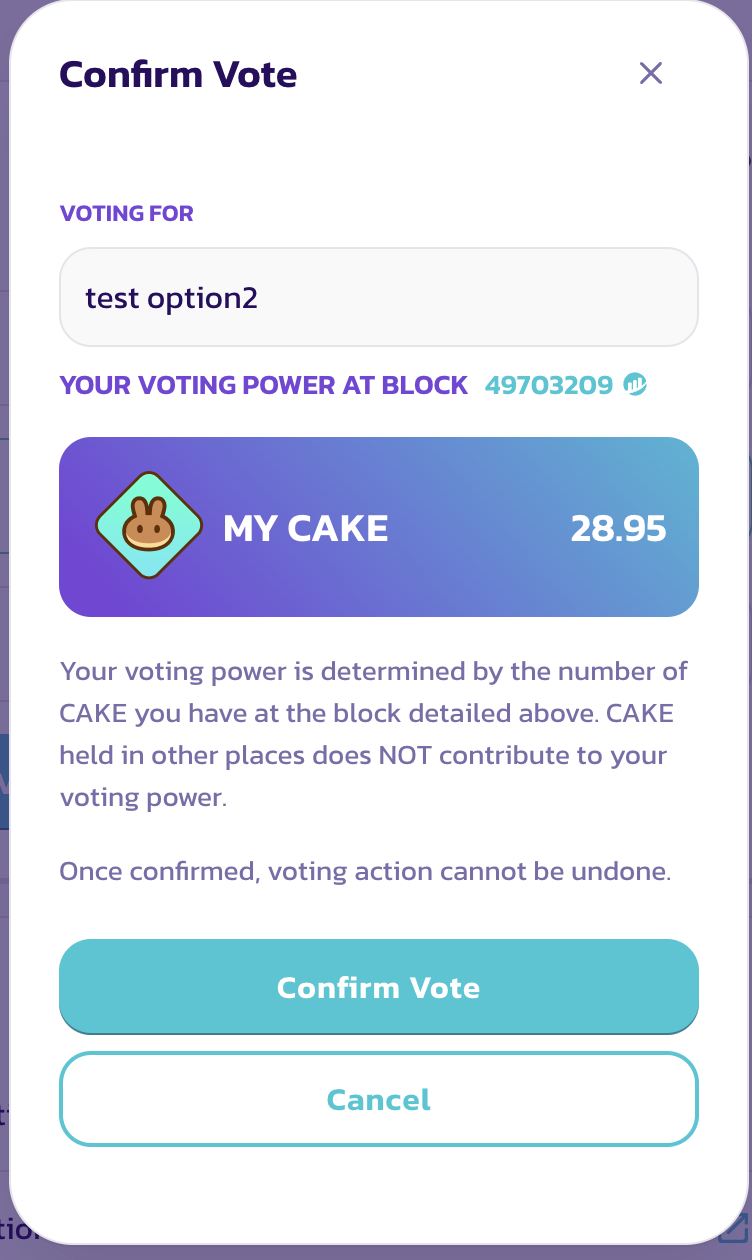
Conferma tutti i dettagli e clicca "Confirm Vote", poi conferma nel tuo portafoglio per firmare il messaggio.
Fatto, hai espresso il tuo voto con successo.
### Come controllare i dettagli
{% tabs %}
{% tab title="Controlla il potere di voto" %}
Prima di esprimere il tuo voto, vedrai una finestra "Confirm Vote".
In questa finestra potrai vedere i seguenti elementi:
* L'opzione scelta
* Il tuo potere di voto
Il tuo potere di voto è uguale al tuo saldo CAKE al blocco snapshot.
{% endtab %}
{% tab title="Controlla il blocco snapshot" %}
**Controlla il blocco snapshot**

Il potere di voto è calcolato in base a uno snapshot effettuato al blocco snapshot. Pertanto, acquistare o depositare più CAKE dopo la pubblicazione della proposta non aumenterà il potere di voto per quella proposta specifica.
Se vuoi conoscere l'ora esatta del blocco snapshot, clicca semplicemente sul numero del blocco e cerca il timestamp nella pagina BscScan.

{% endtab %}
{% endtabs %}
---
# Agent Instructions
This documentation is published with GitBook. GitBook is the documentation platform designed so that both humans and AI agents can read, navigate, and reason over technical content effectively. Learn more at gitbook.com.
## Querying This Documentation
If you need additional information that is not directly available in this page, you can query the documentation dynamically by asking a question.
Perform an HTTP GET request on the current page URL with the `ask` query parameter, and the optional `goal` query parameter:
```
GET https://docs.pancakeswap.finance/italian/protocollo/voting/voting-guide.md?ask=&goal=
```
`ask` is the immediate question: it should be specific, self-contained, and written in natural language.
`goal` is optional and describes the broader end goal you are ultimately trying to accomplish on behalf of the user. GitBook uses it to tailor the answer towards what is most useful for that goal.
The response will contain a direct answer to the question and relevant excerpts and sources from the documentation.
Use this mechanism when the answer is not explicitly present in the current page, you need clarification or additional context, or you want to retrieve related documentation sections.