> For the complete documentation index, see [llms.txt](https://docs.pancakeswap.finance/llms.txt). Markdown versions of documentation pages are available by appending `.md` to page URLs; this page is available as [Markdown](https://docs.pancakeswap.finance/italian/benvenuto-su-pancakeswap/vecake-sunset/bcake/how-to-use-the-new-bcake.md).
# Come usare il nuovo bCAKE
Staking veCAKE e boost del farming
Come iCAKE e vCAKE, bCAKE è un vantaggio dello Staking veCAKE pensato per i nostri fedeli detentori di CAKE. Bloccando CAKE, ottieni veCAKE, che ti fornisce automaticamente bCAKE. Puoi potenziare i guadagni dalle Farm selezionate fino a 2,5x.
Il moltiplicatore di boost viene calcolato in base al tuo saldo di veCAKE e alla quantità di Liquidità nella Farm che stai cercando di potenziare.
## Preparazione
#### **Avvia una posizione di Staking veCAKE a termine fisso**

Se non hai ancora bloccato CAKE nel pool veCAKE, clicca su "Go to Pool" e segui le istruzioni per avviare una posizione di Staking a termine fisso.
Per saperne di più su come avviare una posizione di Staking veCAKE, leggi [qui](https://docs.pancakeswap.finance/products/syrup-pool/new-cake-pool#fixed-term-staking).
#### Individua la Farm e la posizione che vuoi potenziare
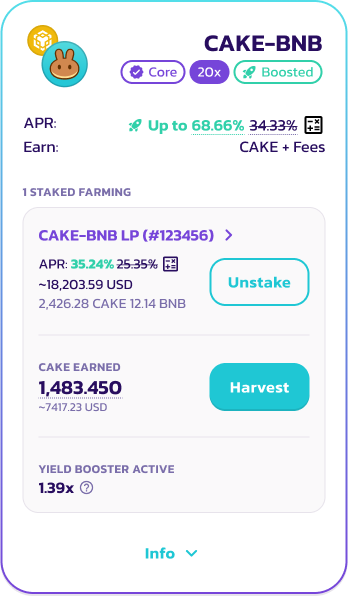
Puoi potenziare i tuoi guadagni solo dalle Farm con bCAKE abilitato. Per trovare queste Farm, controlla la sezione APR e cerca una cifra APR verde con un'icona a razzo verde.

In alternativa, usa il filtro "Booster Available" all'interno del selettore "Farm Types" per filtrare rapidamente tutte le Farm abilitate a bCAKE.

#### Metti in Staking la tua posizione
Per attivare bCAKE, la tua posizione deve essere in Staking nella Farm.
* Per V3: metti in Staking la tua posizione LP cliccando su "Stake".
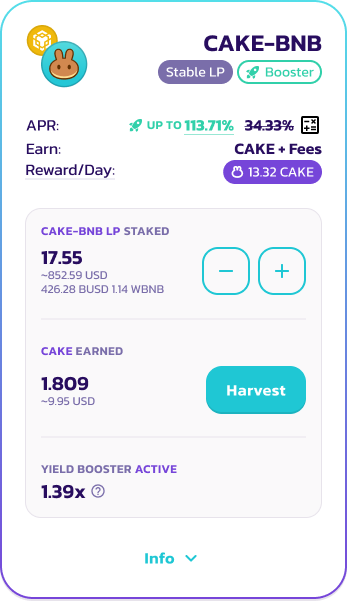
* Per V2 e StableSwap: metti in Staking il tuo token LP cliccando su "Add LP".
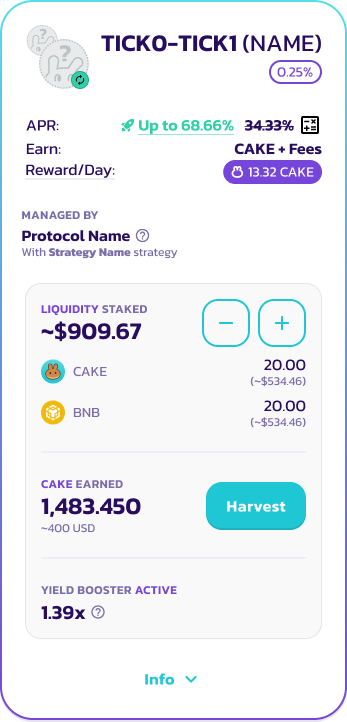
* Per i Position Manager: aggiungi Liquidità cliccando su "Add Liquidity".
Per saperne di più sul Yield Farming, consulta [questo](https://docs.pancakeswap.finance/products/yield-farming/how-to-use-farms) tutorial.
#### Attiva bCAKE
L'attivazione di bCAKE è ora completamente automatica.
V3 Farm
V2, StableSwap
Position Manager
Una volta in Staking, dovresti vedere il moltiplicatore di boost applicato per la Farm in cui stai attualmente facendo Staking. Per saperne di più su come viene calcolato il moltiplicatore bCAKE, leggi [qui](https://docs.pancakeswap.finance/products/yield-farming/bcake/faq#why-do-my-multipliers-change-even-after-activation).
{% hint style="info" %}
Tieni presente che qualsiasi azione dell'utente sulla posizione di farming o sullo Staking veCAKE aggiornerà automaticamente il tuo moltiplicatore di boost in base agli ultimi dati e statistiche delle Farm e del pool di Staking CAKE.
Scopri di più [qui](https://docs.pancakeswap.finance/products/yield-farming/bcake/faq#why-do-my-multipliers-change-even-after-activation).
{% endhint %}
Non c'è più un limite al numero di posizioni di farming che possono essere potenziate simultaneamente. Finché la posizione di Staking veCAKE è attiva, puoi potenziare un numero illimitato di Farm e posizioni in Position Manager.
#### Disattiva bCAKE
Anche la disattivazione di bCAKE è ora completamente automatica.
Per disattivare il boost bCAKE, rimuovi semplicemente la tua Liquidità.
* Per V3: rimuovi lo Staking dalla tua posizione LP cliccando su "Unstake".
* Per V2 e StableSwap: rimuovi lo Staking del tuo token LP cliccando sul pulsante "-" meno.
* Per i Position Manager: rimuovi la Liquidità cliccando sul pulsante "-" meno.
---
# Agent Instructions
This documentation is published with GitBook. GitBook is the documentation platform designed so that both humans and AI agents can read, navigate, and reason over technical content effectively. Learn more at gitbook.com.
## Querying This Documentation
If you need additional information that is not directly available in this page, you can query the documentation by asking a question.
Perform an HTTP GET request on the following URL with the `ask` and `goal` query parameters:
```
GET https://docs.pancakeswap.finance/italian/benvenuto-su-pancakeswap/vecake-sunset/bcake/how-to-use-the-new-bcake.md?ask=&goal=
```
`ask` is the immediate question: it should be specific, self-contained, and written in natural language.
`goal` is what the user is ultimately trying to achieve, the reason they need the answer. Sharing it helps GitBook give you a better, more relevant answer. A goal is most helpful when it describes the outcome the user wants rather than restating the question. For example, with `ask=how do I create an API token`, a goal like `automate deployments from our CI pipeline` lets GitBook tailor the answer to that use case.
The response will contain a direct answer to the question and relevant excerpts and sources from the documentation.
Use this mechanism when the answer is not explicitly present in the current page, you need clarification or additional context, or you want to retrieve related documentation sections.