> For the complete documentation index, see [llms.txt](https://docs.pancakeswap.finance/llms.txt). Markdown versions of documentation pages are available by appending `.md` to page URLs; this page is available as [Markdown](https://docs.pancakeswap.finance/espanol/herramientas-de-trading/notifications.md).
# Notificaciones
¡Recibe todas tus actualizaciones de DeFi en un solo lugar!
### ¿Qué son las Notificaciones Web3?
Las Notificaciones Web3 representan un gran avance en la interacción con plataformas para conocer las últimas noticias y actualizaciones. Integradas perfectamente en PancakeSwap, estas notificaciones aportan una serie de beneficios. En colaboración con WalletConnect, hemos lanzado las Notificaciones (BETA) para que nuestros usuarios accedan a sus noticias de DeFi, actualizaciones y acciones importantes en una sola ventana. Ten en cuenta que las Notificaciones Web3 aún están en BETA y seguirán cambiando y desarrollándose en los próximos meses.
**Beneficios de las Notificaciones Web3:**
* Mantente al día con alertas en tiempo real: nunca te pierdas eventos clave de PancakeSwap, tendencias del mercado, actualizaciones de productos o noticias de la comunidad.
* Prioriza lo que más te importa: selecciona temas, productos y categorías según su relevancia para ti. Personaliza tus notificaciones con una variedad de filtros.
* Enlaces directos y accionables: responde rápidamente a las actualizaciones cruciales directamente desde tus notificaciones, ya que cada notificación incluye un enlace directo.
### Cómo configurar las Notificaciones:
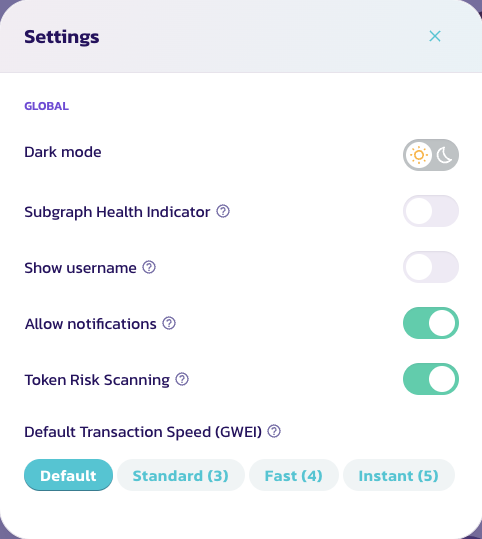
1. Actívalas fácilmente: visita nuestra [página de inicio](https://pancakeswap.finance/). Haz clic en el icono de configuración en la parte superior izquierda del menú de PancakeSwap y selecciona "Permitir notificaciones".
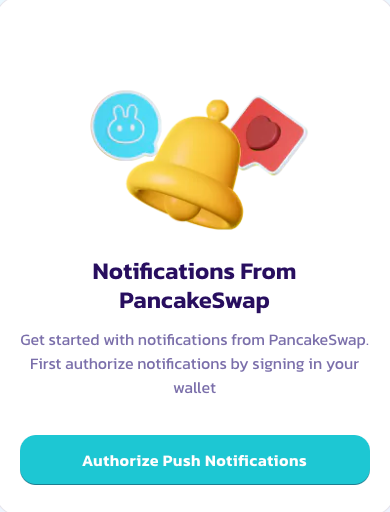
2. Conecta tu billetera: haz clic en el icono de campana en la parte superior derecha y firma un mensaje en tu billetera para autorizar las notificaciones.
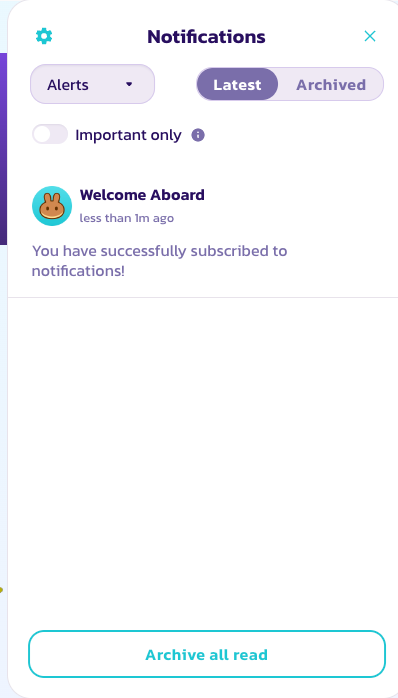
3. Personaliza tu feed: ajusta la configuración de tus notificaciones seleccionando el menú desplegable de la izquierda para que coincida con tus intereses y necesidades.
4. Mantente informado: accede a todas tus notificaciones cómodamente desde el menú desplegable haciendo clic en el icono de campana.
### Funciones de Notificaciones
La lista actual de notificaciones es compatible con todas las cadenas EVM e incluye:
| Notificación | Función |
| -------------------- | ------------------------------------------------------------------------------ |
| Posición de Liquidez | Avisa a los usuarios para mover su posición de liquidez si está fuera de rango |
| Farm | Avisa a los usuarios sobre los APR de los farms o si hay un nuevo farm |
| Saldo de Billetera | Avisa a los usuarios si tienen poco saldo para gas |
| Lotería | Avisa a los usuarios sobre el sorteo de la Lotería |
| Predicción | Avisa a los usuarios para reclamar su recompensa de Predicción |
| Alertas de precio | Avisa a los usuarios sobre cambios de precio significativos |
### ¿Qué sigue?
* Filtrado mejorado: afinar las notificaciones para que los usuarios reciban la información correcta a tiempo
* Multiplataforma: soporte en móvil y otras plataformas, potencial funcionalidad entre protocolos, haciendo de PancakeSwap el centro de tus actividades DeFi
* Más notificaciones: notificaciones para nuestros otros productos e información relacionada con la gobernanza, como nuevas propuestas.
---
# Agent Instructions
This documentation is published with GitBook. GitBook is the documentation platform designed so that both humans and AI agents can read, navigate, and reason over technical content effectively. Learn more at gitbook.com.
## Querying This Documentation
If you need additional information that is not directly available in this page, you can query the documentation by asking a question.
Perform an HTTP GET request on the following URL with the `ask` and `goal` query parameters:
```
GET https://docs.pancakeswap.finance/espanol/herramientas-de-trading/notifications.md?ask=&goal=
```
`ask` is the immediate question: it should be specific, self-contained, and written in natural language.
`goal` is what the user is ultimately trying to achieve, the reason they need the answer. Sharing it helps GitBook give you a better, more relevant answer. A goal is most helpful when it describes the outcome the user wants rather than restating the question. For example, with `ask=how do I create an API token`, a goal like `automate deployments from our CI pipeline` lets GitBook tailor the answer to that use case.
The response will contain a direct answer to the question and relevant excerpts and sources from the documentation.
Use this mechanism when the answer is not explicitly present in the current page, you need clarification or additional context, or you want to retrieve related documentation sections.