> For the complete documentation index, see [llms.txt](https://docs.pancakeswap.finance/llms.txt). Markdown versions of documentation pages are available by appending `.md` to page URLs; this page is available as [Markdown](https://docs.pancakeswap.finance/espanol/bienvenido-a-pancakeswap/vecake-sunset/bcake/how-to-use-the-new-bcake.md).
# Cómo usar el nuevo bCAKE
Al igual que iCAKE y vCAKE, bCAKE es un beneficio del Staking de veCAKE diseñado para nuestros fieles tenedores de CAKE. Al bloquear CAKE, obtienes veCAKE, lo que automáticamente te da bCAKE. Puedes impulsar las ganancias de farms seleccionadas hasta 2.5x.
El multiplicador de impulso se calcula en función de tu balance de veCAKE y cuánta liquidez en la farm estás tratando de impulsar.
## Preparativos
#### **Inicia una posición de Staking de veCAKE a plazo fijo**

Si no has bloqueado ningún CAKE en el pool de veCAKE, haz clic en "Ir al Pool" y sigue las instrucciones para iniciar una posición de Staking a plazo fijo.
Para aprender más sobre cómo iniciar una posición de Staking de veCAKE, lee [aquí](https://docs.pancakeswap.finance/products/syrup-pool/new-cake-pool#fixed-term-staking).
#### Localiza la farm y la posición que quieres impulsar
Solo puedes impulsar tus ganancias de farms con bCAKE habilitado. Para buscar esas farms, revisa la sección APR y busca una figura APR verde con un ícono de cohete verde.

Alternativamente, usa el filtro "Booster disponible" dentro del selector "Tipos de Farm" para filtrar rápidamente todas las farms habilitadas para bCAKE.

#### Apuesta tu posición
Para activar bCAKE, tu posición debe estar apostada en la farm.
* Para V3: apuesta tu posición LP haciendo clic en "Apostar".
* Para V2 y StableSwap: apuesta tu token LP haciendo clic en "Agregar LP".
* Para Gestores de Posiciones: agrega liquidez haciendo clic en "Agregar Liquidez".
Para aprender más sobre el Yield Farming, consulta [este](https://docs.pancakeswap.finance/products/yield-farming/how-to-use-farms) tutorial.
#### Activa bCAKE
La activación de bCAKE ahora es completamente automática.
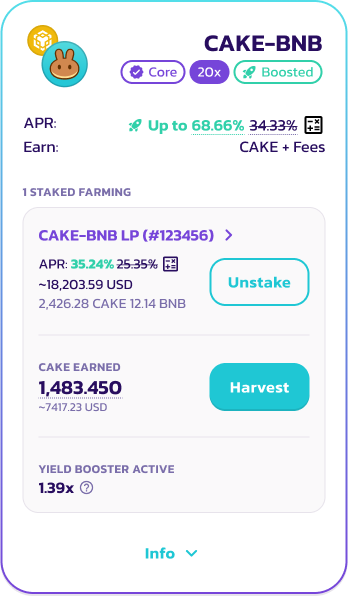
Farm V3
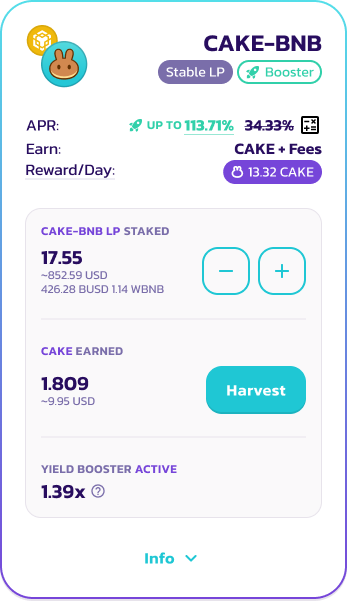
V2, StableSwap
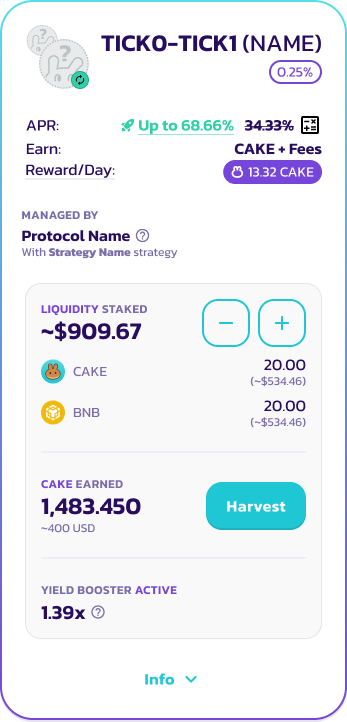
Gestor de Posiciones
Una vez apostado, deberías ver el multiplicador de impulso aplicado para la farm en la que estás apostando actualmente. Para aprender más sobre cómo se calcula el multiplicador de bCAKE, lee [aquí](https://docs.pancakeswap.finance/products/yield-farming/bcake/faq#why-do-my-multipliers-change-even-after-activation).
{% hint style="info" %}
Ten en cuenta que cualquier acción del usuario en la posición de farming o el Staking de veCAKE actualizará automáticamente tu multiplicador de impulso basándose en los últimos datos y estadísticas de las farms y el pool de Staking de CAKE.
Aprende más [aquí](https://docs.pancakeswap.finance/products/yield-farming/bcake/faq#why-do-my-multipliers-change-even-after-activation).
{% endhint %}
Ya no hay un límite en el número de posiciones de farming que pueden impulsarse simultáneamente. Mientras la posición de Staking de veCAKE esté activa, puedes impulsar un número ilimitado de farms y posiciones de gestores de posiciones.
#### Desactivar bCAKE
La desactivación de bCAKE también es ahora completamente automática.
Para desactivar el impulso de bCAKE, simplemente retira tu liquidez.
* Para V3: retira tu posición LP haciendo clic en "Retirar apuesta".
* Para V2 y StableSwap: retira tu token LP haciendo clic en el botón "-" menos.
* Para Gestores de Posiciones: retira la liquidez haciendo clic en el botón "-" menos.
---
# Agent Instructions
This documentation is published with GitBook. GitBook is the documentation platform designed so that both humans and AI agents can read, navigate, and reason over technical content effectively. Learn more at gitbook.com.
## Querying This Documentation
If you need additional information that is not directly available in this page, you can query the documentation dynamically by asking a question.
Perform an HTTP GET request on the current page URL with the `ask` query parameter, and the optional `goal` query parameter:
```
GET https://docs.pancakeswap.finance/espanol/bienvenido-a-pancakeswap/vecake-sunset/bcake/how-to-use-the-new-bcake.md?ask=&goal=
```
`ask` is the immediate question: it should be specific, self-contained, and written in natural language.
`goal` is optional and describes the broader end goal you are ultimately trying to accomplish on behalf of the user. GitBook uses it to tailor the answer towards what is most useful for that goal.
The response will contain a direct answer to the question and relevant excerpts and sources from the documentation.
Use this mechanism when the answer is not explicitly present in the current page, you need clarification or additional context, or you want to retrieve related documentation sections.