> For the complete documentation index, see [llms.txt](https://docs.pancakeswap.finance/llms.txt). Markdown versions of documentation pages are available by appending `.md` to page URLs; this page is available as [Markdown](https://docs.pancakeswap.finance/chinese/zhuan-qu/yield-farming/apr-roi-il-calculator.md).
# APR/ROI/IL 计算器
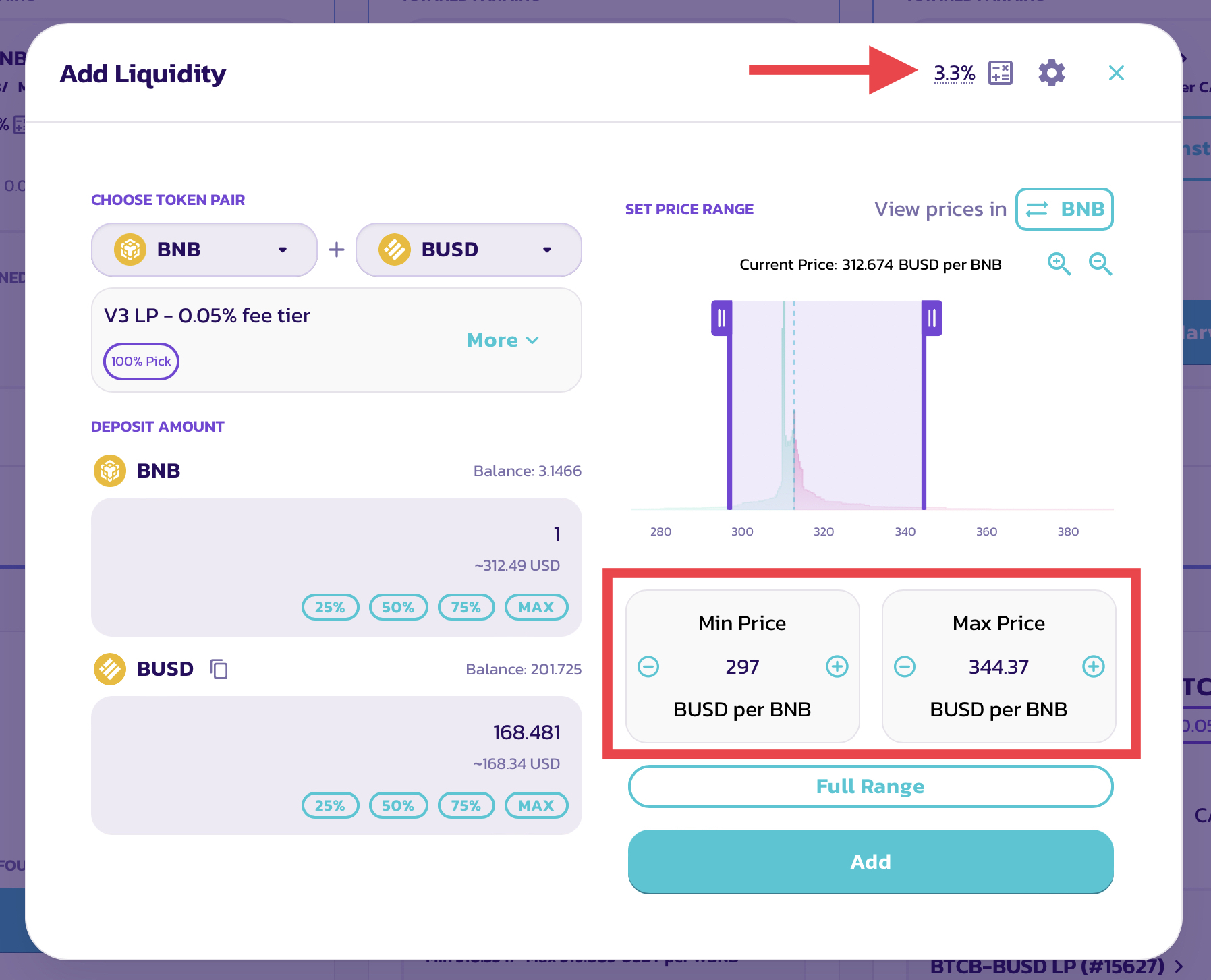
在 V3 流动性和农场中,随着全新的非同质化流动性和可自定义价格区间功能的推出,每个 LP 头寸都将拥有自己的 LP 手续费和 CAKE 农场挖矿 APR。
为了让提供流动性更顺畅、更轻松,每当你提供流动性或进行农场挖矿时,都可以使用全新的自动 APR 显示以及全新的 ROI 计算器。
## 自动 APR 计算与显示
当你提供流动性时,自动 APR 显示会响应你的配置更改,并根据你的设置计算 APR。
例如,在大多数情况下,如果你收紧价格区间设置,APR 会上升。
请注意 LP 手续费 APR:
* LP 手续费奖励的估算金额会根据所选的手续费等级而有所不同,手续费奖励需要手动领取和复投。
* APR 数据使用历史交易量计算,这依赖于 Subgraph,可能存在索引延迟。
关于农场挖矿 APR:
* CAKE 奖励的估算金额基于农场的实时 CAKE 排放量。它们会根据未来的排放量调整而变化。
{% hint style="info" %}
这些数字是根据当前的费率和资金池状况计算的,并会根据各种外部变量而变化。它们仅作为估算值提供给你参考,绝不代表保证的回报。
{% endhint %}
你可以在以下位置找到此 APR 显示:
* “添加流动性”页面 - 显示 LP 手续费 APR
* 每个现有流动性头寸的详情页面 - 显示 LP 手续费 APR\

* 农场页面,在每个农场下的头寸中 - 显示包含 LP 手续费和 CAKE 奖励的综合 APR\

## 改进的 ROI 计算器
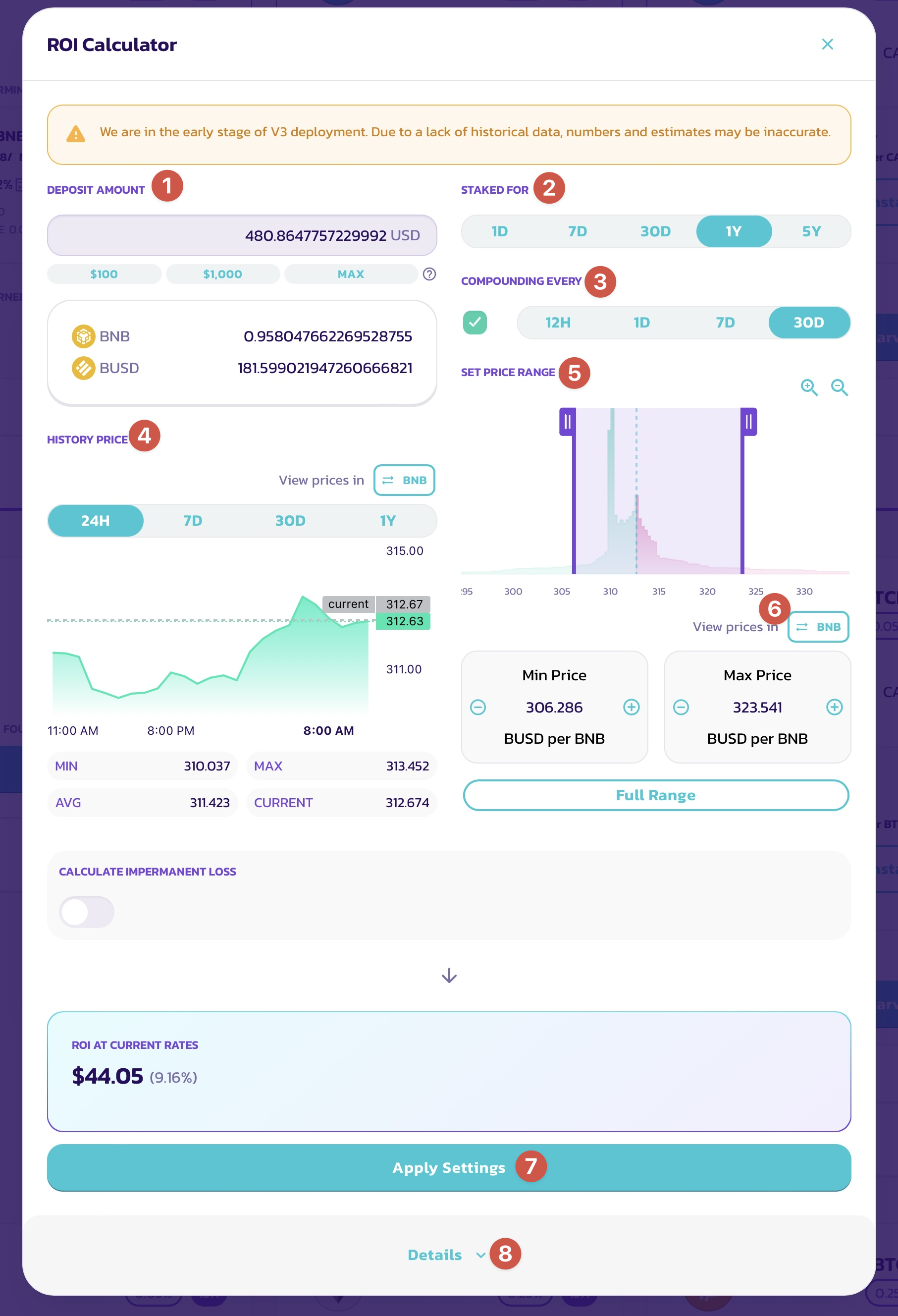
每当你看到自动 APR 显示时,都可以点击调出全新的 ROI 计算器。全新的 ROI 计算器经过重新设计,新增了多项功能,以满足 V3 集中流动性提供和农场挖矿的需求。
让我们一起逐一了解各个部分:
### 存入金额、“质押时长”和“复投频率”
这三项是基本输入项,在之前的 ROI 计算器中也有呈现。它们用于定义:
1. 向流动性头寸提供了多少资产(以美元计)。
2. 这些资产将在头寸中质押多长时间。
3. 你将多频繁地把奖励复投回头寸。
⓵ **存入金额**

你可以手动输入以美元计的金额,或使用快捷操作按钮快速填入 $100、$1000 或根据钱包中代币余额所允许的最大金额。
⓶ **质押时长**

你可以通过选择以下时长来设定资产在流动性头寸中质押的时间:1 天、7 天、30 天、1 年和 5 年。
回报数额将根据你的质押时长计算。
⓷ **复投**

你可以选择多频繁地收获头寸产生的奖励,并将其复投回头寸。你可以在以下时间间隔中选择:12 小时、1 天、7 天和 30 天。
回报数额和 APY 将根据你的选择计算。如果你不打算复投头寸,请取消勾选左侧的复选框。
{% hint style="info" %}
在 V3 中,LP 手续费和赚取的 CAKE 必须手动收获和复投。
{% endhint %}
### ⓸ 历史价格

这是一个仅供查看的部分,用于参考所选交易对的历史价格走势。
你可以参考不同时间范围内的历史价格走势,例如价格通常波动的幅度,然后据此制定合适的价格区间设置,在更高的 APR 与更低的无常损失风险之间取得平衡。
* MIN - 最低价格
* MAX - 最高价格
* AVG - 平均价格
* CURRENT - 当前价格
{% hint style="info" %}
价格图表仅使用实际 V3 交易对的数据。因此,V3 部署之前的价格数据不可用。这四个价格指标代表当前选定的时间范围,并会根据选择而变化。
{% endhint %}
### ⓹ 价格区间

通过此部分,你可以查看不同价格区间内已存入了多少流动性,并据此制定和设置你提供流动性的价格区间。
你可以在标题下方找到分布图表。流动性数量越大,图表越高。
你可以通过以下方式更改价格区间设置:
* 拖动图表上的两个手柄来增大或减小最低和最高价格限制。
* 使用两个手柄之间的区域来移动所选区间。
* 点击最低和最高价格字段上的 + 和 - 按钮。
* 点击价格字段中的数字并手动输入。
如果你想浏览分布图表:
1. 使用加号和减号放大镜按钮进行放大和缩小
2. 拖动 X(底部)轴以左右移动
如果你想为整个价格区间提供流动性,请点击“全区间”
### ⓺ 翻转价格方向以不同基准查看价格

对于某些代币对,以特定基准代币查看价格更容易也更直观。例如,对于 BNB/USDT 交易对,大多数人会更喜欢以“每个 BNB 多少 USDT”来查看价格,而不是反过来。
你可以轻松翻转价格显示。只需点击“查看价格单位:”后面的按钮,即可在交易对中的两种代币之间切换基准。
### ⓻ 导入和导出(应用)你的设置

当你在“添加流动性”窗口中打开 ROI 计算器,或通过查看现有头寸打开时,以下设置将自动导入,因此你无需再次设置:
1. 你存入的资产金额
2. 价格区间
3. 所选的手续费等级
当你在 ROI 计算器中完成配置后,可以点击“应用设置”,将计算器中的设置快速应用回“添加流动性”窗口,这样你就无需手动匹配它们。
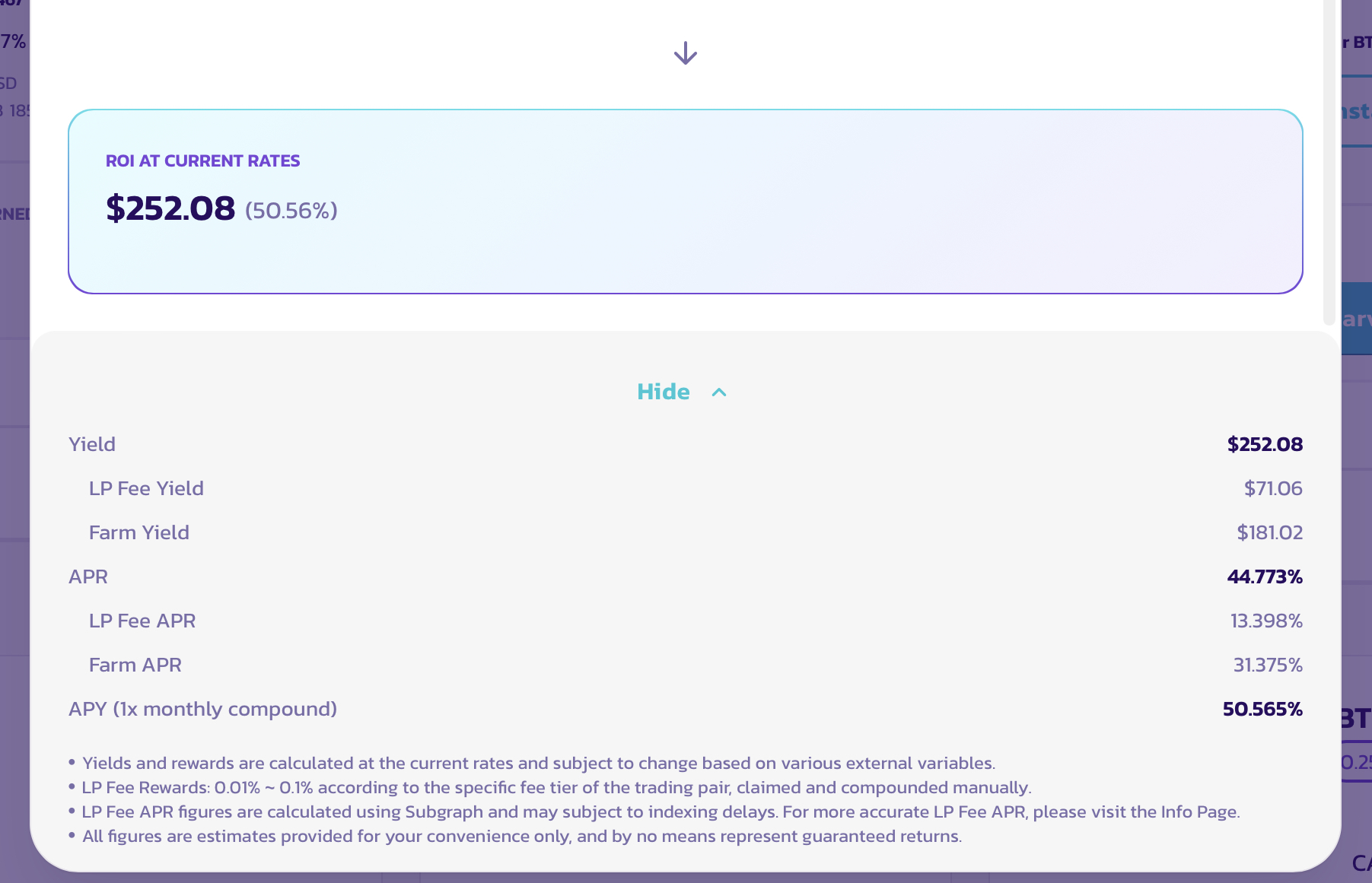
### ⓼ 计算农场挖矿奖励和 APR
如果你在“农场”页面下调出 ROI 计算器,农场挖矿奖励将被纳入计算中。
你可以展开详情部分以查看奖励明细。
---
# Agent Instructions
This documentation is published with GitBook. GitBook is the documentation platform designed so that both humans and AI agents can read, navigate, and reason over technical content effectively. Learn more at gitbook.com.
## Querying This Documentation
If you need additional information that is not directly available in this page, you can query the documentation by asking a question.
Perform an HTTP GET request on the following URL with the `ask` and `goal` query parameters:
```
GET https://docs.pancakeswap.finance/chinese/zhuan-qu/yield-farming/apr-roi-il-calculator.md?ask=&goal=
```
`ask` is the immediate question: it should be specific, self-contained, and written in natural language.
`goal` is what the user is ultimately trying to achieve, the reason they need the answer. Sharing it helps GitBook give you a better, more relevant answer. A goal is most helpful when it describes the outcome the user wants rather than restating the question. For example, with `ask=how do I create an API token`, a goal like `automate deployments from our CI pipeline` lets GitBook tailor the answer to that use case.
The response will contain a direct answer to the question and relevant excerpts and sources from the documentation.
Use this mechanism when the answer is not explicitly present in the current page, you need clarification or additional context, or you want to retrieve related documentation sections.