> For the complete documentation index, see [llms.txt](https://docs.pancakeswap.finance/llms.txt). Markdown versions of documentation pages are available by appending `.md` to page URLs; this page is available as [Markdown](https://docs.pancakeswap.finance/chinese/jiao-yi/perpetual-trading/perpetual-trading-v2/perpetuals-glossary.md).
# 旧版模式术语表
**在这里你将找到期货交易中所有相关术语的定义**
### **永续合约交易**
永续合约(Perpetuals)、永续掉期(perpetual swaps)或 perps 是一种没有到期日的特殊期货合约。
### **杠杆**
杠杆是一种交易机制。交易者可以利用它来增加对市场的敞口,使他们能够支付少于全额投资的资金。简而言之,你借入资金来撬动你的投资。
### 订单
**做多:** 开立做多订单。在这种订单中,你购买一项资产,并等待价格上涨时卖出。"买入"和"做多"可以互换使用。
**做空:** 开立做空订单。在这种订单中,你借入一项资产,将其卖出,并希望在价格下跌时回购。"卖出"和"做空"可以互换使用。
**限价单:** 限价单是以特定价格或更优价格买入或卖出。限价单不保证能够成交。
**市价单:** 市价单是以当前最优可用价格买入或卖出的订单。
#### 仓位管理
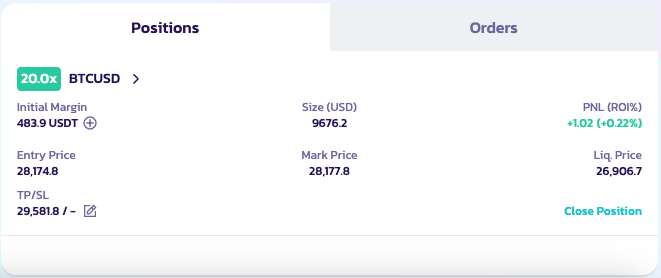
用户可以点击交易页面底部的"仓位"来查看其已开仓位的详细信息,例如开仓价格。他们可以查看开仓价格、仓位数量、最新价格和强制清算价格等详细信息。
**仓位模式**
PancakeSwap 将为每个 v2 交易对使用逐仓杠杆模式。各交易对独立运作:
* 每个交易对都是一个独立的逐仓仓位,用户可以开设多个逐仓仓位
* 每个仓位(交易对)独立运行。如果用户需要补充保证金,即使他们在其他独立仓位中有可用资产,也需要手动操作(ApolloX 未来将支持自动补充)
* 每个逐仓交易仓位都有自己的风险率和清算价格,并将单独结算。
* 清算风险对每个交易对是隔离的。如果一个仓位被清算,不会影响其他仓位。
**平仓**
用户可以通过点击"平仓"来关闭他们的仓位。
#### 费用与滑点
请访问 [Aster 的页面](https://docs.asterdex.com/product/asterex-simple/fees-and-slippage),了解更多关于费用的信息。
---
# Agent Instructions
This documentation is published with GitBook. GitBook is the documentation platform designed so that both humans and AI agents can read, navigate, and reason over technical content effectively. Learn more at gitbook.com.
## Querying This Documentation
If you need additional information that is not directly available in this page, you can query the documentation by asking a question.
Perform an HTTP GET request on the following URL with the `ask` and `goal` query parameters:
```
GET https://docs.pancakeswap.finance/chinese/jiao-yi/perpetual-trading/perpetual-trading-v2/perpetuals-glossary.md?ask=&goal=
```
`ask` is the immediate question: it should be specific, self-contained, and written in natural language.
`goal` is what the user is ultimately trying to achieve, the reason they need the answer. Sharing it helps GitBook give you a better, more relevant answer. A goal is most helpful when it describes the outcome the user wants rather than restating the question. For example, with `ask=how do I create an API token`, a goal like `automate deployments from our CI pipeline` lets GitBook tailor the answer to that use case.
The response will contain a direct answer to the question and relevant excerpts and sources from the documentation.
Use this mechanism when the answer is not explicitly present in the current page, you need clarification or additional context, or you want to retrieve related documentation sections.