> For the complete documentation index, see [llms.txt](https://docs.pancakeswap.finance/llms.txt). Markdown versions of documentation pages are available by appending `.md` to page URLs; this page is available as [Markdown](https://docs.pancakeswap.finance/chinese/jiao-yi/perpetual-trading/perpetual-trading-v2/madbtcusd/madbtcusd-faq.md).
# MADBTCUSD 常见问题解答
### MADBTCUSD 指数是如何计算的?
MADBTCUSD 基于以下公式计算:
**MADBTCUSD 指数**
$$
\begin{align\*}
\text{drift} &= \left( \frac{\text{btcCurrentPrice} - 1}{\text{btcLastSecondPrice}} \right) \times 5 \\
\\
\sigma &= \frac{\text{expectedvol}}{\sqrt{3600 \times 24 \times 365}} \\
\\
norm &= \text{norminv}(\text{Random}, 0, 1) \\
\\
S\_{n+1} &= S\_{n} \times e^{\left\[\left(\text{drift} - \frac{\sigma^2}{2}\right) \times \text{dt} + \sigma \times \sqrt{\text{dt}} \times norm\right]}
\end{align\*}
$$
其中:
* 初始 Sn=1000
* dt=1
* expected vol:100%(expected vol 是 MADBTC 的预期时间波动率)
* "**Random number**(随机数)"基于当前 **BTC 价格以 8 位小数精度** 计算
**随机数的计算:**
```python
import hashlib
from decimal import Decimal
# Assume the current price of Bitcoin is 48923.56789101
bitcoin_price = Decimal("48923.56789101")
# Calculate the SHA-256 hash of the Bitcoin price
price_hash = hashlib.sha256(str(bitcoin_price).encode('utf-8')).hexdigest()
# Extract the first 8 hexadecimal numbers from the hash
hash_substring = price_hash[:8]
# Converts a hexadecimal string to an integer
hash_integer = int(hash_substring, 16)
# Divide the integer by 4294967296 (the decimal number corresponding to the hexadecimal number FFFFFFFF) to get a num
random_number = hash_integer / 4294967296
# Print the random number
print(random_number)
```
如果确定的随机数为 0,将重新计算
### 我在哪里可以交叉验证 BTC 和 MADBTCUSD 的历史价格?
BTC 和 MADBTCUSD 价格源可在此处找到:
[BTCUSD](https://www.apollox.finance/bapi/futures/v1/public/future/apx/V2MarkPriceKline?symbol=BTCUSD\&limit=1800)
[MADBTCUSD](https://www.apollox.finance/bapi/futures/v1/public/future/apx/V2MarkPriceKline?symbol=MADBTCUSD\&limit=1800)
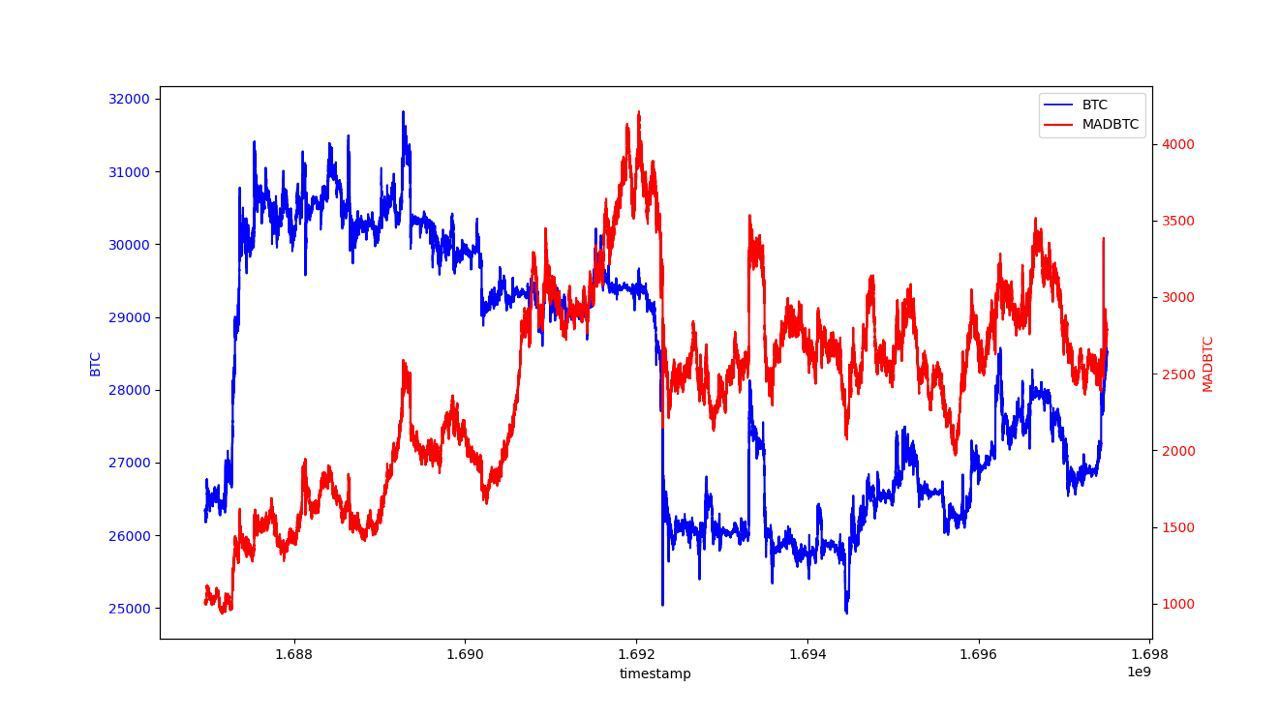
### BTC 和 MADBTC 的历史回测数据
为了交叉验证 BTC 和 MADBTC 的历史价格,我们在下方提供了一个回测图表。
---
# Agent Instructions
This documentation is published with GitBook. GitBook is the documentation platform designed so that both humans and AI agents can read, navigate, and reason over technical content effectively. Learn more at gitbook.com.
## Querying This Documentation
If you need additional information that is not directly available in this page, you can query the documentation dynamically by asking a question.
Perform an HTTP GET request on the current page URL with the `ask` query parameter, and the optional `goal` query parameter:
```
GET https://docs.pancakeswap.finance/chinese/jiao-yi/perpetual-trading/perpetual-trading-v2/madbtcusd/madbtcusd-faq.md?ask=&goal=
```
`ask` is the immediate question: it should be specific, self-contained, and written in natural language.
`goal` is optional and describes the broader end goal you are ultimately trying to accomplish on behalf of the user. GitBook uses it to tailor the answer towards what is most useful for that goal.
The response will contain a direct answer to the question and relevant excerpts and sources from the documentation.
Use this mechanism when the answer is not explicitly present in the current page, you need clarification or additional context, or you want to retrieve related documentation sections.