> For the complete documentation index, see [llms.txt](https://docs.pancakeswap.finance/llms.txt). Markdown versions of documentation pages are available by appending `.md` to page URLs; this page is available as [Markdown](https://docs.pancakeswap.finance/chinese/jiao-yi/perpetual-trading/perpetual-trading-v2/how-can-i-use-it.md).
# 我该如何使用它?
如何使用 V2 永续合约交易

使用此功能其实非常简单(难的是交易得好)。我们只需要遵循一系列步骤,让我们的体验更加完整。如需更多信息,请访问 [V2 术语表](/chinese/jiao-yi/perpetual-trading/perpetual-trading-v2/perpetuals-glossary.md)。
### 进入永续合约交易页面
你可以从[网站](https://pancakeswap.finance)的 Trade → Perpetual 板块进入,或通过此[链接 ](https://perp.pancakeswap.finance/en/futures/BTCUSDT)进入
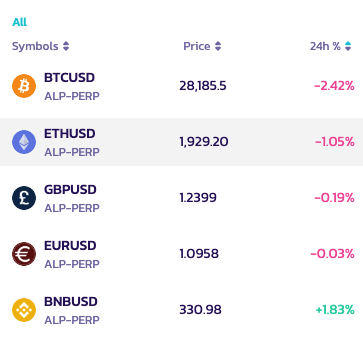
### 选择要交易的交易对
你可以点击页面顶部交易对旁边的箭头来选择可交易的交易对。
更多可交易的交易对即将推出!
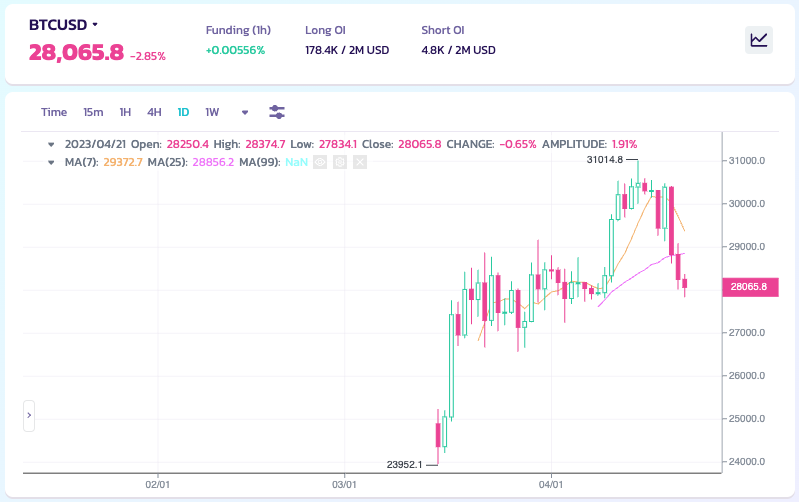
### 分析图表并决定你的交易策略
交易时间到了!让我们认真起来。你可以用你自己的方式,借助所有可用的工具来分析图表
**你知道怎么做,还是想提升你的分析能力?**
这里有一份指南,帮助你开启图表分析的世界:
* [如何在 Binance 网站上使用 TradingView](https://www.binance.com/en/support/faq/8419126024404348a1c6e4039fbed3fe)
* [蜡烛图](https://academy.binance.com/en/articles/a-beginners-guide-to-candlestick-charts)
* [趋势线详解](https://academy.binance.com/en/articles/trend-lines-explained)
### 建立你的仓位
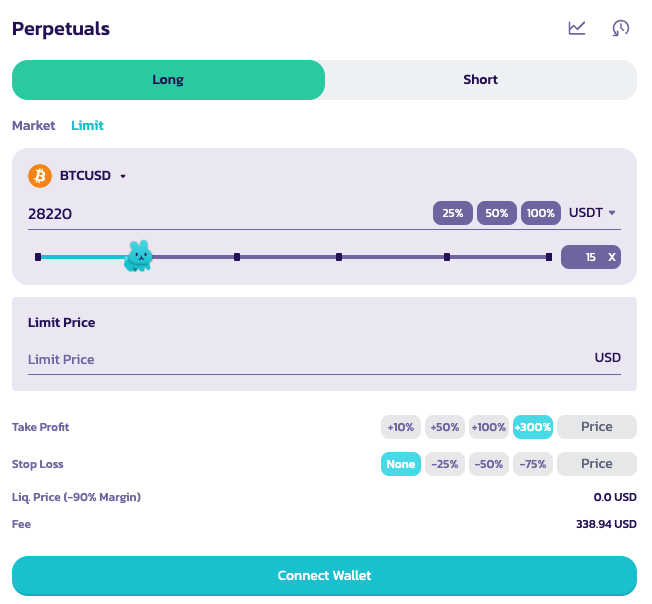
然后,在右上角你会看到用于下单建仓的面板。
在这里你必须设置几个参数,例如:
*顺序不分先后*
1. 做多或做空
选择你想要采用的交易仓位
2\. 杠杆倍数
移动小兔子来选择合适的杠杆仓位。你也可以在左侧的框中手动输入仓位。
免责声明:请记住,高杠杆水平承担着非常高的风险,请明智使用。
3\. 订单类型
4\. 设置订单规模并为你的订单设定价格(用于限价单)
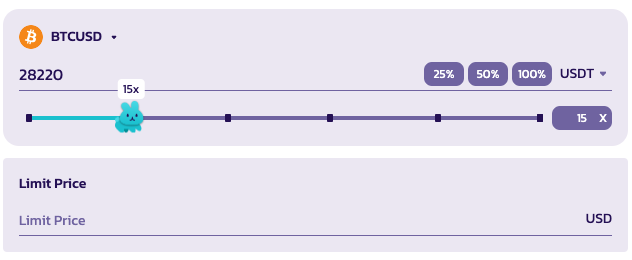
你还可以选择参考货币来查看你的仓位。
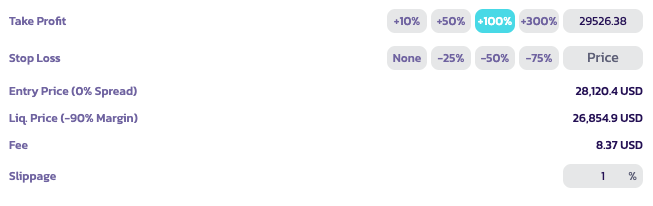
5. 止盈/止损与滑点
用户可以在开仓时设置止盈或止损价格。
* 止盈:一旦用户达到设定的 P\&L 百分比收益,其仓位将被平仓。
* 止损:一旦用户达到设定的 P\&L 百分比亏损,其仓位将被平仓。
* 滑点:用于在市价单开仓前,价格朝交易方向移动过快时自动取消该订单。例如,如果你希望以当前价格市价做多,但在你的交易开仓前价格上涨了 1%,它将自动取消。
注意:你可以将鼠标悬停在每个选项上以获取更多信息。请参阅 [永续合约 V2 术语表](/chinese/jiao-yi/perpetual-trading/perpetual-trading-v2/perpetuals-glossary.md),获取深入指南。
### 提交你的订单
当所有参数都已设置好后,你可以点击开仓来提交订单

### 查看你的仓位
订单提交后,它将出现在"未成交订单"中,直到成交为止。

### 生效!
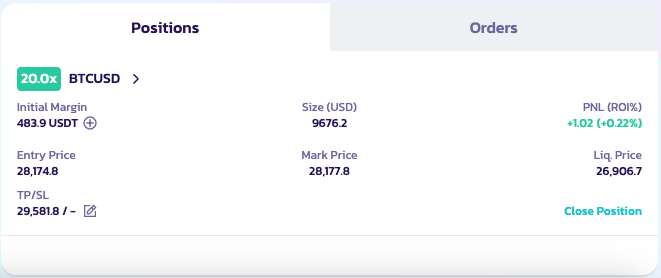
成交后,你的仓位将生效。你可以在仓位面板中看到它。你也可以查看、编辑或平仓。
祝你交易顺利!
---
# Agent Instructions
This documentation is published with GitBook. GitBook is the documentation platform designed so that both humans and AI agents can read, navigate, and reason over technical content effectively. Learn more at gitbook.com.
## Querying This Documentation
If you need additional information that is not directly available in this page, you can query the documentation by asking a question.
Perform an HTTP GET request on the following URL with the `ask` and `goal` query parameters:
```
GET https://docs.pancakeswap.finance/chinese/jiao-yi/perpetual-trading/perpetual-trading-v2/how-can-i-use-it.md?ask=&goal=
```
`ask` is the immediate question: it should be specific, self-contained, and written in natural language.
`goal` is what the user is ultimately trying to achieve, the reason they need the answer. Sharing it helps GitBook give you a better, more relevant answer. A goal is most helpful when it describes the outcome the user wants rather than restating the question. For example, with `ask=how do I create an API token`, a goal like `automate deployments from our CI pipeline` lets GitBook tailor the answer to that use case.
The response will contain a direct answer to the question and relevant excerpts and sources from the documentation.
Use this mechanism when the answer is not explicitly present in the current page, you need clarification or additional context, or you want to retrieve related documentation sections.