> For the complete documentation index, see [llms.txt](https://docs.pancakeswap.finance/llms.txt). Markdown versions of documentation pages are available by appending `.md` to page URLs; this page is available as [Markdown](https://docs.pancakeswap.finance/chinese/jiao-yi/perpetual-trading/perpetual-trading-v2/dumb-mode/dumb-mode-guide.md).
# Dumb Mode 指南
### 如何在 Dumb Mode 中下单
要在 PancakeSwap 上的 Dumb Mode 中下单,请按照以下步骤操作:
1. 选择市场:前往 BSC 上的 [**Pancakeswap 永续合约**](https://perp.pancakeswap.finance/en/futures/v2/BTCUSD?theme=light\&chain=bsc)。从可用市场中选择,例如 BTCUSD、ETHUSD 等。
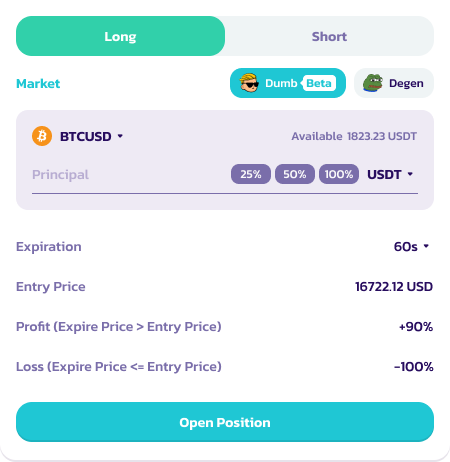
2. 点击 **Dumb (Beta) 图标。** 仓位界面将切换为 Dumb 模式。
2. 选择仓位:选择做多或做空标的资产\*
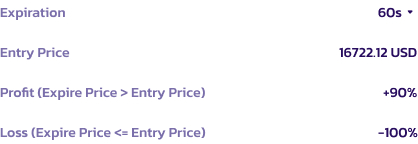
1. 对于做多仓位:如果到期价格高于入场价格,用户将赢得交易并获得盈利。
2. 对于做空仓位:如果到期价格低于入场价格,用户将赢得交易并获得盈利。
3. 否则,用户将损失全部抵押品。
4. 有关仓位的更多详细信息,请参阅注释
3. 设置保证金和金额:选择你的保证金资产(USDC、USDT、CAKE 等)并指定抵押品金额。
4. 选择时长:决定你交易的到期时间 - 60 秒、5 分钟或 10 分钟。
5. 下单:查看 ROI,确认详情,然后点击 **开仓** 进行交易\*
5. 监控交易:交易下单后,通过"仓位"标签监控其进展直至完成。**用户无法在到期前平仓**
7. 结算:在交易结束时,如果成功,你的 ROI 将在扣除 6% 费用后入账。如果交易不成功,损失将为 100%。
### 关于仓位的额外注释
* 请注意,到期计时器并非在你点击"开仓"按钮时开始;相反,60 秒/所选时长的倒计时是从交易在区块链上确认的那一刻开始的
* 你看到显示的价格仅作为参考。最终入场价格将由交易在区块链上确认的确切时刻的价格点决定。这将在"仓位"标签中更新
### 使用 Dumb Mode 的提示
* 了解风险:注意所涉及的高风险,尤其是亏损时的 -100% ROI。
* 管理你的抵押品:只投入你能承受损失的金额。
* 保持信息灵通:及时了解你所交易资产的市场趋势。
---
# Agent Instructions
This documentation is published with GitBook. GitBook is the documentation platform designed so that both humans and AI agents can read, navigate, and reason over technical content effectively. Learn more at gitbook.com.
## Querying This Documentation
If you need additional information that is not directly available in this page, you can query the documentation by asking a question.
Perform an HTTP GET request on the following URL with the `ask` and `goal` query parameters:
```
GET https://docs.pancakeswap.finance/chinese/jiao-yi/perpetual-trading/perpetual-trading-v2/dumb-mode/dumb-mode-guide.md?ask=&goal=
```
`ask` is the immediate question: it should be specific, self-contained, and written in natural language.
`goal` is what the user is ultimately trying to achieve, the reason they need the answer. Sharing it helps GitBook give you a better, more relevant answer. A goal is most helpful when it describes the outcome the user wants rather than restating the question. For example, with `ask=how do I create an API token`, a goal like `automate deployments from our CI pipeline` lets GitBook tailor the answer to that use case.
The response will contain a direct answer to the question and relevant excerpts and sources from the documentation.
Use this mechanism when the answer is not explicitly present in the current page, you need clarification or additional context, or you want to retrieve related documentation sections.