> For the complete documentation index, see [llms.txt](https://docs.pancakeswap.finance/llms.txt). Markdown versions of documentation pages are available by appending `.md` to page URLs; this page is available as [Markdown](https://docs.pancakeswap.finance/chinese/jiao-yi-gong-ju/notifications.md).
# 通知
在一处即可接收您所有的 DeFi 更新!
### 什么是 Web3 通知?
Web3 通知代表了与平台互动以获取最新资讯和更新的一次飞跃。这些通知无缝集成到 PancakeSwap 中,带来了诸多好处。我们与 WalletConnect 合作,为用户推出了通知(BETA)功能,让用户能够在一个窗口中访问他们的 DeFi 资讯、更新和重要操作。请注意,Web3 通知目前仍处于 BETA 阶段,并将在未来几个月内经历进一步的更改和开发。
**Web3 通知的优势:**
* 通过实时提醒保持更新:绝不错过 PancakeSwap 的重要活动、市场趋势、产品更新或社区动态。
* 优先关注对您重要的内容:根据相关性选择主题、产品和类别。通过多种筛选条件定制您的通知。
* 直接且可操作的链接:每条通知都附带一个直接链接,让您能够直接从通知中快速响应关键更新。
### 如何设置通知:
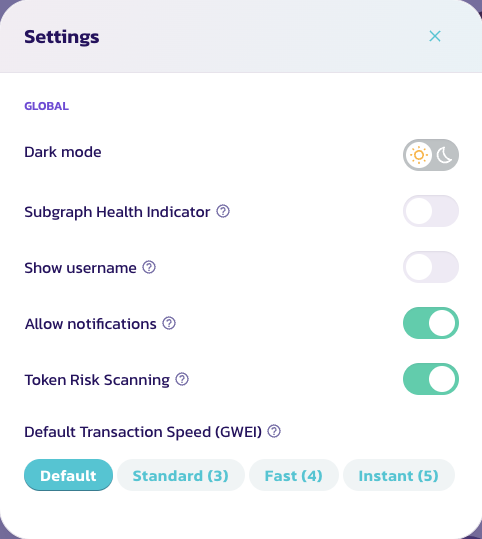
1. 轻松激活:访问我们的[主页](https://pancakeswap.finance/)。点击 PancakeSwap 菜单左上角的设置图标,然后选择 “Allow Notifications”(允许通知)。
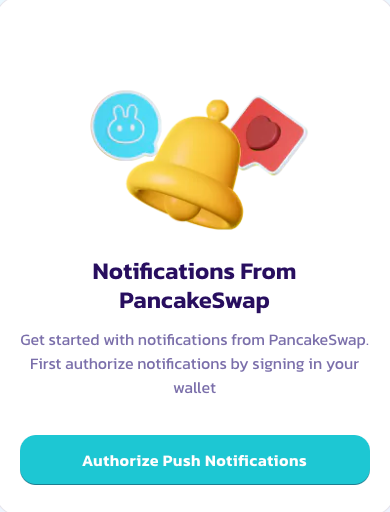
2. 连接钱包:点击右上角的铃铛图标,并在您的钱包中签署一条消息以授权通知。
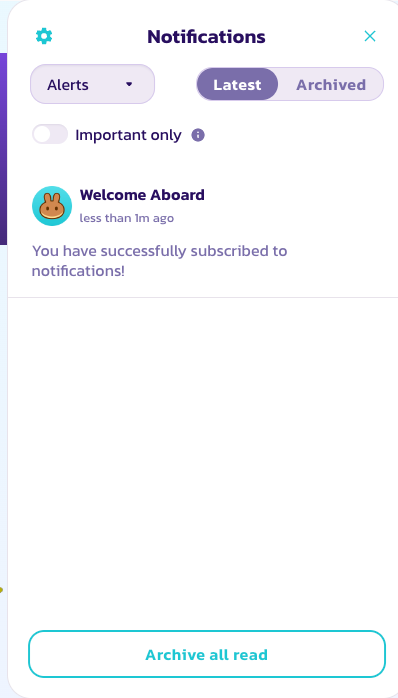
3. 定制您的信息流:通过选择左侧的下拉菜单来定制您的通知设置,以匹配您的兴趣和需求。
4. 保持知情:点击铃铛图标,即可从下拉菜单中方便地访问您的所有通知。
### 通知功能
当前的通知列表在所有 EVM 链上均受支持,包括:
| 通知 | 功能 |
| ----- | ------------------------ |
| 流动性头寸 | 当用户的流动性头寸超出价格区间时,提醒其移动头寸 |
| 农场 | 向用户更新农场 APR,或是否有新的农场 |
| 钱包余额 | 当用户 gas 余额不足时进行提醒 |
| 彩票 | 向用户更新彩票开奖信息 |
| 预测 | 提醒用户领取预测奖励 |
| 价格提醒 | 向用户更新重大价格变化 |
### 接下来会有什么?
* 增强筛选:优化通知,让用户及时收到正确的信息
* 多平台支持:支持移动端及其他平台,并具备潜在的跨协议功能,使 PancakeSwap 成为您 DeFi 活动的中心
* 更多通知:为我们的其他产品以及治理相关信息(如新提案)提供通知。
---
# Agent Instructions
This documentation is published with GitBook. GitBook is the documentation platform designed so that both humans and AI agents can read, navigate, and reason over technical content effectively. Learn more at gitbook.com.
## Querying This Documentation
If you need additional information that is not directly available in this page, you can query the documentation by asking a question.
Perform an HTTP GET request on the following URL with the `ask` and `goal` query parameters:
```
GET https://docs.pancakeswap.finance/chinese/jiao-yi-gong-ju/notifications.md?ask=&goal=
```
`ask` is the immediate question: it should be specific, self-contained, and written in natural language.
`goal` is what the user is ultimately trying to achieve, the reason they need the answer. Sharing it helps GitBook give you a better, more relevant answer. A goal is most helpful when it describes the outcome the user wants rather than restating the question. For example, with `ask=how do I create an API token`, a goal like `automate deployments from our CI pipeline` lets GitBook tailor the answer to that use case.
The response will contain a direct answer to the question and relevant excerpts and sources from the documentation.
Use this mechanism when the answer is not explicitly present in the current page, you need clarification or additional context, or you want to retrieve related documentation sections.