> For the complete documentation index, see [llms.txt](https://docs.pancakeswap.finance/llms.txt). Markdown versions of documentation pages are available by appending `.md` to page URLs; this page is available as [Markdown](https://docs.pancakeswap.finance/chinese/huan-ying-lai-dao-pancakeswap/how-to-guides/get-started-aptos/wallet-guide.md).

# 创建钱包

![](https://raw.githubusercontent.com/pancakeswap/pancake-document/en/.gitbook/assets/how-to-make-a-crypto-wallet-header.png)

要在 Aptos 上开启你的 PancakeSwap 之旅，你首先需要设置一个支持 Aptos 链的钱包。钱包既有桌面电脑版本，也有智能手机设备版本。你需要选择最适合你需求的钱包。

{% hint style="danger" %}
**在设置钱包时，请务必：**

* ✅ **只从官方来源下载并安装最新版本。**
* ✅ **仔细按照设置指南操作。**
* ✅ **安全地备份你的助记词。**
* ❌ **在任何情况下，都绝不要与任何人分享你的助记词。**
* ❌ **绝不要在钱包应用以外的任何网站或应用中输入你的助记词。**
  {% endhint %}

## 智能手机/移动钱包还是桌面钱包？

{% hint style="warning" %}
在撰写本文时，支持 Aptos 的移动钱包数量有限。当更多钱包可用时，Chefs 会在教程中加入它们。

**我们建议使用**[**桌面钱包**](#desktop-web-browser-wallets)**，直到有更多移动钱包准备就绪。**
{% endhint %}

移动设备钱包和桌面钱包各有优势和劣势。请考虑哪种更适合你的需求，以帮助决定使用哪种类型的钱包。

|           | 移动端 | 桌面端 |
| --------- | --- | --- |
| 随处可用      | ✅   | ➖   |
| 易于使用      | ✅   | ➖   |
| 更安全       | ➖   | ✅   |
| 无障碍友好     | ➖   | ✅   |
| 抗损坏/丢失/盗窃 | ➖   | ✅   |
| 抗断电/断网    | ✅   | ➖   |

## **智能手机/移动钱包**

智能手机/移动钱包让你几乎可以随时随地访问你的加密资产。钱包在 Android 和 iOS 设备上均可使用。

### 我应该选择哪个移动钱包？

这张对比表概述了 PancakeSwap 上最常用的几款移动钱包。

<table><thead><tr><th width="283.4285714285714"></th><th width="148">SafePal</th><th>Trust Wallet</th><th>Blocto</th></tr></thead><tbody><tr><td>Aptos 链支持</td><td>✅</td><td>✅</td><td>✅</td></tr><tr><td>内置 DApp 浏览器</td><td>✅</td><td>✅</td><td>✅</td></tr><tr><td>兼容硬件钱包</td><td><p>✅</p><p>（仅 SafePal）</p></td><td>➖</td><td>➖</td></tr><tr><td>开源（可审计性）</td><td>➖</td><td>✅</td><td>➖</td></tr></tbody></table>

你可以在下方找到关于每款钱包的更深入信息，以及下载链接和安装指南。

{% tabs %}
{% tab title="SafePal" %}

<figure><img src="https://files.gitbook.com/v0/b/gitbook-x-prod.appspot.com/o/spaces%2F-MHREX7DHcljbY5IkjgJ-1972196547%2Fuploads%2FZuCcaLK4UtU3jCU0MDaz%2F7cccc2d2-c9db-4d38-8641-5a94cfa6083d_4x.png.webp?alt=media&#x26;token=4091057f-c068-482f-8cf5-e24f856b971d" alt=""><figcaption><p>SafePal 既可作为软件钱包也可作为硬件钱包使用。该钱包易于安装和创建，开箱即支持 Aptos、BEP2（BNB Beacon Chain）<strong>、</strong>BEP20（BNB Smart Chain）。</p></figcaption></figure>

​**优点：**

* 在多个加密网络之间轻松切换
* 内置 Google Authenticator 选项
* 支持大量语言
* 设置过程非常简单
* 既可作为软件钱包也可作为硬件钱包使用（可协同工作）

**缺点：**

* 并非完全开源
* 不提供用户通知
* 在初始设置和钱包创建期间不强制要求强安全性

​[**下载 SafePal**](https://safepal.io/download)（自动检测设备）\
[**SafePal Aptos 设置指南**](https://safepalsupport.zendesk.com/hc/en-us/articles/10061372532891-How-to-add-send-Aptos-mainnet-coin-APT-with-SafePal-Software-Wallet)
{% endtab %}

{% tab title="Trust Wallet" %}
​

<figure><img src="https://files.gitbook.com/v0/b/gitbook-legacy-files/o/assets%2F-MHREX7DHcljbY5IkjgJ%2F-Maajz3RNBhCbi_iel09%2F-MaaqWJXQio1awWtJiub%2Fimage.png?alt=media&#x26;token=63e7a2d9-8a05-49ac-b3dd-063f87f3a8b6" alt=""><figcaption></figcaption></figure>

Trust Wallet 是一款适用于智能设备的热门钱包。它支持 DApp、NFT 收藏品（支持 Opensea.io）以及钱包内质押。

**优点：**

* 开源，可审计
* 由 Binance 加密货币交易所支持
* 在多个加密网络之间轻松切换
* 默认包含 Aptos 网络

**缺点：**

* DApp 有限
* 交易通知可能会延迟

[**下载 Trust Wallet**](https://trustwallet.com)（自动检测设备）\
[**Trust Wallet Aptos 设置指南**](https://community.trustwallet.com/t/trust-wallet-adds-native-support-for-aptos-apt/575701)
{% endtab %}

{% tab title="Blocto" %}
![](https://raw.githubusercontent.com/pancakeswap/pancake-document/en/.gitbook/assets/image%20%28295%29.png)

Blocto 提供了一个用户友好的解决方案，是一个用于使用 Dapp 和管理资产的一体化套件。

**亮点：**

* 开箱即支持 BNB Chain、Aptos 链以及其他主要加密网络。
* 易于设置。
* 同时支持 iOS 和 Android。
* 电子邮件登录。
* 智能合约钱包免去了管理自己私钥的需要，并且还提供账户恢复等高级功能
* 智能合约钱包的初始设置 gas 费由平台承担

**注意：**

* **需要电子邮件地址才能开始使用**
* 托管模式
* 如果你想导出私钥并自行管理或在其他钱包中使用，会有点复杂。[教程](https://portto.zendesk.com/hc/en-us/articles/4411564072217-Can-I-export-my-private-key-from-Blocto-and-use-it-in-Metamask-Phantom-Trust-Wallet-)。

[**下载 Blocto 钱包**](https://portto.com/download)

#### **Blocto 钱包设置指南**

1 - 通过输入你的电子邮件地址进行设置。然后输入通过电子邮件收到的一次性密码。

![](https://raw.githubusercontent.com/pancakeswap/pancake-document/en/.gitbook/assets/blocto-setup-guide-mobile-1.png) ![](https://raw.githubusercontent.com/pancakeswap/pancake-document/en/.gitbook/assets/blocto-setup-guide-mobile-2.png)

2 - 点击加号按钮，然后选择“APT - Aptos”

![](https://raw.githubusercontent.com/pancakeswap/pancake-document/en/.gitbook/assets/blocto-setup-guide-mobile-3.png) ![](https://raw.githubusercontent.com/pancakeswap/pancake-document/en/.gitbook/assets/blocto-setup-guide-mobile-4.png)

3 - 完成！现在你可以将 APT 存入 Aptos 钱包，并通过进入“Discover”（发现）页面开始在 Aptos 上使用 PancakeSwap！

![](https://raw.githubusercontent.com/pancakeswap/pancake-document/en/.gitbook/assets/blocto-setup-guide-mobile-6.png) ![](https://raw.githubusercontent.com/pancakeswap/pancake-document/en/.gitbook/assets/blocto-setup-guide-mobile-7.png)
{% endtab %}
{% endtabs %}

## **桌面/网页浏览器钱包**

桌面钱包可在你的家用电脑或笔记本电脑上使用。电脑上的钱包可以作为独立应用程序运行，也可以作为 Chrome、Firefox 等热门浏览器的浏览器插件运行。

### 我应该选择哪个桌面钱包？

这张对比表概述了在 Aptos 上 PancakeSwap 最常用的几款桌面钱包

<table><thead><tr><th width="187"></th><th width="79">Petra</th><th width="97">Martian</th><th width="92">Pontem</th><th width="109">Fewcha</th><th width="94">Blocto</th></tr></thead><tbody><tr><td>Aptos 链支持</td><td>✅</td><td>✅</td><td>✅</td><td>✅</td><td>✅</td></tr><tr><td>兼容硬件钱包</td><td>➖</td><td>➖</td><td>➖</td><td>➖</td><td>➖</td></tr><tr><td>开源（可审计性）</td><td>✅</td><td>❓</td><td>✅</td><td>❓</td><td>❓</td></tr></tbody></table>

*❓ - 截至撰写本文时，我们尚不确定此信息的状态*

你可以在下方找到关于每款钱包的更深入信息，以及下载链接和安装指南。

{% tabs %}
{% tab title="Petra" %}

<figure><img src="https://raw.githubusercontent.com/pancakeswap/pancake-document/en/.gitbook/assets/image%20%28110%29.png" alt=""><figcaption></figcaption></figure>

Petra 钱包是一个扩展程序，让你可以在浏览器中探索 Aptos。

**亮点：**

* 由 Aptos Labs 构建
* 易于使用
* 支持多个账户
* 内置 NFT 支持
* 支持 Aptos testnet 以及一键 testnet APT 水龙头

**注意：**

* 仅限桌面端
* 仅支持 Aptos 链

[**下载 Petra 钱包**](https://petra.app/)

[**Petra 钱包设置指南**](https://petra.app/docs/use)
{% endtab %}

{% tab title="Martian" %}

<figure><img src="https://raw.githubusercontent.com/pancakeswap/pancake-document/en/.gitbook/assets/image%20%28298%29.png" alt=""><figcaption></figcaption></figure>

Martian 是一款 Aptos 链钱包，让你可以存储、发送、接收代币，并管理和铸造 NFT。其移动版本即将推出。

**亮点：**

* 移动版本即将推出
* 易于使用
* 支持多个账户
* 内置 NFT 支持
* 支持 Aptos testnet

[**下载 Martian 钱包**](https://martianwallet.xyz/)
{% endtab %}

{% tab title="Pontem" %}

<figure><img src="https://raw.githubusercontent.com/pancakeswap/pancake-document/en/.gitbook/assets/pontem-setup-desktop-banner.png" alt=""><figcaption></figcaption></figure>

Pontem 钱包是一款 Aptos 链钱包，让你可以存储、发送、接收代币，并连接到 Aptos 生态系统中的 dApp。

**亮点：**

* 移动版本即将推出
* 易于使用
* 支持多个账户
* 内置 NFT 支持
* 支持 Aptos testnet

[**下载 Pontem 钱包**](https://pontem.network/pontem-wallet)
{% endtab %}

{% tab title="Fewcha" %}

<figure><img src="https://raw.githubusercontent.com/pancakeswap/pancake-document/en/.gitbook/assets/image%20%28196%29.png" alt=""><figcaption></figcaption></figure>

Fewcha 是一款受信赖的加密钱包，针对 Aptos 和 SUI 生态系统进行了优化，为你解锁 web3 中的应用世界。

**亮点：**

* 支持 Aptos 和 Sui 区块链
* 首款支持使用 Move 语言的纯区块链的钱包
* 友好的 UX/UI
* 简单、优雅、易于使用
* 内置兑换功能
* 内置质押功能
* 多种语言
* EBCI 协议——一种在与 dApp 交互时防止多个弹窗的协议，它将帮助用户管理他们正在为哪个 dApp 签署交易。
* 支持硬件钱包连接（Keystone Wallet）

[**下载 FewCha 钱包**](https://fewcha.app/)

#### **Fewcha 钱包设置指南**

1\. Fewcha 钱包扩展程序下载完成后，会出现一个欢迎标签页。在这里你可以选择“Create a new wallet”（创建新钱包）（如果你已有钱包，则选择“Use an existing wallet”（使用现有钱包））。

<figure><img src="https://lh5.googleusercontent.com/xzkPxptL1JdM_IcX3jEH8J1JpEC9uWabA5QUJzKBRIqszgGeOUh67QuQx7Y6BCzv1UIXshZuxrCCgZe6wYhxCZ4JbjcbtYIdP_zO9A6VDiQgypsbr2wlvqUjhioyPsRDVOYTBJv_smcjhODx3zHnqrTvxiJzWMhZa3e4TvG3lfAqFtE6-47N08s" alt=""><figcaption></figcaption></figure>

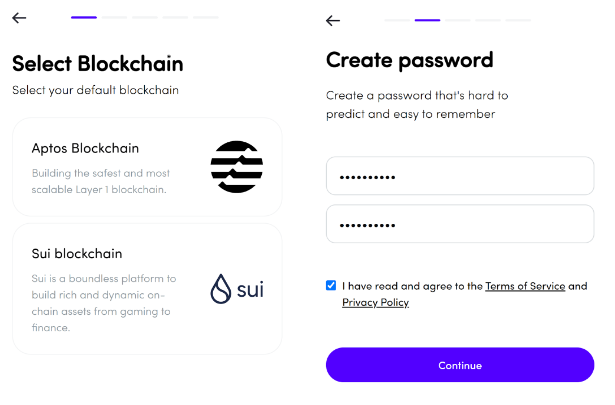
2\. 选择你的默认区块链。创建一个难以猜测但易于记住的密码。确保你已阅读并同意服务条款和隐私政策。然后点击“Continue”（继续）。

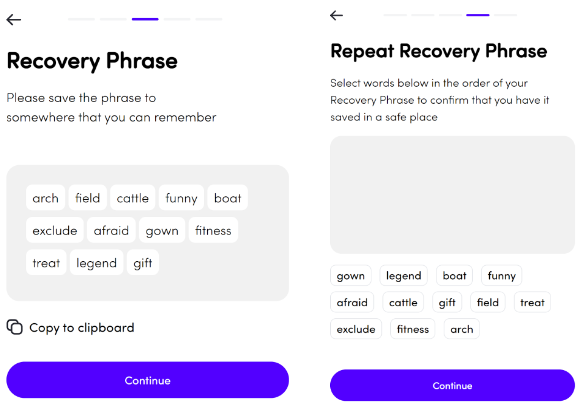
3\. 对于助记词，请将其写下来或复制保存到你能记住的地方。

<figure><img src="https://raw.githubusercontent.com/pancakeswap/pancake-document/en/.gitbook/assets/image%20%28108%29.png" alt=""><figcaption></figcaption></figure>

> * 安全地备份你的助记词。如果你丢失了助记词，你可能会永远失去对钱包及其中加密资产的访问权限。
> * 在任何情况下，都**绝不要**与任何人分享你的助记词。
> * **绝不要**在钱包应用以外的任何网站或应用中输入你的助记词&#x70;**。**

<figure><img src="https://raw.githubusercontent.com/pancakeswap/pancake-document/en/.gitbook/assets/image%20%28203%29.png" alt=""><figcaption></figcaption></figure>

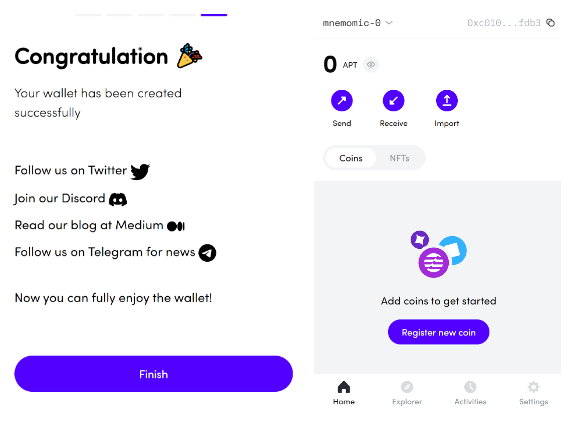
4\. 点击 Finish（完成）以结束此设置过程。大功告成！钱包创建完成后，你随时都可以通过点击扩展程序栏上的 Fewcha 钱包图标来访问它。

<figure><img src="https://raw.githubusercontent.com/pancakeswap/pancake-document/en/.gitbook/assets/image%20%28324%29.png" alt=""><figcaption></figcaption></figure>

要开始在 Aptos 上使用 PancakeSwap，你还需要有一些 $APT 代币来支付 gas 费。你可以在这里了解如何获取一些。
{% endtab %}

{% tab title="Blocto" %}
![](https://raw.githubusercontent.com/pancakeswap/pancake-document/en/.gitbook/assets/image%20%28295%29.png)

Blocto 提供了一个用户友好的解决方案，是一个用于使用 Dapp 和管理资产的一体化套件。

**亮点：**

* 开箱即支持 BNB Chain、Aptos 链以及其他主要加密网络。
* 在桌面端使用无需任何应用或扩展程序。
* 同时支持桌面端和移动端。
* 电子邮件登录。
* 智能合约钱包免去了管理自己私钥的需要，并且还提供账户恢复等高级功能
* 智能合约钱包的初始设置 gas 费由平台承担

**注意：**

* **需要电子邮件地址才能开始使用**
* 托管模式
* 如果你想导出私钥并自行管理或在其他钱包中使用，会有点复杂。[教程](https://portto.zendesk.com/hc/en-us/articles/4411564072217-Can-I-export-my-private-key-from-Blocto-and-use-it-in-Metamask-Phantom-Trust-Wallet-)。

#### **Blocto 钱包设置指南**

1 - 在钱包连接窗口中选择“Blocto”后，你应该会看到一个登录窗口。输入你的电子邮件地址并点击“Register”（注册）。如果你之前已经设置过 Blocto 账户，请输入电子邮件地址并点击“sign in”（登录）。

![](https://raw.githubusercontent.com/pancakeswap/pancake-document/en/.gitbook/assets/blocto-setup-desktop-1%20%281%29.png)

2 - 然后输入通过电子邮件收到的一次性密码。

![](https://raw.githubusercontent.com/pancakeswap/pancake-document/en/.gitbook/assets/blocto-setup-desktop-2.png)

3 - 点击“Create Aptos wallet”（创建 Aptos 钱包）。然后点击“Confirm”（确认）进行连接。

![](https://raw.githubusercontent.com/pancakeswap/pancake-document/en/.gitbook/assets/blocto-setup-desktop-3.png) ![](https://raw.githubusercontent.com/pancakeswap/pancake-document/en/.gitbook/assets/blocto-setup-desktop-4.png)

4 - 完成！请注意，你需要为你的 Aptos 地址充值 APT 才能开始在 Aptos 上使用 PancakeSwap。如果你想在其他设备上访问同一账户，只需使用相同的电子邮件地址登录即可。
{% endtab %}
{% endtabs %}

{% hint style="danger" %}
在任何情况下，你都绝不应该把你的私钥或助记词（“seed phrase”）提供给任何人。这会让别人获得对你加密资产的完全访问权限！

真正的 PancakeSwap 网站和工作人员永远不会要求你输入助记词。
{% endhint %}


---

# Agent Instructions
This documentation is published with GitBook. GitBook is the documentation platform designed so that both humans and AI agents can read, navigate, and reason over technical content effectively. Learn more at gitbook.com.

## Querying This Documentation
If you need additional information that is not directly available in this page, you can query the documentation dynamically by asking a question.

Perform an HTTP GET request on the current page URL with the `ask` query parameter, and the optional `goal` query parameter:

```
GET https://docs.pancakeswap.finance/chinese/huan-ying-lai-dao-pancakeswap/how-to-guides/get-started-aptos/wallet-guide.md?ask=<question>&goal=<endgoal>
```

`ask` is the immediate question: it should be specific, self-contained, and written in natural language.
`goal` is optional and describes the broader end goal you are ultimately trying to accomplish on behalf of the user. GitBook uses it to tailor the answer towards what is most useful for that goal.

The response will contain a direct answer to the question and relevant excerpts and sources from the documentation.

Use this mechanism when the answer is not explicitly present in the current page, you need clarification or additional context, or you want to retrieve related documentation sections.