> For the complete documentation index, see [llms.txt](https://docs.pancakeswap.finance/llms.txt). Markdown versions of documentation pages are available by appending `.md` to page URLs; this page is available as [Markdown](https://docs.pancakeswap.finance/chinese/huan-ying-lai-dao-pancakeswap/how-to-guides/get-started-aptos/connection-guide.md).
# 将你的钱包连接到 PancakeSwap

## 连接你的钱包
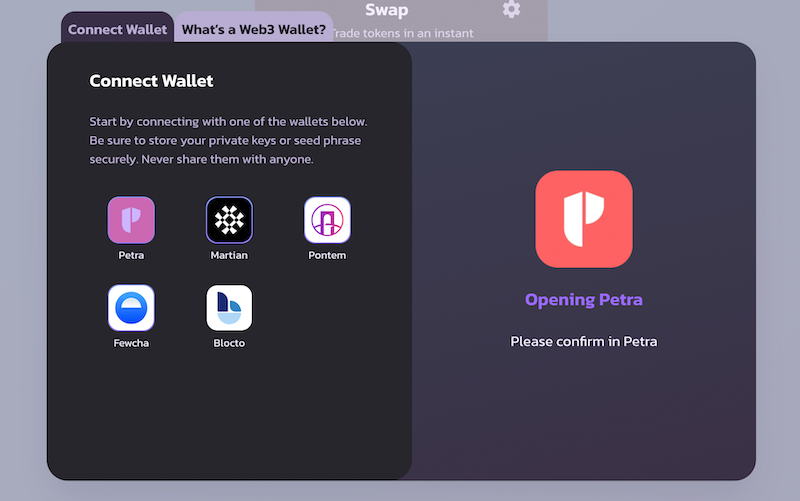
1. 点击右上角的“Connect Wallet”(连接钱包)。
2. 对于大多数浏览器扩展钱包,只需选择它们的图标,并按照弹出窗口中的说明操作即可。
3. 对于 Blocto,请使用你的电子邮件地址注册或登录。如需了解更多,请查看[此处](/chinese/huan-ying-lai-dao-pancakeswap/how-to-guides/get-started-aptos/wallet-guide.md)。
{% hint style="danger" %}
**记住——在任何情况下,你都绝不应该把你的私钥或助记词提供给任何人。**
{% endhint %}
## **连接到 Aptos Mainnet**
Aptos 有多个网络,包括多个 devnet 和 testnet。但要在 Aptos 链上使用 PancakeSwap,请务必确保你的钱包已连接到 **Aptos Mainnet**。
操作方法如下:
{% tabs %}
{% tab title="Petra" %}

{% endtab %}
{% tab title="Martian" %}

{% endtab %}
{% tab title="Pontem" %}

{% endtab %}
{% tab title="Fewcha" %}

{% endtab %}
{% endtabs %}
---
# Agent Instructions
This documentation is published with GitBook. GitBook is the documentation platform designed so that both humans and AI agents can read, navigate, and reason over technical content effectively. Learn more at gitbook.com.
## Querying This Documentation
If you need additional information that is not directly available in this page, you can query the documentation dynamically by asking a question.
Perform an HTTP GET request on the current page URL with the `ask` query parameter, and the optional `goal` query parameter:
```
GET https://docs.pancakeswap.finance/chinese/huan-ying-lai-dao-pancakeswap/how-to-guides/get-started-aptos/connection-guide.md?ask=&goal=
```
`ask` is the immediate question: it should be specific, self-contained, and written in natural language.
`goal` is optional and describes the broader end goal you are ultimately trying to accomplish on behalf of the user. GitBook uses it to tailor the answer towards what is most useful for that goal.
The response will contain a direct answer to the question and relevant excerpts and sources from the documentation.
Use this mechanism when the answer is not explicitly present in the current page, you need clarification or additional context, or you want to retrieve related documentation sections.